# Import / export

# Export / orders list

# ![Screenshot_2020-04-29_at_19.12.41.png](https://knowledge.tauceti-digital.com/uploads/images/gallery/2024-11/ORWscreenshot-2020-04-29-at-19-12-41-png.png) Getting started

In this article, you can learn about **export / orders list** functionality, which will allow you to export created e-commerce orders with their basic information. In order to access this module you have to have **BOK supervisors**, **MC business admin,** **Administrator**, **Super administrator**, or **Root** group.

<table id="bkmrk-%C2%A0-visualization-of-t" style="margin-right: auto; margin-left: auto; height: auto; width: 731px;"><tbody><tr style="height: auto;"><td class="wysiwyg-text-align-center" style="text-align: center; vertical-align: middle; height: auto; width: 719.233px;">![POWERPNT_h6wEpFGvDv.png](https://knowledge.tauceti-digital.com/uploads/images/gallery/2024-11/7287921788956.png)</td></tr><tr style="height: 22px;"><td class="wysiwyg-text-align-center" style="text-align: center; vertical-align: middle; height: 22px; width: 719.233px;"><span class="wysiwyg-font-size-medium"> </span><span class="wysiwyg-font-size-medium">*Visualization of the exported orders list* </span></td></tr></tbody></table>

To open the Featured products / list view, in the admin panel, navigate to:  
***Import / export &gt; Export / orders list***

All possible operations to perform on the **Export / orders list** view can be done in the **Filters<span style="color: #4054a0;"> </span>**and **Export / orders list**<span style="color: #4054a0;"> </span>tabs.

<table id="bkmrk-%C2%A0-visualization-of-t-1" style="margin-right: auto; margin-left: auto; height: auto; width: 774px;"><tbody><tr style="height: auto;"><td class="wysiwyg-text-align-center" style="text-align: center; vertical-align: middle; height: auto; width: 762.233px;">[![Screenshot 2025-02-13 at 14-44-29 Export _ orders list - Admin module.png](https://ecomm-docs.tauceti-digital.com/uploads/images/gallery/2025-02/scaled-1680-/screenshot-2025-02-13-at-14-44-29-export-orders-list-admin-module.png)](https://ecomm-docs.tauceti-digital.com/uploads/images/gallery/2025-02/screenshot-2025-02-13-at-14-44-29-export-orders-list-admin-module.png)</td></tr><tr style="height: 22px;"><td class="wysiwyg-text-align-center" style="text-align: center; vertical-align: middle; height: 22px; width: 762.233px;"><span class="wysiwyg-font-size-medium"> </span><span class="wysiwyg-font-size-medium">*Visualization of the export / orders list module in the administrator panel*</span></td></tr></tbody></table>

Table of contents:

1. [ Filters section](#bkmrk-filters-section)
2. [ Export / orders list section](#bkmrk-export-%2F-orders-list)
3. [ Exporting orders to the xlsx](#bkmrk-exporting-orders-to-)

---

# ![Screenshot_2020-04-29_at_19.12.41.png](https://knowledge.tauceti-digital.com/uploads/images/gallery/2024-11/ORWscreenshot-2020-04-29-at-19-12-41-png.png) Filters section

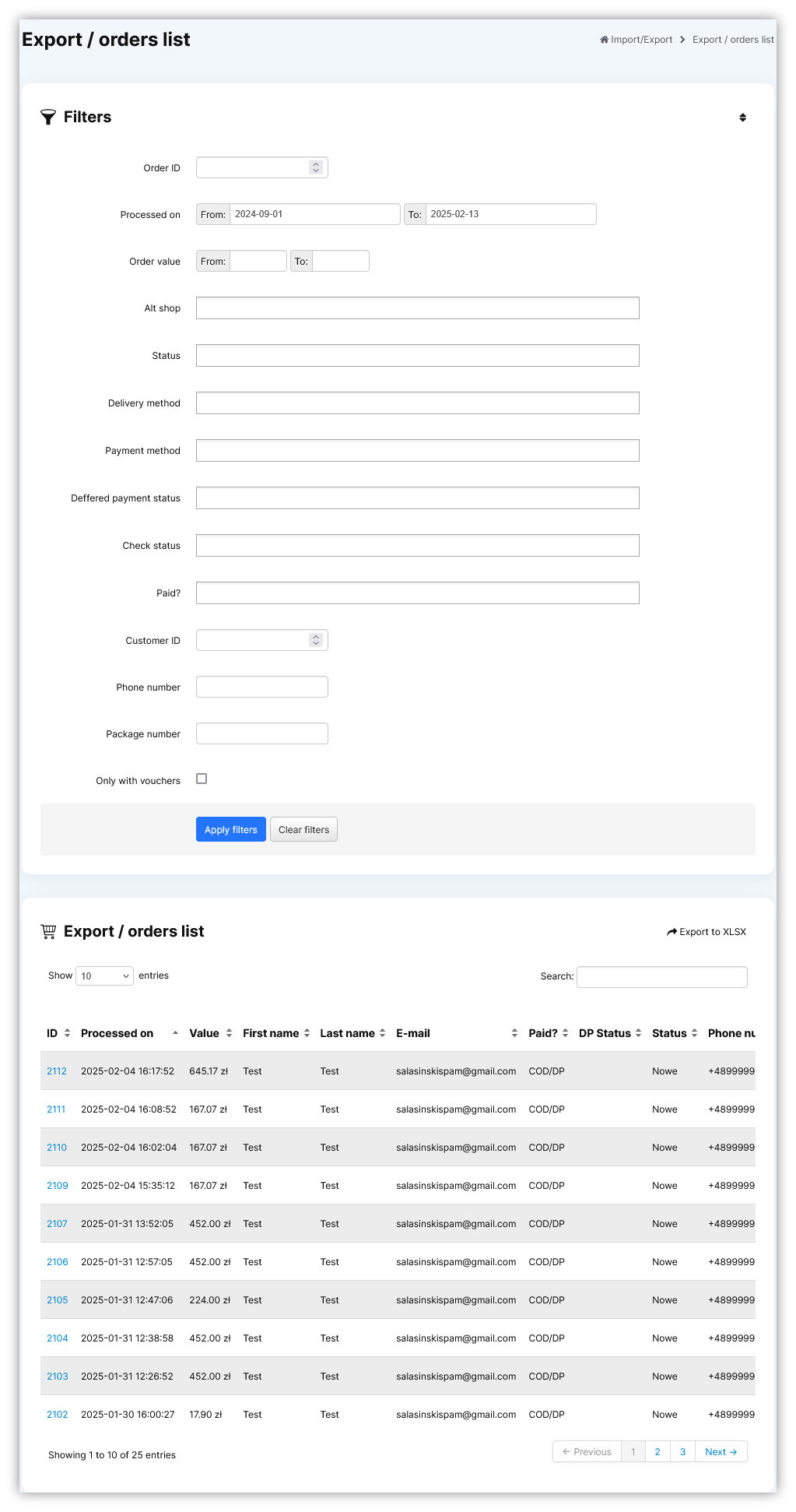
The **Filters** section allows the sorting of the orders in the **export / orders list** module, based on the available filters. Orders are not visible by default and it is required to apply any filter first in order to see them. Below you will find a description of each filter.

<table id="bkmrk-visualization-of-the" style="margin-right: auto; margin-left: auto;"><tbody><tr style="height: 20.2812px;"><td class="wysiwyg-text-align-center" style="text-align: center; vertical-align: middle; height: 20.2812px;">[![POWERPNT_ypOgCIY8Rl.png](https://ecomm-docs.tauceti-digital.com/uploads/images/gallery/2025-02/scaled-1680-/Yw2powerpnt-ypogciy8rl.png)](https://ecomm-docs.tauceti-digital.com/uploads/images/gallery/2025-02/Yw2powerpnt-ypogciy8rl.png)</td></tr><tr style="height: 22px;"><td class="wysiwyg-text-align-center" style="text-align: center; vertical-align: middle; height: 22px;"><span class="wysiwyg-font-size-medium">*Visualization of the filters tab* </span></td></tr></tbody></table>

- **Order ID** - Orders internal ID.
- **Processed on** - A range of dates when the order was processed.
- **Order value** - A range of total order values.
- **Alt shop** - Altshop name where the order was placed on.
- **Status** - Current status of the order.
- **Delivery method** - Selected orders delivery method.
- **Payment method** - Selected orders payment method.
- **Deffered payment status** - Current status of the deffered payment.
- **Check status** - Current internal check status of the order.
- **Paid?** - Order payment status.
- **Customer ID** - ID of the customer.
- **Phone number** - Customer's phone number.
- **Package number** - Number of the delivery package.
- **Only with vouchers** - A tickbox that allows seeing only orders with vouchers.
- **Status (Balikobot)** - Order status acquired from Balikobot.

After defining the above filters, select the **Apply Filters** button to get a list of sites according to the applied filters.

---

# ![Screenshot_2020-04-29_at_19.12.41.png](https://knowledge.tauceti-digital.com/uploads/images/gallery/2024-11/ORWscreenshot-2020-04-29-at-19-12-41-png.png) <span class="title">Export / orders list</span> section

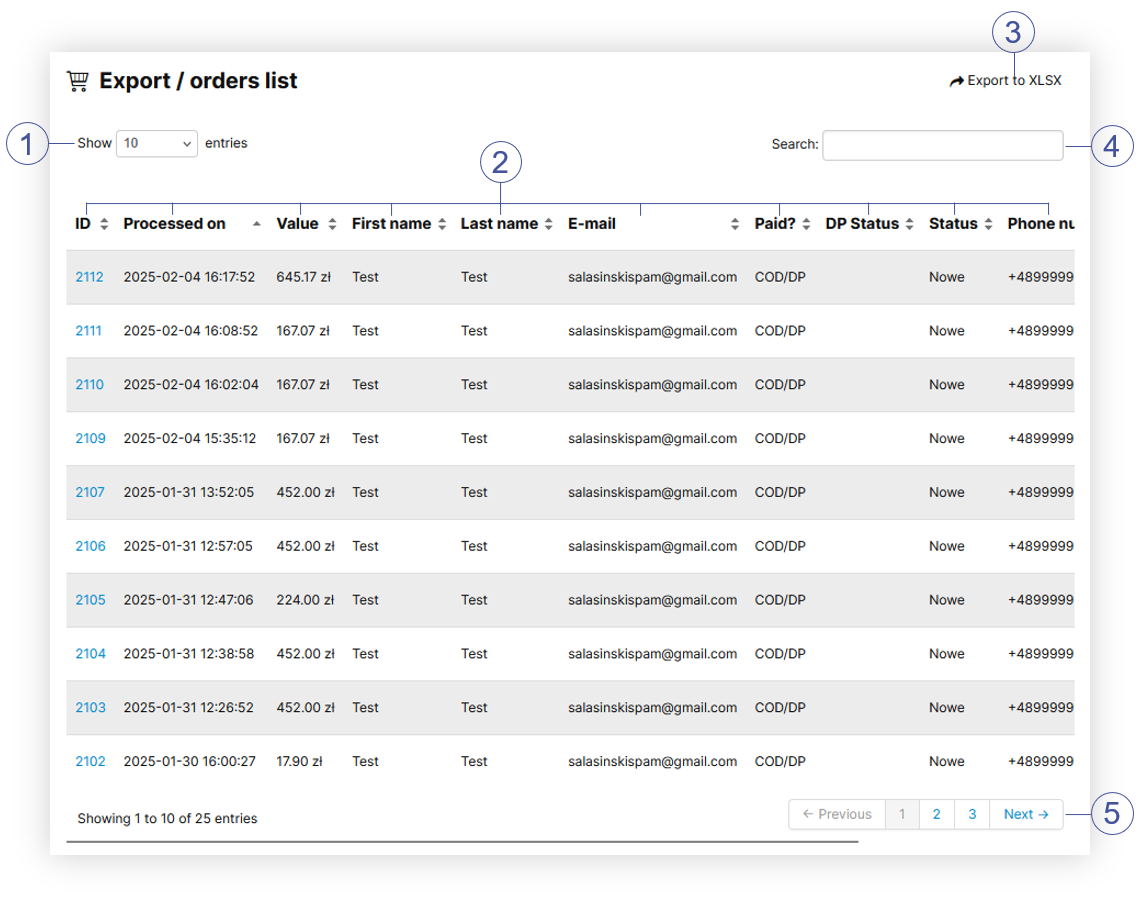
The **Export / orders list** section allows to further narrow down the list of orders. Below you will find a description of possible actions.

<table id="bkmrk-%C2%A0%C2%A0%C2%A0-%C2%A0-visualization-" style="margin-right: auto; margin-left: auto; width: 717px;"><tbody><tr><td class="wysiwyg-text-align-center" style="text-align: center; vertical-align: middle; width: 705.233px;">[![POWERPNT_6OEtvkRjD2.png](https://ecomm-docs.tauceti-digital.com/uploads/images/gallery/2025-02/scaled-1680-/powerpnt-6oetvkrjd2.png)](https://ecomm-docs.tauceti-digital.com/uploads/images/gallery/2025-02/powerpnt-6oetvkrjd2.png)</td></tr><tr><td class="wysiwyg-text-align-center" style="text-align: center; vertical-align: middle; width: 705.233px;"><span class="wysiwyg-font-size-medium">  </span><span class="wysiwyg-font-size-medium"> </span><span class="wysiwyg-font-size-medium"> *Visualization of the export / orders list section* </span></td></tr></tbody></table>

- Select the **Show X entries** **<span style="color: #4054a0;">(1)</span>** field to set the number of orders, displayed on one page (min 10 / max 100).
- The names of the columns **<span style="color: #4054a0;">(2)</span>** that contain information about a given order. Each column is susceptible to sorting. To sort the records, click on the title of the column in question.  
    
    - **Order ID** - Orders internal ID. By clicking on the order ID you will be redirected to the detailed order information located in the **Orders &gt; Orders / list.**
    - **Processed on** - A range of dates when the order was processed.
    - **Value** - A range of total order values.
    - **First name** - Customer's first name.
    - **Last name** - Customer's last name.
    - **E-mail** - Customer's e-mail address.
    - **Paid?** - Order payment status.
    - **DP status** - Current status of the deffered payment.
    - **Status** - Current status of the order.
    - **Phone number** - Customer's phone number.
    - **Package number** - Number of the delivery package (Carrier Barcode).
- Select the **Export to xlsx <span style="color: #4054a0;">(3)</span>** button to export all filtered orders to the xlsx file. You can learn more about exported xlsx file in the [ Exporting orders to the xlsx](#bkmrk-exporting-orders-to-) section
- **Search box** **<span style="color: #4054a0;">(4)</span>** where you can search for desired orders by their ID, first name, last name, e-mail address, status, phone number, and package number.
- **Page buttons** **<span style="color: #4054a0;">(5)</span>**, which allow users to change the page of currently viewed orders.

---

# ![Screenshot_2020-04-29_at_19.12.41.png](https://knowledge.tauceti-digital.com/uploads/images/gallery/2024-11/ORWscreenshot-2020-04-29-at-19-12-41-png.png)<span class="title"> Exporting orders to the xlsx  
</span>

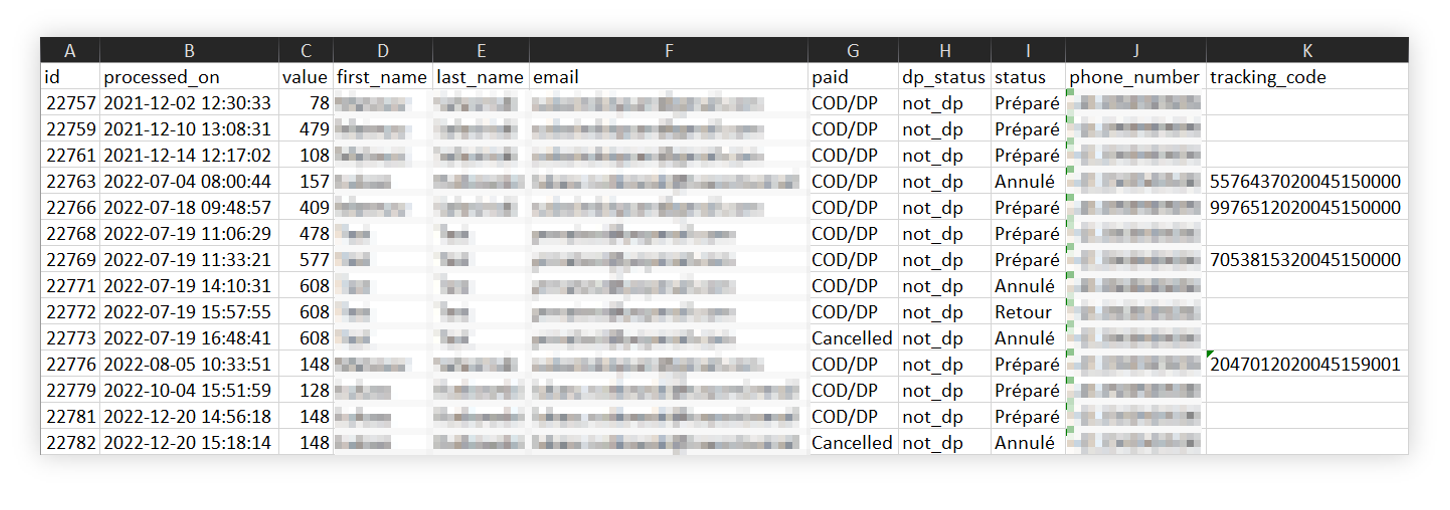
<span class="title">By pressing the Export to xlsx button shown in the [ Export / orders list section](#bkmrk-export-%2F-orders-list) chapter you are able to export all the filtered orders to the xlsx file and download it.</span>

<table id="bkmrk-%C2%A0%C2%A0%C2%A0-%C2%A0-visualization--1" style="margin-right: auto; margin-left: auto; width: 725px;"><tbody><tr><td class="wysiwyg-text-align-center" style="text-align: center; vertical-align: middle; width: 713.233px;">![POWERPNT_h6wEpFGvDv.png](https://knowledge.tauceti-digital.com/uploads/images/gallery/2024-11/7287921788956.png)</td></tr><tr><td class="wysiwyg-text-align-center" style="text-align: center; vertical-align: middle; width: 713.233px;"><span class="wysiwyg-font-size-medium">  </span><span class="wysiwyg-font-size-medium"> </span><span class="wysiwyg-font-size-medium"> *Visualization of the exported orders=s* </span></td></tr></tbody></table>

Xlsx file contains the exactly same information as **export / orders list** tab:

- **ID** - Orders internal ID.
- **Processed on** - A range of dates when the order was processed.
- **Value** - A range of total order values.
- **First name** - Customer's first name.
- **Last name** - Customer's last name.
- **E-mail** - Customer's e-mail address.
- **Paid?** - Order payment status.
- **DP status** - Current status of the deffered payment.
- **Status** - Current status of the order.
- **Phone number** - Customer's phone number.
- **Package number** - Number of the delivery package (Carrier Barcode).

# Export customers

# ![Screenshot_2020-04-29_at_19.12.41.png](https://knowledge.tauceti-digital.com/uploads/images/gallery/2024-11/10027086064156.png) Getting started

In this article, you can find information about e-commerce customer export with various filter options to a .csv file, that will help to export the exact type of customers that have an account on the e-commerce platform.

<span class="wysiwyg-color-black" style="color: #44549b;">![info2.svg](https://knowledge.tauceti-digital.com/uploads/images/gallery/2024-11/10027294665628.png) **Remember**</span><span class="wysiwyg-color-black" style="display: block; margin-top: 10px;">You can find information regarding the Beauty Advisor customer export in the **\[UNDER CONSTRUCTION\]** article.</span>

<table id="bkmrk-visualization-of-the" style="margin-right: auto; margin-left: auto; height: 44px; width: auto;"><tbody><tr style="height: 22px;"><td class="wysiwyg-text-align-center" style="text-align: center; vertical-align: middle; height: 22px; width: auto;">[![POWERPNT_xyjEabGTRm.png](https://ecomm-docs.tauceti-digital.com/uploads/images/gallery/2025-02/scaled-1680-/powerpnt-xyjeabgtrm.png)](https://ecomm-docs.tauceti-digital.com/uploads/images/gallery/2025-02/powerpnt-xyjeabgtrm.png)</td></tr><tr style="height: 22px;"><td class="wysiwyg-text-align-center" style="text-align: center; vertical-align: middle; height: 22px; width: auto;"><span class="wysiwyg-font-size-medium">*Visualization of the export customers tab location* </span></td></tr></tbody></table>

Table of contents:

1. [ Exporting the e-commerce customers](#bkmrk-exporting-the-e-comm-1)
2. [ Exported file overview ](#bkmrk-exported-file-overvi)

---

# ![Screenshot_2020-04-29_at_19.12.41.png](https://knowledge.tauceti-digital.com/uploads/images/gallery/2024-11/10027086064156.png) Exporting the e-commerce customers

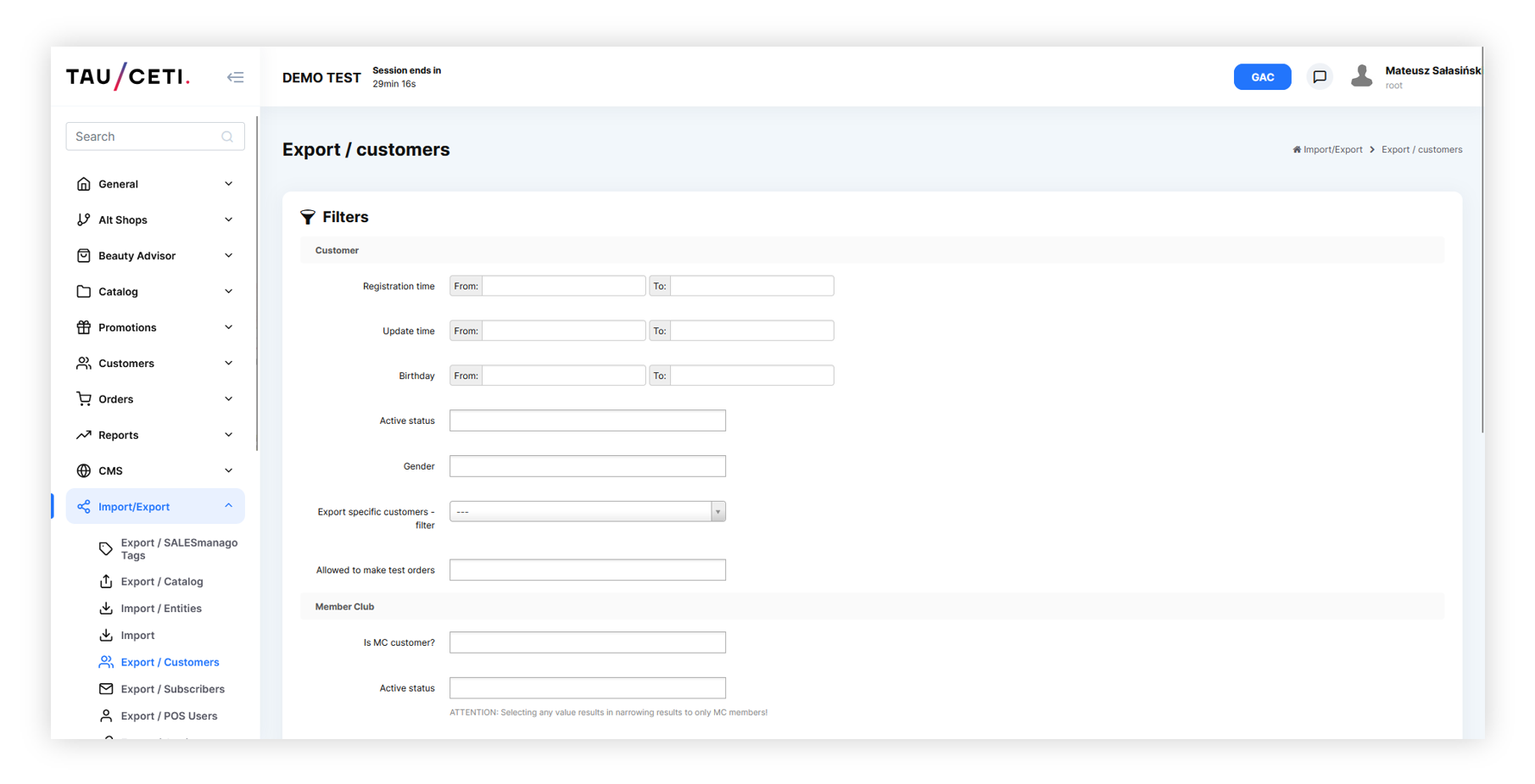
E-commerce customer export can be found in

***Import / Export &gt; Export / customers***

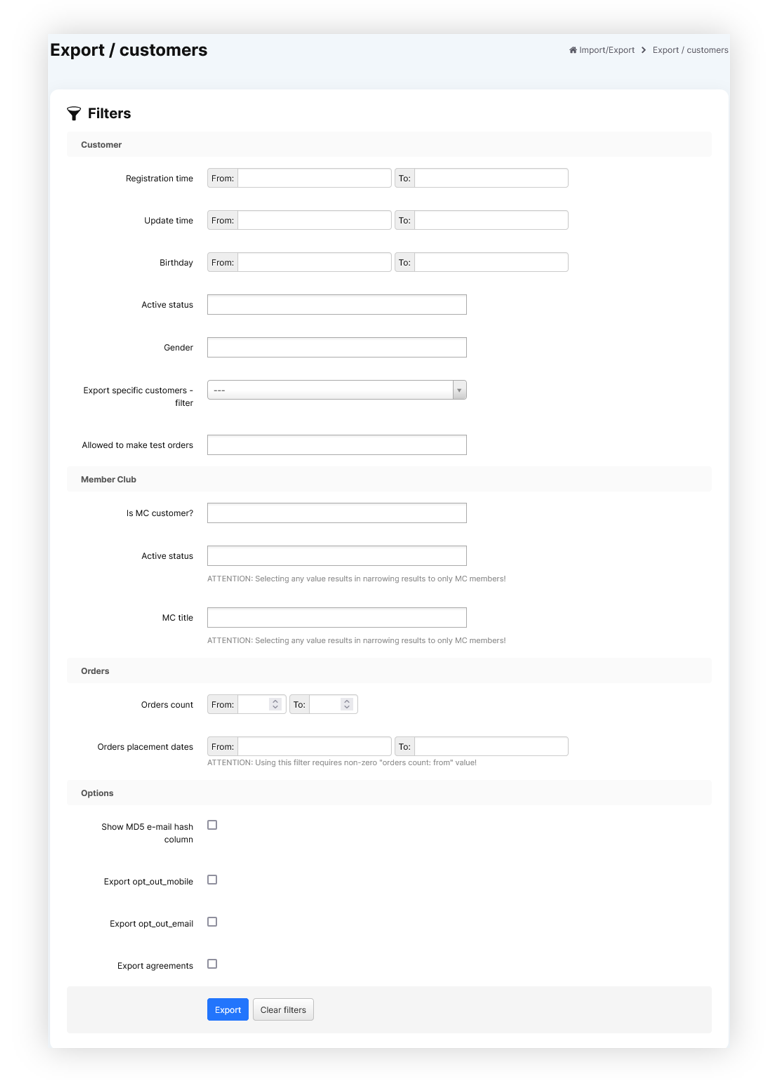
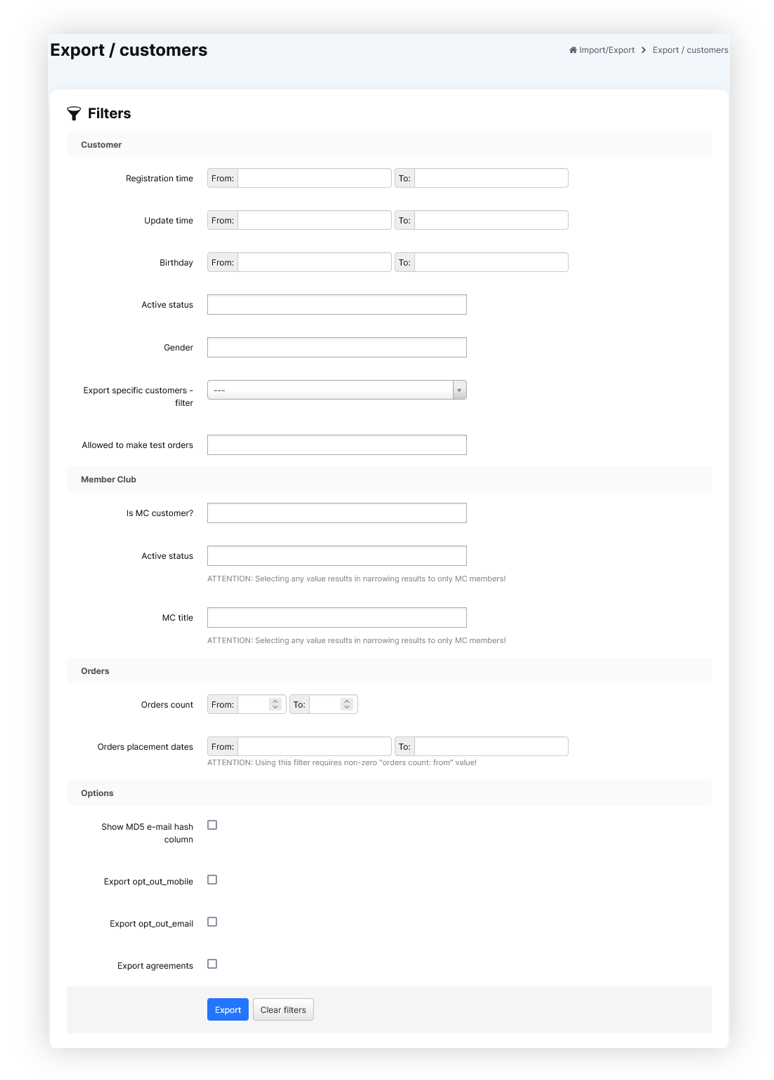
Below you can find all filter options to customize your export to your needs.

<table id="bkmrk-visualization-of-the-1" style="margin-right: auto; margin-left: auto; height: 44px; width: auto;"><tbody><tr style="height: 22px;"><td class="wysiwyg-text-align-center" style="text-align: center; vertical-align: middle; height: 22px; width: auto;">[![POWERPNT_ypOgCIY8Rl.png](https://ecomm-docs.tauceti-digital.com/uploads/images/gallery/2025-02/scaled-1680-/powerpnt-ypogciy8rl.png)](https://ecomm-docs.tauceti-digital.com/uploads/images/gallery/2025-02/powerpnt-ypogciy8rl.png)</td></tr><tr style="height: 22px;"><td class="wysiwyg-text-align-center" style="text-align: center; vertical-align: middle; height: 22px; width: auto;"><span class="wysiwyg-font-size-medium">*Visualization of the all available export filters* </span></td></tr></tbody></table>

- **Registration time** - A range of dates when customers registered on an e-commerce platform.
- **Update time** - A range of dates whenever customer information has been updated.
- **Birthday** - A range of dates of customer birthdays.
- **Active status** - Customers current status. Available statuses are: **Inactive**, **Active**, **Waiting for activation**, **One-time**
- **Gender** - Customers gender. Available options are **Man**, **Woman**, **Not specified**.
- **Export specific customers - filter** - A filter which allows to specify customers by their:  
    
    - **E-mail**
    - **ID**
    - **JOY ID**
- <label class="control-label" for="filters_specific_customers"><label class="control-label" for="filters_specific_customers">**Specific customers data** - </label></label>A field where you should put specific customer data with a "**;**" separator, data will be filtered according to the selected filter. This field is only visible whenever the **Export specific customers - filter** is selected. Example (with email filter selected): example@example.com;example2@example.com;example3@example.com
- **Allowed to make test orders** - A **Yes** / **No** selection if customers are able to make test orders. This is defined by the "**Allowed to make test orders**" tickbox in the customers profile.
- i**s MC customer?** - A **Yes** / **No** selection if a customer has a member club rank. All countries that use Member club functionality for various customer ranks (i.e. on Poland Default / Silver / Gold) are MC customers.
- **Active status** - Customers member club current status. This field only filters the member  
    club customers
- **MC title** - Member club title assigned to the customers (in the case of Poland it can be T0 / TS / TG). This field only filters the member club customers.
- **Orders count** - A range of numbers of created orders on the website.
- **Orders placement dates** - A range of dates when customers have placed new orders using the e-commerce platform. Using this filter requires a non-zero "**orders count: from**" value.
- **Show MD5 e-mail hash column** - Shows customers MD5 e-mail hash column in the report.
- **Export opt-out\_mobile** - Shows customers current mobile communication  
    subscription status.
- **Export opt\_out\_email** - Shows customers current e-mail communication subscription status.
- **Export agreements** -Exports all available agreements as columns and defines which customers have agreed to the selected agreements.
- **Export FIDEN2 cards** -Exports customers FIDEN2 card information. The exported fields are:  
    
    - **cards\_active** - A list of customers active FIDEN2 cards
    - **cards\_waiting** - The number of points waiting to be assigned to the selected customer FIDEN2 cards.
    - **cards\_balance** - Current FIDEN2 balance
    - **cards\_balance\_time** - A date of last balance change for the selected customer.
- **Only customers which manually assigned retail card** - A tickbox which defines if only customers with manually assigned retail cards should be exported.

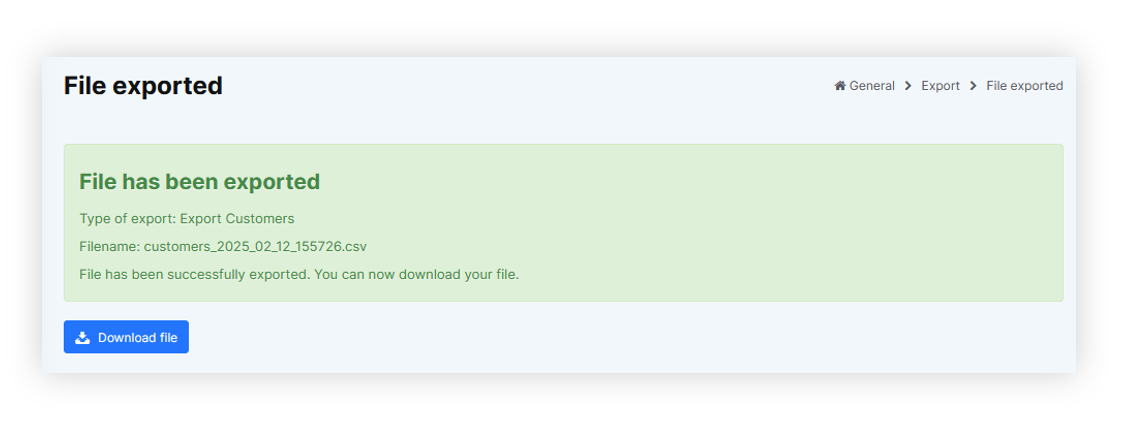
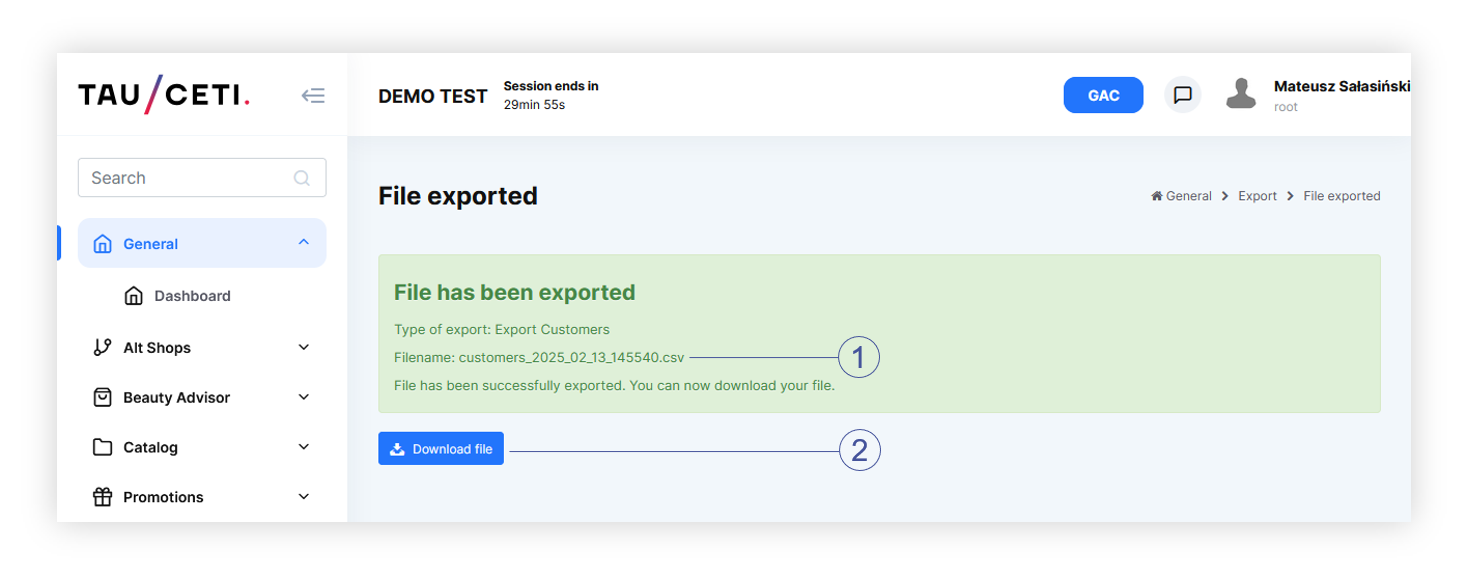
With selected filters you can export customers using the **Export** button or clear all filters by using the **Clear filters** button.

<table id="bkmrk-visualization-of-the-2" style="margin-right: auto; margin-left: auto; height: 44px; width: auto;"><tbody><tr style="height: 22px;"><td class="wysiwyg-text-align-center" style="text-align: center; vertical-align: middle; height: 22px; width: auto;">[![POWERPNT_WK2pZwiiqi.png](https://ecomm-docs.tauceti-digital.com/uploads/images/gallery/2025-02/scaled-1680-/powerpnt-wk2pzwiiqi.png)](https://ecomm-docs.tauceti-digital.com/uploads/images/gallery/2025-02/powerpnt-wk2pzwiiqi.png)</td></tr><tr style="height: 22px;"><td class="wysiwyg-text-align-center" style="text-align: center; vertical-align: middle; height: 22px; width: auto;"><span class="wysiwyg-font-size-medium">*Visualization of the prepared export file* </span></td></tr></tbody></table>

With exported file you are able to download it to your device using the **Download file** button.

---

# ![Screenshot_2020-04-29_at_19.12.41.png](https://knowledge.tauceti-digital.com/uploads/images/gallery/2024-11/10027086064156.png) Exported file overview

The exported file will be in a **.csv** format with an export date and hour in it's file name (i.e. **customers\_2023\_08\_16\_131359**)

<table id="bkmrk-visualization-of-the-3" style="margin-right: auto; margin-left: auto; height: 44px; width: auto;"><tbody><tr style="height: 22px;"><td class="wysiwyg-text-align-center" style="text-align: center; vertical-align: middle; height: 22px; width: auto;">![POWERPNT_53Kap3zLv3.png](https://knowledge.tauceti-digital.com/uploads/images/gallery/2024-11/10043712384668.png)</td></tr><tr style="height: 22px;"><td class="wysiwyg-text-align-center" style="text-align: center; vertical-align: middle; height: 22px; width: auto;"><span class="wysiwyg-font-size-medium">*Visualization of the exported csv file* </span></td></tr></tbody></table>

By default in the exported customers file you can find the following columns:

- **id** - Customers internal ID. Example: **123456**
- **first\_name** - Customers name. Example: **Jan**
- **last\_name** - Customers surname. Example: **Kowalski**
- **street** - Main street name. Example: **Uliczna**
- **building** - Main building number. Example: **123**
- **flat** - Main flat number. Example: **2**
- **city** - Main city name. Example: **Warsaw**
- **postal\_code** - Main postal code. Example: **12-345**
- **email** - Customers e-mail address. Example: **test@example.com**
- **mobile** - Customers mobile number with a country code. Example: **48123123123**
- **birthday** - Customers birthday date. Example: **01-01-1990**
- **gender** - Customers gender (if selected). Example: **Man**

With additional fields dependent on selected options:

- **md5\_email** - Customers MD5 email value. Example: **26h2cb31af663cdccaa2779c9d165a0b**
- **opt out mobile** - Customers mobile communication current status. If the customer is opted in this value will be **empty**. If the customer is opted out the value will be set to **Opted out**.
- **opt out email** - Customers e-mail communication current status. If the customer is opted in this value will be **empty**. If the customer is opted out the value will be set to **Opted out**.
- **Customers agreement status to the selected agreements** - These fields will have different column names depending on the country and selected agreements (i.e. **terms\_of\_service\_vpi**, **data\_processing\_mc**). Whenever the customer has agreed to the selected agreement there will be a "**Selected**" value in the column. If the customer has not agreed to the agreement the field will be empty.
- **cards\_active** - A list of customers active FIDEN2 cards. Example: **123456789, 987654321**.
- **cards\_waiting** - The number of points waiting to be assigned to the selected customer cards. Example: **123**
- **cards\_balance** - Current FIDEN2 balance Example: **5333**
- **cards\_balance\_time** - A date of last balance change for the selected customer.  
    Example: **05-08-2023**

# Product catalog export and import

# ![Screenshot_2020-04-29_at_19.12.41.png](https://knowledge.tauceti-digital.com/uploads/images/gallery/2024-11/9359915156764.png) Getting started

In this article, you will learn how to extract a product catalog in the form of CSV files and how to import it back. The overview for each product catalog file is here.

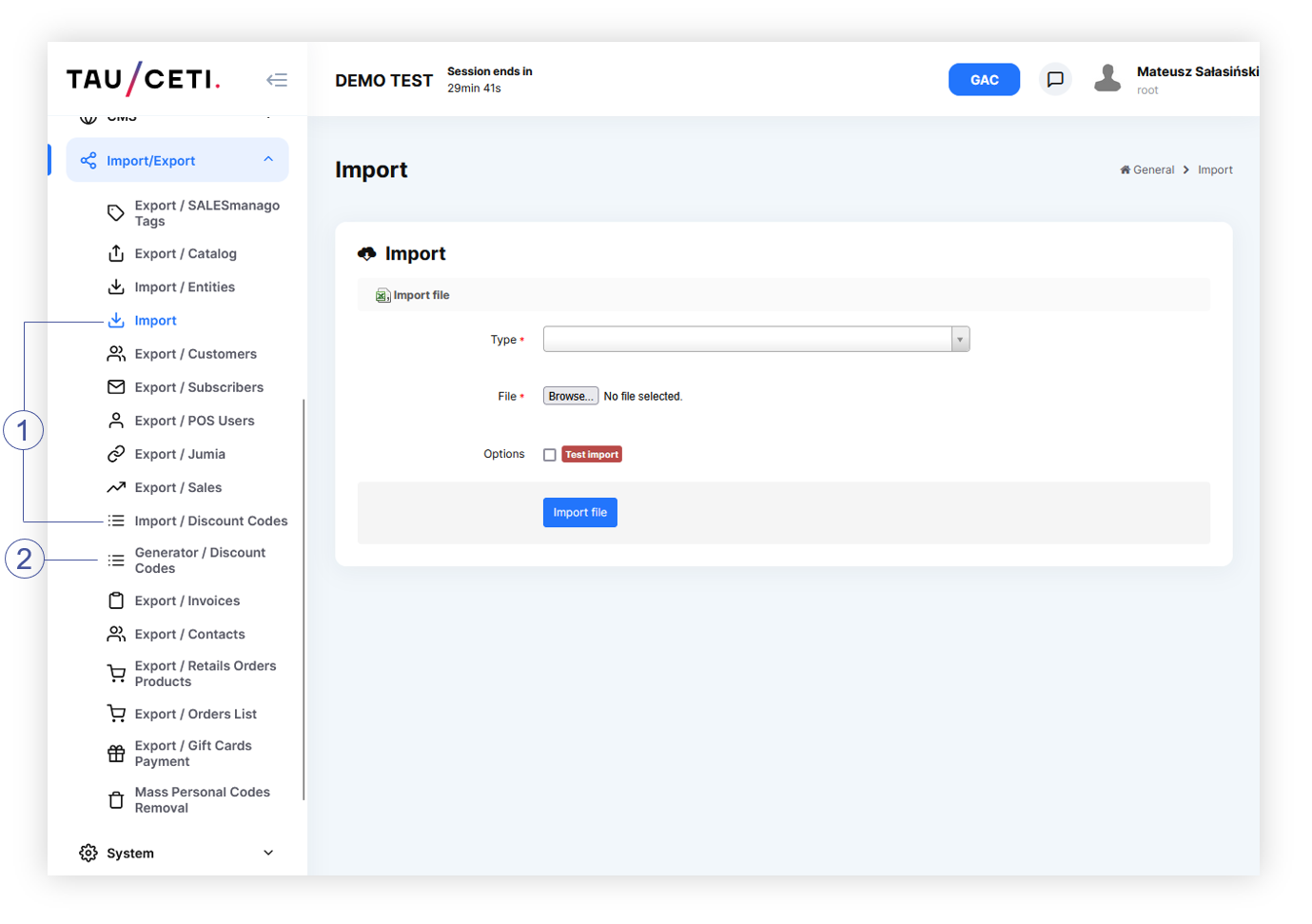
Export can be found in ***Import / Export &gt; Export / catalog <span style="color: #4054a0;">(1)</span>***

Import can be found in ***Import / Export &gt; Import &gt; Type &gt; Catalog mass import <span style="color: #4054a0;">(2)</span>***

<table id="bkmrk-visualization-of-the" style="margin-right: auto; margin-left: auto;"><tbody><tr><td class="wysiwyg-text-align-center" style="text-align: center; vertical-align: middle; width: 688.021px;">[![POWERPNT_hv9c1tmzEd.png](https://ecomm-docs.tauceti-digital.com/uploads/images/gallery/2025-02/scaled-1680-/powerpnt-hv9c1tmzed.png)](https://ecomm-docs.tauceti-digital.com/uploads/images/gallery/2025-02/powerpnt-hv9c1tmzed.png)</td></tr><tr><td class="wysiwyg-text-align-center" style="text-align: center; vertical-align: middle; width: 688.021px;"><span class="wysiwyg-font-size-medium">*Visualization of the product catalog options in the Import / export module* </span></td></tr></tbody></table>

Table of contents:

1. [Export catalog](#h_01GCH0X17BDKRC07GCXTQDSF97)
2. [Catalog files](#h_01GCH0X17BDKRC07GCXTQDSF91)
3. [Catalog import](#h_01GCH0X17BDKRC07GCXTQDSF92)
4. [How to make mass import](#imp0)
5. [Overview - catalog\_product.csv](#imp1)
6. [Overview - catalog\_product\_description.csv](#bkmrk-%C2%A0-10)
7. [Overview - catalog\_product\_attribute.csv](#bkmrk-%C2%A0-12)
8. [Overview - catalog\_product\_stock.csv](#bkmrk-%C2%A0-15)
9. [Overview - dict\_tag\_catalog\_product.csv](#bkmrk-%C2%A0-17)
10. [Overview - dict\_property.csv](#bkmrk-%C2%A0%C2%A0-2)
11. [Overview - dict\_tag.csv](#bkmrk-%C2%A0-20)
12. [ Overview - catalog\_product\_category.csv](#h_01H0T23XV4R0NE6N0TMR8EKG8B)
13. [Overview - alt\_shop\_catalog\_product.csv](#bkmrk-%C2%A0-28)
14. [ Overview - catalog\_product\_category.csv](#bkmrk-overview---catalog_p-3)
15. [ Overview - dict\_tag\_catalog\_product\_remove.csv](#bkmrk-overview---dict_tag_-1)
16. [ Order of processing files](#bkmrk-order-of-processing-)

---

# ![Screenshot_2020-04-29_at_19.12.41.png](https://knowledge.tauceti-digital.com/uploads/images/gallery/2024-11/9359915156764.png) Export catalog

Catalog export has some filtering options for thinning out the results of extracted data.

<table id="bkmrk-visualization-of-the-1" style="margin-right: auto; margin-left: auto; width: 688px;"><tbody><tr><td class="wysiwyg-text-align-center" style="text-align: center; vertical-align: middle; width: 676.016px;">[![POWERPNT_VQRk4QGAv5.png](https://ecomm-docs.tauceti-digital.com/uploads/images/gallery/2025-02/scaled-1680-/powerpnt-vqrk4qgav5.png)](https://ecomm-docs.tauceti-digital.com/uploads/images/gallery/2025-02/powerpnt-vqrk4qgav5.png)</td></tr><tr><td class="wysiwyg-text-align-center" style="text-align: center; vertical-align: middle; width: 676.016px;"><span class="wysiwyg-font-size-medium">*Visualization of the Catalog export* </span></td></tr></tbody></table>

- **Alt shop** - Chooses for which alt shop the catalog should be exported. If left empty, products from all alt shops will be exported. You can learn more about altshops in the [Alt shops - Introduction](https://tauceti.zendesk.com/hc/en-us/articles/360017301600) article.
- **Product status** - Chooses between **Active** and **Inactive** products. If left empty, all products will be exported.
- **Is altshop active?** - Choose if the product exported are active on chosen altshop or inactive.
- **Product SKU** - A list of product SKUs. A list of multiple SKUs needs to be separated by commas (i.e. 123456,654321,55555).
- **Two buttons**: 
    - **Apply filters** - A button, which will apply selected filters and automatically start the download of the filtered products.
    - **Clear filters** - A button, which clears all already chosen filters.

Exported files described in [ Catalog files](#h_01GCH0X17BDKRC07GCXTQDSF91) section are packed in a .zip file, which needs to be unpacked.

---

# ![Screenshot_2020-04-29_at_19.12.41.png](https://knowledge.tauceti-digital.com/uploads/images/gallery/2024-11/9359915156764.png) Catalog files

The downloaded archive will contain the following files:

- **alt\_shop\_catalog\_product.csv** - Contains data for **Alt shops &gt; Products / list** (You can find more information about this module in [Products / list - browsing and managing products in altshop module](https://tauceti.zendesk.com/hc/en-us/articles/5591686579228) article)
- **catalog\_product.csv** - Contains data for **Catalog &gt; Products / list** (More information about this module in **\[UNDER CONSTRUCTION\]**)
- **catalog\_product\_attribute.csv** - Contains data for **Catalog &gt; Products / list &gt; View product &gt; Add color** (More information about this module in **\[UNDER CONSTRUCTION\]**)
- **catalog\_product\_description.csv** - Contains data for **Catalog &gt; Products / list &gt; View product, Description tab** (More information about this module in **\[UNDER CONSTRUCTION\]**)
- **catalog\_product\_meta.csv** - Contains data for
- **Catalog &gt; Products / list &gt; View product, Metadata tab** (More information about this module in **\[UNDER CONSTRUCTION\]**)
- **catalog\_product\_stock.csv** - Contains data for **Catalog &gt; Products / list &gt; View product, Stock tab** (More information about this module in **\[UNDER CONSTRUCTION\]**)
- **dict\_property.csv** - Contains data for **Catalog &gt; Properties / list** (More information about this module in **\[UNDER CONSTRUCTION\]**)
- **dict\_tag.csv** - Contains data for **Catalog &gt; Tags / list** (More information about this module in **\[UNDER CONSTRUCTION\]**)
- **dict\_tag\_catalog\_product.csv** - Contains data for **Catalog &gt; Products / list &gt; View product, Tags tab** (More information about this module in **\[UNDER CONSTRUCTION\]**)
- **catalog\_product\_category.csv** - Contains data for Catalog &gt; Products / list &gt; View product, **edit product tab**. You can find more information about the category module in [Catalog categorization](https://knowledge.tauceti-digital.com/books/e-commerce/page/catalog-categorization) article.
- **dict\_tag\_catalog\_product\_remove.csv** - Contains exact same data structure as **dict\_tag\_catalog\_product.csv**, but it removes the assigned tags from the selected products.

---

# ![Screenshot_2020-04-29_at_19.12.41.png](https://knowledge.tauceti-digital.com/uploads/images/gallery/2024-11/9359915156764.png) Catalog import

All the exported files can be edited and imported back to the administration panel to update catalog data. Files can be imported separately or in groups but their import must always be consolidated in a .zip file. The file names must be exactly the same as defined in this article and they cannot be changed. There are no mandatory files, so it is possible to import only **catalog\_product\_description.csv** without any other files as long as it is in the .zip file. Packed .csv files can be in any folder structure as long as file names are not duplicated.

Other file formats than .zip will be rejected and won't be uploaded.

## Files specification

Since the imported files directly correspond with the database some rules must be followed while creating and editing import files, here is a general specification for these:

- Field type **BOOLEAN:**  
    
    - 0 - NO
    - **1** - YES
- Field type **DATE** must be in the following format "**YYYY-MM-DD**"
- **EOL (End Of Line)** column must contain EOL in every row with a product. This column shows our system, that for a selected product its info ends with this column, and the system can move to another row. <span class="wysiwyg-underline">Here</span> is an example of **EOL** use: 
    - ```
        column1;column2;EOL
        ```
    - ```
        “abc”;”abc”;EOL
        ```
    - ```
        “cde”;”cde”;EOL
        ```
- The decimal separator must be a dot "**.**" for example: "**199.99**"
- While editing files in text editors (not spreadsheets) all columns have to be separated by **semicolon** "**;**"
- **STRING** field type can be filled with any text and/or number. The only exception to this exists in every field with **URL** value, these must be strings without any special/regional characters besides "**/**" as a start to the URL and "**\_**" as a separator for word f.x. "**/new\_product\_sku\_123**"

---

# ![Screenshot_2020-04-29_at_19.12.41.png](https://knowledge.tauceti-digital.com/uploads/images/gallery/2024-11/9359915156764.png) How to make mass import

Mass import is a product import of a ZIP file that contains prepared .csv files. This operation changes the product data based on their SKU or creates a new product if the selected SKU doesn't exist in the catalog database. You don't need to put every .csv file in the .zip, only the ones that you have modified can be put in the .zip file and then imported. In order to import catalog files, they have to be in CSV format, coded in UTF-8. Go to ***Import/Export &gt; Import*** and choose ***Catalog mass import** in the* **Type***.*

<table id="bkmrk-visualization-of-imp" style="margin-right: auto; margin-left: auto;"><tbody><tr><td class="wysiwyg-text-align-center">[![POWERPNT_PN7j1CAtyh.png](https://ecomm-docs.tauceti-digital.com/uploads/images/gallery/2025-02/scaled-1680-/powerpnt-pn7j1catyh.png)](https://ecomm-docs.tauceti-digital.com/uploads/images/gallery/2025-02/powerpnt-pn7j1catyh.png)</td></tr><tr><td class="wysiwyg-text-align-center"><span id="bkmrk-visualization-of-imp-1"><span class="wysiwyg-font-size-medium"> *Visualization of Import / Export, Import*</span></span></td></tr></tbody></table>

- **<span class="wysiwyg-color-red90"> <span style="color: #2f3941;">File</span> \* </span>**  - **Choose a file,** and find your zip archive with CSV files.
- **Type<span class="wysiwyg-color-red90">\* </span>**- Click and choose **Catalog mass import** in order to perform the change in the catalog database.
- **Options** - **Test import** allows for virtual database calculation after importing a chosen archive. You'll be able to check the results of this import by receiving a report for each imported file. Test import won't perform any actual changes in the environment.
- **Import file** - Click to perform an import. The file will start processing right after clicking.

<span class="wysiwyg-color-black" style="color: #44549b;">![info2.svg](https://knowledge.tauceti-digital.com/uploads/images/gallery/2024-11/9359915161244.png) **Remember**</span><span class="wysiwyg-color-black" style="display: block; margin-top: 10px;">Product descriptions can be enriched by HTML and CSS codes.</span>

---

# ![Screenshot_2020-04-29_at_19.12.41.png](https://knowledge.tauceti-digital.com/uploads/images/gallery/2024-11/9359915156764.png) Overview - catalog\_product.csv

File ***catalog\_product.csv*** contain mainly data regarding imported products. Mass import of this file allows to:

- Adding new records
- Updating records (on a base of unique SKU)

<table border="1" id="bkmrk-%23-column-name-value-" style="width: 700px; height: 795px;"><tbody><tr style="height: 44px;"><td style="text-align: center; vertical-align: middle; width: 27.1167px; height: 44px;"><span class="wysiwyg-font-size-medium">**\#**</span></td><td style="text-align: center; vertical-align: middle; width: 114.35px; height: 44px;"><span class="wysiwyg-font-size-medium">**Column name**</span></td><td style="text-align: center; vertical-align: middle; width: 63.2167px; height: 44px;"><span class="wysiwyg-font-size-medium">**Value type**</span></td><td style="text-align: center; vertical-align: middle; width: 70.2333px; height: 44px;"><span class="wysiwyg-font-size-medium">**Max length**</span></td><td style="text-align: center; vertical-align: middle; width: 60.2px; height: 44px;"><span class="wysiwyg-font-size-medium">**Can be empty?**</span></td><td style="text-align: center; vertical-align: middle; width: 161.5px; height: 44px;"><span class="wysiwyg-font-size-medium">**Description**</span></td><td style="text-align: center; vertical-align: middle; width: 125.383px; height: 44px;"><span class="wysiwyg-font-size-medium">**What, if empty**</span></td></tr><tr style="height: 22px;"><td style="text-align: center; vertical-align: middle; width: 27.1167px; height: 22px;"><span class="wysiwyg-font-size-medium">1</span></td><td style="text-align: center; vertical-align: middle; width: 114.35px; height: 22px;"><span class="wysiwyg-font-size-medium">SKU</span></td><td style="text-align: center; vertical-align: middle; width: 63.2167px; height: 22px;"><span class="wysiwyg-font-size-medium">STRING</span></td><td style="text-align: center; vertical-align: middle; width: 70.2333px; height: 22px;"><span class="wysiwyg-font-size-medium">7</span></td><td style="text-align: center; vertical-align: middle; width: 60.2px; height: 22px;"><span class="wysiwyg-font-size-medium">No</span></td><td style="text-align: center; vertical-align: middle; width: 161.5px; height: 22px;"><span class="wysiwyg-font-size-medium">Product code</span></td><td style="text-align: center; vertical-align: middle; width: 125.383px; height: 22px;"><span class="wysiwyg-font-size-medium">-</span></td></tr><tr style="height: 44px;"><td style="text-align: center; vertical-align: middle; width: 27.1167px; height: 44px;"><span class="wysiwyg-font-size-medium">2</span></td><td style="text-align: center; vertical-align: middle; width: 114.35px; height: 44px;"><span class="wysiwyg-font-size-medium">is\_active</span></td><td style="text-align: center; vertical-align: middle; width: 63.2167px; height: 44px;"><span class="wysiwyg-font-size-medium">BOOLEAN (0/1)</span></td><td style="text-align: center; vertical-align: middle; width: 70.2333px; height: 44px;"><span class="wysiwyg-font-size-medium">1</span></td><td style="text-align: center; vertical-align: middle; width: 60.2px; height: 44px;"><span class="wysiwyg-font-size-medium">No</span></td><td style="text-align: center; vertical-align: middle; width: 161.5px; height: 44px;"><span class="wysiwyg-font-size-medium">Is the product visible?</span></td><td style="text-align: center; vertical-align: middle; width: 125.383px; height: 44px;"><span class="wysiwyg-font-size-medium">-</span></td></tr><tr style="height: 22px;"><td style="text-align: center; vertical-align: middle; width: 27.1167px; height: 22px;"><span class="wysiwyg-font-size-medium">3</span></td><td style="text-align: center; vertical-align: middle; width: 114.35px; height: 22px;"><span class="wysiwyg-font-size-medium">name</span></td><td style="text-align: center; vertical-align: middle; width: 63.2167px; height: 22px;"><span class="wysiwyg-font-size-medium">STRING</span></td><td style="text-align: center; vertical-align: middle; width: 70.2333px; height: 22px;"><span class="wysiwyg-font-size-medium">255</span></td><td style="text-align: center; vertical-align: middle; width: 60.2px; height: 22px;"><span class="wysiwyg-font-size-medium">No</span></td><td style="text-align: center; vertical-align: middle; width: 161.5px; height: 22px;"><span class="wysiwyg-font-size-medium">Product name</span></td><td style="text-align: center; vertical-align: middle; width: 125.383px; height: 22px;"><span class="wysiwyg-font-size-medium">-</span></td></tr><tr style="height: 44px;"><td style="text-align: center; vertical-align: middle; width: 27.1167px; height: 44px;"><span class="wysiwyg-font-size-medium">4</span></td><td style="text-align: center; vertical-align: middle; width: 114.35px; height: 44px;"><span class="wysiwyg-font-size-medium">title</span></td><td style="text-align: center; vertical-align: middle; width: 63.2167px; height: 44px;"><span class="wysiwyg-font-size-medium">STRING</span></td><td style="text-align: center; vertical-align: middle; width: 70.2333px; height: 44px;"><span class="wysiwyg-font-size-medium">255</span></td><td style="text-align: center; vertical-align: middle; width: 60.2px; height: 44px;"><span class="wysiwyg-font-size-medium">Yes</span></td><td style="text-align: center; vertical-align: middle; width: 161.5px; height: 44px;"><span class="wysiwyg-font-size-medium">Title for product</span></td><td style="text-align: center; vertical-align: middle; width: 125.383px; height: 44px;"><span class="wysiwyg-font-size-medium">Empty product title</span></td></tr><tr style="height: 22px;"><td style="text-align: center; vertical-align: middle; width: 27.1167px; height: 22px;"><span class="wysiwyg-font-size-medium">5</span></td><td style="text-align: center; vertical-align: middle; width: 114.35px; height: 22px;"><span class="wysiwyg-font-size-medium">short\_description</span></td><td style="text-align: center; vertical-align: middle; width: 63.2167px; height: 22px;"><span class="wysiwyg-font-size-medium">STRING</span></td><td style="text-align: center; vertical-align: middle; width: 70.2333px; height: 22px;"><span class="wysiwyg-font-size-medium">255</span></td><td style="text-align: center; vertical-align: middle; width: 60.2px; height: 22px;"><span class="wysiwyg-font-size-medium">Yes</span></td><td style="text-align: center; vertical-align: middle; width: 161.5px; height: 22px;"><span class="wysiwyg-font-size-medium">Short description</span></td><td style="text-align: center; vertical-align: middle; width: 125.383px; height: 22px;"><span class="wysiwyg-font-size-medium">Empty description</span></td></tr><tr style="height: 67px;"><td style="text-align: center; vertical-align: middle; width: 27.1167px; height: 67px;"><span class="wysiwyg-font-size-medium">6</span></td><td style="text-align: center; vertical-align: middle; width: 114.35px; height: 67px;"><span class="wysiwyg-font-size-medium">capacity</span></td><td style="text-align: center; vertical-align: middle; width: 63.2167px; height: 67px;"><span class="wysiwyg-font-size-medium">STRING</span></td><td style="text-align: center; vertical-align: middle; width: 70.2333px; height: 67px;"><span class="wysiwyg-font-size-medium">125</span></td><td style="text-align: center; vertical-align: middle; width: 60.2px; height: 67px;"><span class="wysiwyg-font-size-medium">Yes</span></td><td style="text-align: center; vertical-align: middle; width: 161.5px; height: 67px;"><span class="wysiwyg-font-size-medium">Capacity/size of the product</span></td><td style="text-align: center; vertical-align: middle; width: 125.383px; height: 67px;"><span class="wysiwyg-font-size-medium">Capacity undefined</span></td></tr><tr style="height: 22px;"><td style="text-align: center; vertical-align: middle; width: 27.1167px; height: 22px;"><span class="wysiwyg-font-size-medium">7</span></td><td style="text-align: center; vertical-align: middle; width: 114.35px; height: 22px;"><span class="wysiwyg-font-size-medium">sort\_order</span></td><td style="text-align: center; vertical-align: middle; width: 63.2167px; height: 22px;"><span class="wysiwyg-font-size-medium">INTEGER</span></td><td style="text-align: center; vertical-align: middle; width: 70.2333px; height: 22px;"><span class="wysiwyg-font-size-medium">1</span></td><td style="text-align: center; vertical-align: middle; width: 60.2px; height: 22px;"><span class="wysiwyg-font-size-medium">Yes</span></td><td style="text-align: center; vertical-align: middle; width: 161.5px; height: 22px;"><span class="wysiwyg-font-size-medium">Sort Order</span></td><td style="text-align: center; vertical-align: middle; width: 125.383px; height: 22px;"><span class="wysiwyg-font-size-medium">0</span></td></tr><tr style="height: 22px;"><td style="text-align: center; vertical-align: middle; width: 27.1167px; height: 22px;"><span class="wysiwyg-font-size-medium">8</span></td><td style="text-align: center; vertical-align: middle; width: 114.35px; height: 22px;"><span class="wysiwyg-font-size-medium">price</span></td><td style="text-align: center; vertical-align: middle; width: 63.2167px; height: 22px;"><span class="wysiwyg-font-size-medium">DECIMAL</span></td><td style="text-align: center; vertical-align: middle; width: 70.2333px; height: 22px;"><span class="wysiwyg-font-size-medium">10,2</span></td><td style="text-align: center; vertical-align: middle; width: 60.2px; height: 22px;"><span class="wysiwyg-font-size-medium">No</span></td><td style="text-align: center; vertical-align: middle; width: 161.5px; height: 22px;"><span class="wysiwyg-font-size-medium">Catalog price</span></td><td style="text-align: center; vertical-align: middle; width: 125.383px; height: 22px;"><span class="wysiwyg-font-size-medium">-</span></td></tr><tr style="height: 44px;"><td style="text-align: center; vertical-align: middle; width: 27.1167px; height: 44px;"><span class="wysiwyg-font-size-medium">9</span></td><td style="text-align: center; vertical-align: middle; width: 114.35px; height: 44px;"><span class="wysiwyg-font-size-medium">f\_green\_point</span></td><td style="text-align: center; vertical-align: middle; width: 63.2167px; height: 44px;"><span class="wysiwyg-font-size-medium">BOOLEAN (0/1)</span></td><td style="text-align: center; vertical-align: middle; width: 70.2333px; height: 44px;"><span class="wysiwyg-font-size-medium">1</span></td><td style="text-align: center; vertical-align: middle; width: 60.2px; height: 44px;"><span class="wysiwyg-font-size-medium">Yes</span></td><td style="text-align: center; vertical-align: middle; width: 161.5px; height: 44px;"><span class="wysiwyg-font-size-medium">Flag: green point </span></td><td style="text-align: center; vertical-align: middle; width: 125.383px; height: 44px;"><span class="wysiwyg-font-size-medium">0 </span></td></tr><tr style="height: 44px;"><td style="text-align: center; vertical-align: middle; width: 27.1167px; height: 44px;"><span class="wysiwyg-font-size-medium">10</span></td><td style="text-align: center; vertical-align: middle; width: 114.35px; height: 44px;"><span class="wysiwyg-font-size-medium">f\_bestseller</span></td><td style="text-align: center; vertical-align: middle; width: 63.2167px; height: 44px;"><span class="wysiwyg-font-size-medium">BOOLEAN (0/1)</span></td><td style="text-align: center; vertical-align: middle; width: 70.2333px; height: 44px;"><span class="wysiwyg-font-size-medium">1</span></td><td style="text-align: center; vertical-align: middle; width: 60.2px; height: 44px;"><span class="wysiwyg-font-size-medium">Yes </span></td><td style="text-align: center; vertical-align: middle; width: 161.5px; height: 44px;"><span class="wysiwyg-font-size-medium"> Flag: bestseller</span></td><td style="text-align: center; vertical-align: middle; width: 125.383px; height: 44px;"><span class="wysiwyg-font-size-medium">0 </span></td></tr><tr style="height: 44px;"><td style="text-align: center; vertical-align: middle; width: 27.1167px; height: 44px;"><span class="wysiwyg-font-size-medium">11</span></td><td style="text-align: center; vertical-align: middle; width: 114.35px; height: 44px;"><span class="wysiwyg-font-size-medium">f\_limited\_edition</span></td><td style="text-align: center; vertical-align: middle; width: 63.2167px; height: 44px;"><span class="wysiwyg-font-size-medium">BOOLEAN (0/1)</span></td><td style="text-align: center; vertical-align: middle; width: 70.2333px; height: 44px;"><span class="wysiwyg-font-size-medium">1</span></td><td style="text-align: center; vertical-align: middle; width: 60.2px; height: 44px;"><span class="wysiwyg-font-size-medium">Yes </span></td><td style="text-align: center; vertical-align: middle; width: 161.5px; height: 44px;"><span class="wysiwyg-font-size-medium"> Flag: limited edition</span></td><td style="text-align: center; vertical-align: middle; width: 125.383px; height: 44px;"><span class="wysiwyg-font-size-medium">0 </span></td></tr><tr style="height: 44px;"><td style="text-align: center; vertical-align: middle; width: 27.1167px; height: 44px;"><span class="wysiwyg-font-size-medium">12</span></td><td style="text-align: center; vertical-align: middle; width: 114.35px; height: 44px;"><span class="wysiwyg-font-size-medium"> f\_set</span></td><td style="text-align: center; vertical-align: middle; width: 63.2167px; height: 44px;"><span class="wysiwyg-font-size-medium">BOOLEAN (0/1)</span></td><td style="text-align: center; vertical-align: middle; width: 70.2333px; height: 44px;"><span class="wysiwyg-font-size-medium">1</span></td><td style="text-align: center; vertical-align: middle; width: 60.2px; height: 44px;"><span class="wysiwyg-font-size-medium">Yes </span></td><td style="text-align: center; vertical-align: middle; width: 161.5px; height: 44px;"><span class="wysiwyg-font-size-medium"> Flag: set</span></td><td style="text-align: center; vertical-align: middle; width: 125.383px; height: 44px;"><span class="wysiwyg-font-size-medium">0 </span></td></tr><tr style="height: 44px;"><td style="text-align: center; vertical-align: middle; width: 27.1167px; height: 44px;"><span class="wysiwyg-font-size-medium">13</span></td><td style="text-align: center; vertical-align: middle; width: 114.35px; height: 44px;"><span class="wysiwyg-font-size-medium"> f\_gift</span></td><td style="text-align: center; vertical-align: middle; width: 63.2167px; height: 44px;"><span class="wysiwyg-font-size-medium">BOOLEAN (0/1)</span></td><td style="text-align: center; vertical-align: middle; width: 70.2333px; height: 44px;"><span class="wysiwyg-font-size-medium">1</span></td><td style="text-align: center; vertical-align: middle; width: 60.2px; height: 44px;"><span class="wysiwyg-font-size-medium">Yes </span></td><td style="text-align: center; vertical-align: middle; width: 161.5px; height: 44px;"><span class="wysiwyg-font-size-medium">Flag: gift</span></td><td style="text-align: center; vertical-align: middle; width: 125.383px; height: 44px;"><span class="wysiwyg-font-size-medium">0 </span></td></tr><tr style="height: 67px;"><td style="text-align: center; vertical-align: middle; width: 27.1167px; height: 67px;"><span class="wysiwyg-font-size-medium">14</span></td><td style="text-align: center; vertical-align: middle; width: 114.35px; height: 67px;"><span class="wysiwyg-font-size-medium"> f\_gift\_choice</span></td><td style="text-align: center; vertical-align: middle; width: 63.2167px; height: 67px;"><span class="wysiwyg-font-size-medium">BOOLEAN (0/1)</span></td><td style="text-align: center; vertical-align: middle; width: 70.2333px; height: 67px;"><span class="wysiwyg-font-size-medium">1</span></td><td style="text-align: center; vertical-align: middle; width: 60.2px; height: 67px;"><span class="wysiwyg-font-size-medium">Yes </span></td><td style="text-align: center; vertical-align: middle; width: 161.5px; height: 67px;"><span class="wysiwyg-font-size-medium">Flag: gift of choice </span></td><td style="text-align: center; vertical-align: middle; width: 125.383px; height: 67px;"><span class="wysiwyg-font-size-medium">0 </span></td></tr><tr style="height: 44px;"><td style="text-align: center; vertical-align: middle; width: 27.1167px; height: 44px;"><span class="wysiwyg-font-size-medium">15</span></td><td style="text-align: center; vertical-align: middle; width: 114.35px; height: 44px;"><span class="wysiwyg-font-size-medium">f\_outlet </span></td><td style="text-align: center; vertical-align: middle; width: 63.2167px; height: 44px;"><span class="wysiwyg-font-size-medium">BOOLEAN (0/1)</span></td><td style="text-align: center; vertical-align: middle; width: 70.2333px; height: 44px;"><span class="wysiwyg-font-size-medium">1</span></td><td style="text-align: center; vertical-align: middle; width: 60.2px; height: 44px;"><span class="wysiwyg-font-size-medium">Yes </span></td><td style="text-align: center; vertical-align: middle; width: 161.5px; height: 44px;"><span class="wysiwyg-font-size-medium">Flag: outlet 0</span></td><td style="text-align: center; vertical-align: middle; width: 125.383px; height: 44px;"><span class="wysiwyg-font-size-medium">0 </span></td></tr><tr style="height: 67px;"><td style="text-align: center; vertical-align: middle; width: 27.1167px; height: 67px;"><span class="wysiwyg-font-size-medium">16</span></td><td style="text-align: center; vertical-align: middle; width: 114.35px; height: 67px;"><span class="wysiwyg-font-size-medium">is\_new\_until</span></td><td style="text-align: center; vertical-align: middle; width: 63.2167px; height: 67px;"><span class="wysiwyg-font-size-medium">DATE</span></td><td style="text-align: center; vertical-align: middle; width: 70.2333px; height: 67px;"><span class="wysiwyg-font-size-medium">10</span></td><td style="text-align: center; vertical-align: middle; width: 60.2px; height: 67px;"><span class="wysiwyg-font-size-medium">Yes </span></td><td style="text-align: center; vertical-align: middle; width: 161.5px; height: 67px;"><span class="wysiwyg-font-size-medium">Date till the product is marked as "new". Should be in a DD-MM-YYY format.  
</span></td><td style="text-align: center; vertical-align: middle; width: 125.383px; height: 67px;"><span class="wysiwyg-font-size-medium">The product won't be marked as "new"</span></td></tr><tr style="height: 44px;"><td style="text-align: center; vertical-align: middle; width: 27.1167px; height: 44px;"><span class="wysiwyg-font-size-medium">17</span></td><td style="text-align: center; vertical-align: middle; width: 114.35px; height: 44px;"><span class="wysiwyg-font-size-medium">friendly\_url</span></td><td style="text-align: center; vertical-align: middle; width: 63.2167px; height: 44px;"><span class="wysiwyg-font-size-medium">STRING</span></td><td style="text-align: center; vertical-align: middle; width: 70.2333px; height: 44px;"><span class="wysiwyg-font-size-medium">255</span></td><td style="text-align: center; vertical-align: middle; width: 60.2px; height: 44px;"><span class="wysiwyg-font-size-medium">Yes </span></td><td style="text-align: center; vertical-align: middle; width: 161.5px; height: 44px;"><span class="wysiwyg-font-size-medium">URL for the product</span></td><td style="text-align: center; vertical-align: middle; width: 125.383px; height: 44px;"><span class="wysiwyg-font-size-medium">- </span></td></tr><tr><td style="text-align: center; vertical-align: middle; width: 27.1167px;"><span class="wysiwyg-font-size-medium">18  
</span></td><td style="text-align: center; vertical-align: middle; width: 114.35px;"><span class="wysiwyg-font-size-medium">ean</span></td><td style="text-align: center; vertical-align: middle; width: 63.2167px;"><span class="wysiwyg-font-size-medium">STRING  
</span></td><td style="text-align: center; vertical-align: middle; width: 70.2333px;"><span class="wysiwyg-font-size-medium"> <span style="font-size: small;"> 13  
</span> </span></td><td style="text-align: center; vertical-align: middle; width: 60.2px;"><span class="wysiwyg-font-size-medium">Yes  
</span></td><td style="text-align: center; vertical-align: middle; width: 161.5px;"><span class="wysiwyg-font-size-medium">EAN code. Multiple EANs can be separated by a comma (,). The system verifies in the import process if the typed EAN is in correct EAN-8 or EAN-13 format.  
</span></td><td style="text-align: center; vertical-align: middle; width: 125.383px;"><span class="wysiwyg-font-size-medium">-  
</span></td></tr><tr style="height: 44px;"><td style="text-align: center; vertical-align: middle; width: 27.1167px; height: 44px;"><span class="wysiwyg-font-size-medium">19</span></td><td style="text-align: center; vertical-align: middle; width: 114.35px; height: 44px;"><span class="wysiwyg-font-size-medium"> EOL</span></td><td style="text-align: center; vertical-align: middle; width: 63.2167px; height: 44px;"><span class="wysiwyg-font-size-medium">STRING</span></td><td style="text-align: center; vertical-align: middle; width: 70.2333px; height: 44px;"><span class="wysiwyg-font-size-medium"> <span style="font-size: small;">3</span> </span></td><td style="text-align: center; vertical-align: middle; width: 60.2px; height: 44px;"><span class="wysiwyg-font-size-medium">No </span></td><td style="text-align: center; vertical-align: middle; width: 161.5px; height: 44px;"><span class="wysiwyg-font-size-medium">Always must be “EOL” </span></td><td style="text-align: center; vertical-align: middle; width: 125.383px; height: 44px;"><span class="wysiwyg-font-size-medium"> -</span></td></tr></tbody></table>

---

# ![Screenshot_2020-04-29_at_19.12.41.png](https://knowledge.tauceti-digital.com/uploads/images/gallery/2024-11/9359915156764.png) Overview - catalog\_product\_description.csv

File ***catalog\_product\_description.csv*** contains descriptions for the products. Mass import allows to:

- Adding new records
- Updating records (on a base of unique SKU)

<span class="wysiwyg-color-black" style="color: #d23a4e;">![caution.svg](https://knowledge.tauceti-digital.com/uploads/images/gallery/2024-11/9359915165212.png) **Warning**</span> <span class="wysiwyg-color-black" style="display: block; margin-top: 10px;">There must be a product in the database with SKU matching the value of the SKU column in order to apply any changes. </span>

<table border="1" id="bkmrk-%23-column-name-value--1" style="width: 672px; height: 583px;"><tbody><tr><td style="text-align: center; vertical-align: middle; width: 15.1562px;"><span class="wysiwyg-font-size-medium">**\#**</span></td><td style="text-align: center; vertical-align: middle; width: 209.336px; height: 44px;"><span class="wysiwyg-font-size-medium">**Column name**</span></td><td style="text-align: center; vertical-align: middle; width: 62.4349px; height: 44px;"><span class="wysiwyg-font-size-medium">**Value type**</span></td><td style="text-align: center; vertical-align: middle; width: 56.3932px; height: 44px;"><span class="wysiwyg-font-size-medium">**Max length**</span></td><td style="text-align: center; vertical-align: middle; width: 65.4557px; height: 44px;"><span class="wysiwyg-font-size-medium">**Can be empty?**</span></td><td style="text-align: center; vertical-align: middle; width: 99.6615px; height: 44px;"><span class="wysiwyg-font-size-medium">**Description**</span></td><td style="text-align: center; vertical-align: middle; width: 85.638px; height: 44px;"><span class="wysiwyg-font-size-medium">**What, if empty**</span></td></tr><tr><td style="text-align: center; vertical-align: middle; width: 15.1562px;"><span class="wysiwyg-font-size-medium">1</span></td><td style="text-align: center; vertical-align: middle; width: 209.336px;"><span class="wysiwyg-font-size-medium">SKU</span></td><td style="text-align: center; vertical-align: middle; width: 62.4349px;"><span class="wysiwyg-font-size-medium">STRING</span></td><td style="text-align: center; vertical-align: middle; width: 56.3932px;"><span class="wysiwyg-font-size-medium">7</span></td><td style="text-align: center; vertical-align: middle; width: 65.4557px;"><span class="wysiwyg-font-size-medium">No</span></td><td style="text-align: center; vertical-align: middle; width: 99.6615px;">Product code</td><td style="text-align: center; vertical-align: middle; width: 85.638px;"><span class="wysiwyg-font-size-medium">-</span></td></tr><tr><td style="text-align: center; vertical-align: middle; width: 15.1562px;"><span class="wysiwyg-font-size-medium">2</span></td><td style="text-align: center; vertical-align: middle; width: 209.336px;"><span class="wysiwyg-font-size-medium">description\_main</span></td><td style="text-align: center; vertical-align: middle; width: 62.4349px;"><span class="wysiwyg-font-size-medium">STRING</span></td><td style="text-align: center; vertical-align: middle; width: 56.3932px;"><span class="wysiwyg-font-size-medium">undefined</span></td><td style="text-align: center; vertical-align: middle; width: 65.4557px;"><span class="wysiwyg-font-size-medium">Yes</span></td><td style="text-align: center; vertical-align: middle; width: 99.6615px;"><span class="wysiwyg-font-size-medium">Main description</span></td><td style="text-align: center; vertical-align: middle; width: 85.638px;"><span class="wysiwyg-font-size-medium">empty description</span></td></tr><tr><td style="text-align: center; vertical-align: middle; width: 15.1562px;"><span class="wysiwyg-font-size-medium">3</span></td><td style="text-align: center; vertical-align: middle; width: 209.336px;"><span class="wysiwyg-font-size-medium">description\_effect</span></td><td style="text-align: center; vertical-align: middle; width: 62.4349px;"><span class="wysiwyg-font-size-medium">STRING</span></td><td style="text-align: center; vertical-align: middle; width: 56.3932px;"><span class="wysiwyg-font-size-medium">undefined</span></td><td style="text-align: center; vertical-align: middle; width: 65.4557px;"><span class="wysiwyg-font-size-medium">Yes</span></td><td style="text-align: center; vertical-align: middle; width: 99.6615px;"><span class="wysiwyg-font-size-medium">Effects description</span></td><td style="text-align: center; vertical-align: middle; width: 85.638px;"><span class="wysiwyg-font-size-medium">empty description</span></td></tr><tr><td style="text-align: center; vertical-align: middle; width: 15.1562px;"><span class="wysiwyg-font-size-medium">4</span></td><td style="text-align: center; vertical-align: middle; width: 209.336px;"><span class="wysiwyg-font-size-medium">description\_usage</span></td><td style="text-align: center; vertical-align: middle; width: 62.4349px;"><span class="wysiwyg-font-size-medium">STRING</span></td><td style="text-align: center; vertical-align: middle; width: 56.3932px;"><span class="wysiwyg-font-size-medium">5</span></td><td style="text-align: center; vertical-align: middle; width: 65.4557px;"><span class="wysiwyg-font-size-medium">Yes</span></td><td style="text-align: center; vertical-align: middle; width: 99.6615px;"><span class="wysiwyg-font-size-medium">Usage description</span></td><td style="text-align: center; vertical-align: middle; width: 85.638px;"><span class="wysiwyg-font-size-medium">empty description</span></td></tr><tr><td style="text-align: center; vertical-align: middle; width: 15.1562px;"><span class="wysiwyg-font-size-medium">5</span></td><td style="text-align: center; vertical-align: middle; width: 209.336px;"><span class="wysiwyg-font-size-medium">description\_ingredient</span></td><td style="text-align: center; vertical-align: middle; width: 62.4349px;"><span class="wysiwyg-font-size-medium">STRING</span></td><td style="text-align: center; vertical-align: middle; width: 56.3932px;"><span class="wysiwyg-font-size-medium">undefined</span></td><td style="text-align: center; vertical-align: middle; width: 65.4557px;"><span class="wysiwyg-font-size-medium">Yes</span></td><td style="text-align: center; vertical-align: middle; width: 99.6615px;"><span class="wysiwyg-font-size-medium">Ingredients</span></td><td style="text-align: center; vertical-align: middle; width: 85.638px;"><span class="wysiwyg-font-size-medium">empty description</span></td></tr><tr><td style="text-align: center; vertical-align: middle; width: 15.1562px;"><span class="wysiwyg-font-size-medium">6</span></td><td style="text-align: center; vertical-align: middle; width: 209.336px;"><span class="wysiwyg-font-size-medium">description\_capacity</span></td><td style="text-align: center; vertical-align: middle; width: 62.4349px;"><span class="wysiwyg-font-size-medium">STRING</span></td><td style="text-align: center; vertical-align: middle; width: 56.3932px;"><span class="wysiwyg-font-size-medium">undefined</span></td><td style="text-align: center; vertical-align: middle; width: 65.4557px;"><span class="wysiwyg-font-size-medium">Yes</span></td><td style="text-align: center; vertical-align: middle; width: 99.6615px;"><span class="wysiwyg-font-size-medium">Type of package and capacity</span></td><td style="text-align: center; vertical-align: middle; width: 85.638px;"><span class="wysiwyg-font-size-medium">empty description</span></td></tr><tr><td style="text-align: center; vertical-align: middle; width: 15.1562px;"><span class="wysiwyg-font-size-medium">7</span></td><td style="text-align: center; vertical-align: middle; width: 209.336px;"><span class="wysiwyg-font-size-medium">description\_additional\_info</span></td><td style="text-align: center; vertical-align: middle; width: 62.4349px;"><span class="wysiwyg-font-size-medium">STRING</span></td><td style="text-align: center; vertical-align: middle; width: 56.3932px;"><span style="font-size: small;">undefined</span></td><td style="text-align: center; vertical-align: middle; width: 65.4557px;"><span class="wysiwyg-font-size-medium">Yes</span></td><td style="text-align: center; vertical-align: middle; width: 99.6615px;"><span class="wysiwyg-font-size-medium">Additional information</span></td><td style="text-align: center; vertical-align: middle; width: 85.638px;"><span class="wysiwyg-font-size-medium">empty description</span></td></tr><tr><td style="text-align: center; vertical-align: middle; width: 15.1562px;"><span class="wysiwyg-font-size-medium">8</span></td><td style="text-align: center; vertical-align: middle; width: 209.336px;"><span class="wysiwyg-font-size-medium">description\_notes</span></td><td style="text-align: center; vertical-align: middle; width: 62.4349px;"><span class="wysiwyg-font-size-medium">STRING</span></td><td style="text-align: center; vertical-align: middle; width: 56.3932px;"><span class="wysiwyg-font-size-medium">undefined</span></td><td style="text-align: center; vertical-align: middle; width: 65.4557px;"><span class="wysiwyg-font-size-medium">Yes</span></td><td style="text-align: center; vertical-align: middle; width: 99.6615px;"><span class="wysiwyg-font-size-medium">Results</span></td><td style="text-align: center; vertical-align: middle; width: 85.638px;"><span class="wysiwyg-font-size-medium">empty description</span></td></tr><tr><td style="text-align: center; vertical-align: middle; width: 15.1562px;"><span class="wysiwyg-font-size-medium"> <span style="font-size: small;">9</span> </span></td><td style="text-align: center; vertical-align: middle; width: 209.336px;"><span class="wysiwyg-font-size-medium"> EOL</span></td><td style="text-align: center; vertical-align: middle; width: 62.4349px;"><span class="wysiwyg-font-size-medium">STRING</span></td><td style="text-align: center; vertical-align: middle; width: 56.3932px;"><span class="wysiwyg-font-size-medium"> <span style="font-size: small;">3</span> </span></td><td style="text-align: center; vertical-align: middle; width: 65.4557px;"><span class="wysiwyg-font-size-medium">No </span></td><td style="text-align: center; vertical-align: middle; width: 99.6615px;"><span class="wysiwyg-font-size-medium">Always must be “EOL” </span></td><td style="text-align: center; vertical-align: middle; width: 85.638px;"><span class="wysiwyg-font-size-medium"> -</span></td></tr></tbody></table>

<span class="wysiwyg-color-black" style="color: #44549b;">![info2.svg](https://knowledge.tauceti-digital.com/uploads/images/gallery/2024-11/9359840869148.png) **Remember**</span><span class="wysiwyg-color-black" style="display: block; margin-top: 10px;">New lines in descriptions fields will be changed to &lt;br&gt; HTML can be used to customize the text.</span>

---

# ![Screenshot_2020-04-29_at_19.12.41.png](https://knowledge.tauceti-digital.com/uploads/images/gallery/2024-11/9359915156764.png) Overview - catalog\_product\_attribute.csv

File ***catalog\_product\_attribute.csv*** contains data about color variants of imported products. Mass import allows to:

- Adding new records
- Updating records (on a base of unique SKU)

<span class="wysiwyg-color-black" style="color: #d23a4e;">![caution.svg](https://knowledge.tauceti-digital.com/uploads/images/gallery/2024-11/9359915165212.png) **Warning**</span> <span class="wysiwyg-color-black" style="display: block; margin-top: 10px;">There must be a product in the database with SKU matching the value of the SKU column in order to apply any changes. If there is no color from the color column in the database then a new color will be created and assigned to the new attribute.</span>

<table border="1" id="bkmrk-%23-column-name-value--2" style="width: 682px; height: 356px;"><tbody><tr><td style="text-align: center; vertical-align: middle; width: 23.9453px;"><span class="wysiwyg-font-size-medium">**\#**</span></td><td style="text-align: center; vertical-align: middle; width: 193.281px; height: 44px;"><span class="wysiwyg-font-size-medium">**Column name**</span></td><td style="text-align: center; vertical-align: middle; width: 70.3255px; height: 44px;"><span class="wysiwyg-font-size-medium">**Value type**</span></td><td style="text-align: center; vertical-align: middle; width: 53.4505px; height: 44px;"><span class="wysiwyg-font-size-medium">**Max length**</span></td><td style="text-align: center; vertical-align: middle; width: 60px; height: 44px;"><span class="wysiwyg-font-size-medium">**Can be empty?**</span></td><td style="text-align: center; vertical-align: middle; width: 98.2422px; height: 44px;"><span class="wysiwyg-font-size-medium">**Description**</span></td><td style="text-align: center; vertical-align: middle; width: 104.831px; height: 44px;"><span class="wysiwyg-font-size-medium">**What, if empty**</span></td></tr><tr><td style="text-align: center; vertical-align: middle; width: 23.9453px;"><span class="wysiwyg-font-size-medium">1</span></td><td style="text-align: center; vertical-align: middle; width: 193.281px;"><span class="wysiwyg-font-size-medium">SKU\_parent</span></td><td style="text-align: center; vertical-align: middle; width: 70.3255px;"><span class="wysiwyg-font-size-medium">STRING</span></td><td style="text-align: center; vertical-align: middle; width: 53.4505px;"><span class="wysiwyg-font-size-medium">7</span></td><td style="text-align: center; vertical-align: middle; width: 60px;"><span class="wysiwyg-font-size-medium">No</span></td><td style="text-align: center; vertical-align: middle; width: 98.2422px;">Code of the parent product</td><td style="text-align: center; vertical-align: middle; width: 104.831px;"><span class="wysiwyg-font-size-medium">-</span></td></tr><tr><td style="text-align: center; vertical-align: middle; width: 23.9453px;"><span class="wysiwyg-font-size-medium">2</span></td><td style="text-align: center; vertical-align: middle; width: 193.281px;"><span class="wysiwyg-font-size-medium">SKU</span></td><td style="text-align: center; vertical-align: middle; width: 70.3255px;"><span class="wysiwyg-font-size-medium">STRING</span></td><td style="text-align: center; vertical-align: middle; width: 53.4505px;"><span class="wysiwyg-font-size-medium">7</span></td><td style="text-align: center; vertical-align: middle; width: 60px;"><span class="wysiwyg-font-size-medium">No</span></td><td style="text-align: center; vertical-align: middle; width: 98.2422px;"><span class="wysiwyg-font-size-medium">Code of the color variant</span></td><td style="text-align: center; vertical-align: middle; width: 104.831px;"><span class="wysiwyg-font-size-medium"> <span style="font-size: small;">-</span> </span></td></tr><tr><td style="text-align: center; vertical-align: middle; width: 23.9453px;"><span class="wysiwyg-font-size-medium">3</span></td><td style="text-align: center; vertical-align: middle; width: 193.281px;"><span class="wysiwyg-font-size-medium">color</span></td><td style="text-align: center; vertical-align: middle; width: 70.3255px;"><span class="wysiwyg-font-size-medium">STRING</span></td><td style="text-align: center; vertical-align: middle; width: 53.4505px;"><span class="wysiwyg-font-size-medium">255</span></td><td style="text-align: center; vertical-align: middle; width: 60px;"><span class="wysiwyg-font-size-medium">No</span></td><td style="text-align: center; vertical-align: middle; width: 98.2422px;"><span class="wysiwyg-font-size-medium">Color name</span></td><td style="text-align: center; vertical-align: middle; width: 104.831px;"><span class="wysiwyg-font-size-medium"> <span style="font-size: small;">-</span> </span></td></tr><tr><td style="text-align: center; vertical-align: middle; width: 23.9453px;"><span class="wysiwyg-font-size-medium">4</span></td><td style="text-align: center; vertical-align: middle; width: 193.281px;"><span class="wysiwyg-font-size-medium">is\_active</span></td><td style="text-align: center; vertical-align: middle; width: 70.3255px;"><span class="wysiwyg-font-size-medium">BOOLEAN (0/1)</span></td><td style="text-align: center; vertical-align: middle; width: 53.4505px;"><span class="wysiwyg-font-size-medium">1</span></td><td style="text-align: center; vertical-align: middle; width: 60px;"><span class="wysiwyg-font-size-medium">No</span></td><td style="text-align: center; vertical-align: middle; width: 98.2422px;"><span class="wysiwyg-font-size-medium">Flag: is active?</span></td><td style="text-align: center; vertical-align: middle; width: 104.831px;"><span class="wysiwyg-font-size-medium"> <span style="font-size: small;">-</span> </span></td></tr><tr><td style="text-align: center; vertical-align: middle; width: 23.9453px;"><span class="wysiwyg-font-size-medium"> <span style="font-size: small;">5</span> </span></td><td style="text-align: center; vertical-align: middle; width: 193.281px;"><span class="wysiwyg-font-size-medium"> EOL</span></td><td style="text-align: center; vertical-align: middle; width: 70.3255px;"><span class="wysiwyg-font-size-medium">STRING</span></td><td style="text-align: center; vertical-align: middle; width: 53.4505px;"><span class="wysiwyg-font-size-medium"> <span style="font-size: small;">3</span> </span></td><td style="text-align: center; vertical-align: middle; width: 60px;"><span class="wysiwyg-font-size-medium">No </span></td><td style="text-align: center; vertical-align: middle; width: 98.2422px;"><span class="wysiwyg-font-size-medium">Always must be “EOL” </span></td><td style="text-align: center; vertical-align: middle; width: 104.831px;"><span class="wysiwyg-font-size-medium"> -</span></td></tr></tbody></table>

---

# ![Screenshot_2020-04-29_at_19.12.41.png](https://knowledge.tauceti-digital.com/uploads/images/gallery/2024-11/9359915156764.png) Overview - catalog\_product\_stock.csv

File ***catalog\_product\_stock.csv*** contains information about the stock resources of the imported products. Mass import allows to:

- Updating records (on a base of unique SKU)

<span class="wysiwyg-color-black" style="color: #d23a4e;">![caution.svg](https://knowledge.tauceti-digital.com/uploads/images/gallery/2024-11/9359915165212.png) **Warning**</span> <span class="wysiwyg-color-black" style="display: block; margin-top: 10px;">There must be a product in the database with SKU matching the value of the SKU column in order to apply any changes.</span>

<table border="1" id="bkmrk-%23-column-name-value--3" style="width: 696px; height: 676px;"><tbody><tr style="height: 44px;"><td style="text-align: center; vertical-align: middle; width: 19.0625px; height: 44px;"><span class="wysiwyg-font-size-medium">**\#**</span></td><td style="text-align: center; vertical-align: middle; width: 169.414px; height: 44px;"><span class="wysiwyg-font-size-medium">**Column name**</span></td><td style="text-align: center; vertical-align: middle; width: 97.9427px; height: 44px;"><span class="wysiwyg-font-size-medium">**Value type**</span></td><td style="text-align: center; vertical-align: middle; width: 77.9818px; height: 44px;"><span class="wysiwyg-font-size-medium">**Max length** </span></td><td style="text-align: center; vertical-align: middle; width: 61.1458px; height: 44px;"><span class="wysiwyg-font-size-medium">**Can be empty?**</span></td><td style="text-align: center; vertical-align: middle; width: 95.2474px; height: 44px;"><span class="wysiwyg-font-size-medium">**Description**</span></td><td style="text-align: center; vertical-align: middle; width: 97.2786px; height: 44px;"><span class="wysiwyg-font-size-medium">**What, if empty**</span></td></tr><tr style="height: 164px;"><td style="text-align: center; vertical-align: middle; width: 19.0625px; height: 164px;"><span class="wysiwyg-font-size-medium">1</span></td><td style="text-align: center; vertical-align: middle; width: 169.414px; height: 164px;"><span class="wysiwyg-font-size-medium">SKU</span></td><td style="text-align: center; vertical-align: middle; width: 97.9427px; height: 164px;"><span class="wysiwyg-font-size-medium">STRING</span></td><td style="text-align: center; vertical-align: middle; width: 77.9818px; height: 164px;"><span class="wysiwyg-font-size-medium">7</span></td><td style="text-align: center; vertical-align: middle; width: 61.1458px; height: 164px;"><span class="wysiwyg-font-size-medium">No</span></td><td style="text-align: center; vertical-align: middle; width: 95.2474px; height: 164px;">Product code</td><td style="text-align: center; vertical-align: middle; width: 97.2786px; height: 164px;"><span class="wysiwyg-font-size-medium">-</span></td></tr><tr style="height: 47px;"><td style="text-align: center; vertical-align: middle; width: 19.0625px; height: 47px;"><span class="wysiwyg-font-size-medium">2</span></td><td style="text-align: center; vertical-align: middle; width: 169.414px; height: 47px;"><span class="wysiwyg-font-size-medium">stock\_value</span></td><td style="text-align: center; vertical-align: middle; width: 97.9427px; height: 47px;"><span class="wysiwyg-font-size-medium">INTEGER</span></td><td style="text-align: center; vertical-align: middle; width: 77.9818px; height: 47px;">5</td><td style="text-align: center; vertical-align: middle; width: 61.1458px; height: 47px;"><span class="wysiwyg-font-size-medium">No</span></td><td style="text-align: center; vertical-align: middle; width: 95.2474px; height: 47px;"><span class="wysiwyg-font-size-medium">Amount of stock value</span></td><td style="text-align: center; vertical-align: middle; width: 97.2786px; height: 47px;"><span class="wysiwyg-font-size-medium"> <span style="font-size: small;">-</span> </span></td></tr><tr style="height: 70px;"><td style="text-align: center; vertical-align: middle; width: 19.0625px; height: 70px;"><span class="wysiwyg-font-size-medium">3</span></td><td style="text-align: center; vertical-align: middle; width: 169.414px; height: 70px;"><span class="wysiwyg-font-size-medium">always\_in\_stock</span></td><td style="text-align: center; vertical-align: middle; width: 97.9427px; height: 70px;"><span class="wysiwyg-font-size-medium">BOOLEAN(0/1)</span></td><td style="text-align: center; vertical-align: middle; width: 77.9818px; height: 70px;"><span class="wysiwyg-font-size-medium">1</span></td><td style="text-align: center; vertical-align: middle; width: 61.1458px; height: 70px;"><span class="wysiwyg-font-size-medium">Yes</span></td><td style="text-align: center; vertical-align: middle; width: 95.2474px; height: 70px;"><span class="wysiwyg-font-size-medium">Flag: product is always in stock</span></td><td style="text-align: center; vertical-align: middle; width: 97.2786px; height: 70px;"><span class="wysiwyg-font-size-medium"> <span style="font-size: small;">0</span> </span></td></tr><tr style="height: 94px;"><td style="text-align: center; vertical-align: middle; width: 19.0625px; height: 94px;"><span class="wysiwyg-font-size-medium">4</span></td><td style="text-align: center; vertical-align: middle; width: 169.414px; height: 94px;"><span class="wysiwyg-font-size-medium">min\_stock\_value</span></td><td style="text-align: center; vertical-align: middle; width: 97.9427px; height: 94px;"><span class="wysiwyg-font-size-medium">INTEGER</span></td><td style="text-align: center; vertical-align: middle; width: 77.9818px; height: 94px;">5</td><td style="text-align: center; vertical-align: middle; width: 61.1458px; height: 94px;"><span class="wysiwyg-font-size-medium">Yes</span></td><td style="text-align: center; vertical-align: middle; width: 95.2474px; height: 94px;"><span class="wysiwyg-font-size-medium">Minimal stock value</span></td><td style="text-align: center; vertical-align: middle; width: 97.2786px; height: 94px;"><span class="wysiwyg-font-size-medium">Default value from the database</span></td></tr><tr style="height: 187px;"><td style="text-align: center; vertical-align: middle; width: 19.0625px; height: 187px;"><span class="wysiwyg-font-size-medium">5</span></td><td style="text-align: center; vertical-align: middle; width: 169.414px; height: 187px;"><span class="wysiwyg-font-size-medium">warn\_stock\_value</span></td><td style="text-align: center; vertical-align: middle; width: 97.9427px; height: 187px;"><span class="wysiwyg-font-size-medium">INTEGER </span></td><td style="text-align: center; vertical-align: middle; width: 77.9818px; height: 187px;"><span class="wysiwyg-font-size-medium wysiwyg-color-black"> 5</span></td><td style="text-align: center; vertical-align: middle; width: 61.1458px; height: 187px;"><span class="wysiwyg-font-size-medium"> Yes</span></td><td style="text-align: center; vertical-align: middle; width: 95.2474px; height: 187px;"><span class="wysiwyg-font-size-medium">Stock limit at which administrator will receive a warning about low stock value</span></td><td style="text-align: center; vertical-align: middle; width: 97.2786px; height: 187px;"><span class="wysiwyg-font-size-medium">Default value from the database </span></td></tr><tr style="height: 70px;"><td style="text-align: center; vertical-align: middle; width: 19.0625px; height: 70px;"><span class="wysiwyg-font-size-medium"> <span style="font-size: small;">6</span> </span></td><td style="text-align: center; vertical-align: middle; width: 169.414px; height: 70px;"><span class="wysiwyg-font-size-medium"> EOL</span></td><td style="text-align: center; vertical-align: middle; width: 97.9427px; height: 70px;"><span class="wysiwyg-font-size-medium">STRING</span></td><td style="text-align: center; vertical-align: middle; width: 77.9818px; height: 70px;"><span class="wysiwyg-font-size-medium"> <span style="font-size: small;">3</span> </span></td><td style="text-align: center; vertical-align: middle; width: 61.1458px; height: 70px;"><span class="wysiwyg-font-size-medium">No </span></td><td style="text-align: center; vertical-align: middle; width: 95.2474px; height: 70px;"><span class="wysiwyg-font-size-medium">Always must be “EOL” </span></td><td style="text-align: center; vertical-align: middle; width: 97.2786px; height: 70px;"><span class="wysiwyg-font-size-medium"> -</span></td></tr></tbody></table>

---

# ![Screenshot_2020-04-29_at_19.12.41.png](https://knowledge.tauceti-digital.com/uploads/images/gallery/2024-11/9359915156764.png) Overview - dict\_tag\_catalog\_product.csv

File ***dict\_tag\_catalog\_product.csv*** contains information about tags of imported products. Mass import allows to:

- Adding new assignments
- Updating already existing assignments

<span class="wysiwyg-color-black" style="color: #d23a4e;">![caution.svg](https://knowledge.tauceti-digital.com/uploads/images/gallery/2024-11/9359915165212.png) **Warning**</span> <span class="wysiwyg-color-black" style="display: block; margin-top: 10px;">There must be a product in the database with SKU matching the value of the SKU column in order to apply any changes. The same applies to tags columns and properties.</span>

<table border="1" id="bkmrk-%23-column-name-value--4" style="width: 714px; height: 567px;"><tbody><tr><td style="text-align: center; vertical-align: middle; width: 27.6953px;"><span class="wysiwyg-font-size-medium">**\#**</span></td><td style="text-align: center; vertical-align: middle; width: 172.37px; height: 44px;"><span class="wysiwyg-font-size-medium">**Column name**</span></td><td style="text-align: center; vertical-align: middle; width: 99.0104px; height: 44px;"><span class="wysiwyg-font-size-medium">**Value type**</span></td><td style="text-align: center; vertical-align: middle; width: 78.6328px; height: 44px;"><span class="wysiwyg-font-size-medium">**Max length**</span></td><td style="text-align: center; vertical-align: middle; width: 62.3307px; height: 44px;"><span class="wysiwyg-font-size-medium">**Can be empty?**</span></td><td style="text-align: center; vertical-align: middle; width: 96.9792px; height: 44px;"><span class="wysiwyg-font-size-medium">**Description**</span></td><td style="text-align: center; vertical-align: middle; width: 99.0625px; height: 44px;"><span class="wysiwyg-font-size-medium">**What, if empty**</span></td></tr><tr><td style="text-align: center; vertical-align: middle; width: 27.6953px;"><span class="wysiwyg-font-size-medium">1</span></td><td style="text-align: center; vertical-align: middle; width: 172.37px;"><span class="wysiwyg-font-size-medium">SKU</span></td><td style="text-align: center; vertical-align: middle; width: 99.0104px;"><span class="wysiwyg-font-size-medium">STRING</span></td><td style="text-align: center; vertical-align: middle; width: 78.6328px;"><span class="wysiwyg-font-size-medium">7</span></td><td style="text-align: center; vertical-align: middle; width: 62.3307px;"><span class="wysiwyg-font-size-medium">No</span></td><td style="text-align: center; vertical-align: middle; width: 96.9792px;"><span class="wysiwyg-font-size-medium">Product code, if color variant then uses parent code.</span>

</td><td style="text-align: center; vertical-align: middle; width: 99.0625px;"><span class="wysiwyg-font-size-medium">-</span></td></tr><tr><td style="text-align: center; vertical-align: middle; width: 27.6953px;"><span class="wysiwyg-font-size-medium">2</span></td><td style="text-align: center; vertical-align: middle; width: 172.37px;"><span class="wysiwyg-font-size-medium">property</span></td><td style="text-align: center; vertical-align: middle; width: 99.0104px;"><span class="wysiwyg-font-size-medium">STRING</span></td><td style="text-align: center; vertical-align: middle; width: 78.6328px;"><span class="wysiwyg-font-size-medium">45</span></td><td style="text-align: center; vertical-align: middle; width: 62.3307px;"><span class="wysiwyg-font-size-medium">No</span></td><td style="text-align: center; vertical-align: middle; width: 96.9792px;"><span class="wysiwyg-font-size-medium">Property name</span></td><td style="text-align: center; vertical-align: middle; width: 99.0625px;"><span class="wysiwyg-font-size-medium"> <span style="font-size: small;">-</span> </span></td></tr><tr><td style="text-align: center; vertical-align: middle; width: 27.6953px;"><span class="wysiwyg-font-size-medium">3</span></td><td style="text-align: center; vertical-align: middle; width: 172.37px;"><span class="wysiwyg-font-size-medium">tag1</span></td><td style="text-align: center; vertical-align: middle; width: 99.0104px;"><span class="wysiwyg-font-size-medium">STRING</span></td><td style="text-align: center; vertical-align: middle; width: 78.6328px;"><span class="wysiwyg-font-size-medium">150</span></td><td style="text-align: center; vertical-align: middle; width: 62.3307px;"><span class="wysiwyg-font-size-medium">No</span></td><td style="text-align: center; vertical-align: middle; width: 96.9792px;"><span class="wysiwyg-font-size-medium">Tag name</span></td><td style="text-align: center; vertical-align: middle; width: 99.0625px;"><span class="wysiwyg-font-size-medium"> <span style="font-size: small;">-</span> </span></td></tr><tr><td style="text-align: center; vertical-align: middle; width: 27.6953px;"><span class="wysiwyg-font-size-medium">4</span></td><td style="text-align: center; vertical-align: middle; width: 172.37px;"><span class="wysiwyg-font-size-medium">tag2</span></td><td style="text-align: center; vertical-align: middle; width: 99.0104px;"><span class="wysiwyg-font-size-medium">STRING</span></td><td style="text-align: center; vertical-align: middle; width: 78.6328px;"><span class="wysiwyg-font-size-medium">150</span></td><td style="text-align: center; vertical-align: middle; width: 62.3307px;"><span class="wysiwyg-font-size-medium">Yes</span></td><td style="text-align: center; vertical-align: middle; width: 96.9792px;"><span class="wysiwyg-font-size-medium">Tag name</span></td><td style="text-align: center; vertical-align: middle; width: 99.0625px;"><span class="wysiwyg-font-size-medium"> <span style="font-size: small;">-</span> </span></td></tr><tr><td style="text-align: center; vertical-align: middle; width: 27.6953px;"><span class="wysiwyg-font-size-medium">5</span></td><td style="text-align: center; vertical-align: middle; width: 172.37px;"><span class="wysiwyg-font-size-medium">tag3</span></td><td style="text-align: center; vertical-align: middle; width: 99.0104px;"><span class="wysiwyg-font-size-medium">STRING</span></td><td style="text-align: center; vertical-align: middle; width: 78.6328px;"><span class="wysiwyg-font-size-medium">150</span></td><td style="text-align: center; vertical-align: middle; width: 62.3307px;"><span class="wysiwyg-font-size-medium">Yes</span></td><td style="text-align: center; vertical-align: middle; width: 96.9792px;"><span class="wysiwyg-font-size-medium">Tag name</span></td><td style="text-align: center; vertical-align: middle; width: 99.0625px;"><span class="wysiwyg-font-size-medium"> <span style="font-size: small;">-</span> </span></td></tr><tr><td style="text-align: center; vertical-align: middle; width: 27.6953px;"><span class="wysiwyg-font-size-medium">6</span></td><td style="text-align: center; vertical-align: middle; width: 172.37px;"><span class="wysiwyg-font-size-medium">tag4</span></td><td style="text-align: center; vertical-align: middle; width: 99.0104px;"><span class="wysiwyg-font-size-medium">STRING</span></td><td style="text-align: center; vertical-align: middle; width: 78.6328px;"><span class="wysiwyg-font-size-medium">150</span></td><td style="text-align: center; vertical-align: middle; width: 62.3307px;"><span class="wysiwyg-font-size-medium">Yes</span></td><td style="text-align: center; vertical-align: middle; width: 96.9792px;"><span class="wysiwyg-font-size-medium">Tag name</span></td><td style="text-align: center; vertical-align: middle; width: 99.0625px;"><span class="wysiwyg-font-size-medium"> <span style="font-size: small;">-</span> </span></td></tr><tr><td style="text-align: center; vertical-align: middle; width: 27.6953px;"><span class="wysiwyg-font-size-medium">7</span></td><td style="text-align: center; vertical-align: middle; width: 172.37px;"><span class="wysiwyg-font-size-medium">tag5</span></td><td style="text-align: center; vertical-align: middle; width: 99.0104px;"><span class="wysiwyg-font-size-medium">STRING</span></td><td style="text-align: center; vertical-align: middle; width: 78.6328px;"><span class="wysiwyg-font-size-medium">150</span></td><td style="text-align: center; vertical-align: middle; width: 62.3307px;"><span class="wysiwyg-font-size-medium">Yes</span></td><td style="text-align: center; vertical-align: middle; width: 96.9792px;"><span class="wysiwyg-font-size-medium">Tag name</span></td><td style="text-align: center; vertical-align: middle; width: 99.0625px;"><span class="wysiwyg-font-size-medium"> <span style="font-size: small;">-</span> </span></td></tr><tr><td style="text-align: center; vertical-align: middle; width: 27.6953px;"><span class="wysiwyg-font-size-medium"> <span style="font-size: small;">9</span> </span></td><td style="text-align: center; vertical-align: middle; width: 172.37px;"><span class="wysiwyg-font-size-medium"> EOL</span></td><td style="text-align: center; vertical-align: middle; width: 99.0104px;"><span class="wysiwyg-font-size-medium">STRING</span></td><td style="text-align: center; vertical-align: middle; width: 78.6328px;"><span class="wysiwyg-font-size-medium"> <span style="font-size: small;">3</span> </span></td><td style="text-align: center; vertical-align: middle; width: 62.3307px;"><span class="wysiwyg-font-size-medium">No </span></td><td style="text-align: center; vertical-align: middle; width: 96.9792px;"><span class="wysiwyg-font-size-medium">Always must be “EOL” </span></td><td style="text-align: center; vertical-align: middle; width: 99.0625px;"><span class="wysiwyg-font-size-medium"> -</span></td></tr></tbody></table>

In order to assign more than 5 tags to one product, use another row, here is an example of how to assign 6 tags to SKU1 in property "część ciała":

- ```
    SKU1;”część ciała”;”twarz”;”włosy”;”dłoNo”;”nogi”;”ramiona”;EOL
    ```
- ```
    SKU1;”część ciała”;”uda”;;;;;EOL
    ```

In order to delete a tag from a product add “&lt;delete&gt;” before it. Here is an example of deleting the tag "40+":

- ```
     “<delete>40+”<br></br>
    ```

---

# ![Screenshot_2020-04-29_at_19.12.41.png](https://knowledge.tauceti-digital.com/uploads/images/gallery/2024-11/9359915156764.png) Overview - dict\_property.csv

File **dict\_property.csv** contains information about properties. Mass import allows:

- Adding new properties

<table border="1" id="bkmrk-%23-column-name-value--5" style="width: 633px; height: 303px;"><tbody><tr><td style="text-align: center; vertical-align: middle; width: 27px;"><span class="wysiwyg-font-size-medium">**\#**</span></td><td style="text-align: center; vertical-align: middle; width: 172px; height: 44px;"><span class="wysiwyg-font-size-medium">**Column name**</span></td><td style="text-align: center; vertical-align: middle; width: 99px; height: 44px;"><span class="wysiwyg-font-size-medium">**Value type**</span></td><td style="text-align: center; vertical-align: middle; width: 78px; height: 44px;"><span class="wysiwyg-font-size-medium">**Max length**</span></td><td style="text-align: center; vertical-align: middle; width: 62px; height: 44px;"><span class="wysiwyg-font-size-medium">**Can be empty?**</span></td><td style="text-align: center; vertical-align: middle; width: 96px; height: 44px;"><span class="wysiwyg-font-size-medium">**Description**</span></td><td style="text-align: center; vertical-align: middle; width: 99px; height: 44px;"><span class="wysiwyg-font-size-medium">**What, if empty**</span></td></tr><tr style="height: 15px;"><td style="text-align: center; vertical-align: middle; width: 27px; height: 15px;"><span class="wysiwyg-font-size-medium">1</span></td><td style="text-align: center; vertical-align: middle; width: 172px; height: 15px;"><span class="wysiwyg-font-size-medium">name</span></td><td style="text-align: center; vertical-align: middle; width: 99px; height: 15px;"><span class="wysiwyg-font-size-medium">STRING</span></td><td style="text-align: center; vertical-align: middle; width: 78px; height: 15px;"><span class="wysiwyg-font-size-medium"> <span style="font-size: small;">45</span> </span></td><td style="text-align: center; vertical-align: middle; width: 62px; height: 15px;"><span class="wysiwyg-font-size-medium">No</span></td><td style="text-align: center; vertical-align: middle; width: 96px; height: 15px;"><span class="wysiwyg-font-size-medium">Property name</span>

</td><td style="text-align: center; vertical-align: middle; width: 99px; height: 15px;"><span class="wysiwyg-font-size-medium">-</span></td></tr><tr style="height: 67px;"><td style="text-align: center; vertical-align: middle; width: 27px; height: 67px;"><span class="wysiwyg-font-size-medium">2</span></td><td style="text-align: center; vertical-align: middle; width: 172px; height: 67px;"><span class="wysiwyg-font-size-medium">url\_name</span></td><td style="text-align: center; vertical-align: middle; width: 99px; height: 67px;"><span class="wysiwyg-font-size-medium">STRING</span></td><td style="text-align: center; vertical-align: middle; width: 78px; height: 67px;"><span class="wysiwyg-font-size-medium"> <span style="font-size: small;">45</span> </span></td><td style="text-align: center; vertical-align: middle; width: 62px; height: 67px;"><span class="wysiwyg-font-size-medium">Yes</span></td><td style="text-align: center; vertical-align: middle; width: 96px; height: 67px;"><span class="wysiwyg-font-size-medium">Friendly URL</span></td><td style="text-align: center; vertical-align: middle; width: 99px; height: 67px;"><span class="wysiwyg-font-size-medium"> <span style="font-size: small;">Will be generated automatically from the property name</span> </span></td></tr><tr style="height: 44px;"><td style="text-align: center; vertical-align: middle; width: 27px; height: 44px;"><span class="wysiwyg-font-size-medium">3</span></td><td style="text-align: center; vertical-align: middle; width: 172px; height: 44px;"><span class="wysiwyg-font-size-medium">sort\_order</span></td><td style="text-align: center; vertical-align: middle; width: 99px; height: 44px;"><span class="wysiwyg-font-size-medium">INTEGER</span></td><td style="text-align: center; vertical-align: middle; width: 78px; height: 44px;">5</td><td style="text-align: center; vertical-align: middle; width: 62px; height: 44px;"><span class="wysiwyg-font-size-medium">No</span></td><td style="text-align: center; vertical-align: middle; width: 96px; height: 44px;"><span class="wysiwyg-font-size-medium">Sort Order</span></td><td style="text-align: center; vertical-align: middle; width: 99px; height: 44px;"><span class="wysiwyg-font-size-medium">-</span></td></tr><tr style="height: 44px;"><td style="text-align: center; vertical-align: middle; width: 27px; height: 44px;"><span class="wysiwyg-font-size-medium">4</span></td><td style="text-align: center; vertical-align: middle; width: 172px; height: 44px;"><span class="wysiwyg-font-size-medium">is\_active</span></td><td style="text-align: center; vertical-align: middle; width: 99px; height: 44px;"><span class="wysiwyg-font-size-medium">BOOLEAN(0/1)</span></td><td style="text-align: center; vertical-align: middle; width: 78px; height: 44px;"><span class="wysiwyg-font-size-medium wysiwyg-color-black">1</span></td><td style="text-align: center; vertical-align: middle; width: 62px; height: 44px;"><span class="wysiwyg-font-size-medium">No</span></td><td style="text-align: center; vertical-align: middle; width: 96px; height: 44px;"><span class="wysiwyg-font-size-medium">Flag: Is this property active?</span></td><td style="text-align: center; vertical-align: middle; width: 99px; height: 44px;"><span class="wysiwyg-font-size-medium">-</span></td></tr><tr style="height: 44px;"><td style="text-align: center; vertical-align: middle; width: 27px; height: 44px;"><span class="wysiwyg-font-size-medium"> <span style="font-size: small;">5</span> </span></td><td style="text-align: center; vertical-align: middle; width: 172px; height: 44px;"><span class="wysiwyg-font-size-medium"> EOL</span></td><td style="text-align: center; vertical-align: middle; width: 99px; height: 44px;"><span class="wysiwyg-font-size-medium">STRING</span></td><td style="text-align: center; vertical-align: middle; width: 78px; height: 44px;"><span class="wysiwyg-font-size-medium"> <span style="font-size: small;">3</span> </span></td><td style="text-align: center; vertical-align: middle; width: 62px; height: 44px;"><span class="wysiwyg-font-size-medium">No </span></td><td style="text-align: center; vertical-align: middle; width: 96px; height: 44px;"><span class="wysiwyg-font-size-medium">Always must be “EOL” </span></td><td style="text-align: center; vertical-align: middle; width: 99px; height: 44px;"><span class="wysiwyg-font-size-medium"> -</span></td></tr></tbody></table>

---

# ![Screenshot_2020-04-29_at_19.12.41.png](https://knowledge.tauceti-digital.com/uploads/images/gallery/2024-11/9359915156764.png) Overview - dict\_tag.csv

File ***dict\_tag.csv*** contains information about tags. Mass import allows to:

- Adding new tags

<span class="wysiwyg-color-black" style="color: #d23a4e;">![caution.svg](https://knowledge.tauceti-digital.com/uploads/images/gallery/2024-11/9359915165212.png) **Warning**</span> <span class="wysiwyg-color-black" style="display: block; margin-top: 10px;">There must be a property in the database in order to add new tags.</span>

<table border="1" id="bkmrk-%23-column-name-value--6" style="width: 633px;"><tbody><tr><td style="text-align: center; vertical-align: middle; width: 27px;"><span class="wysiwyg-font-size-medium">**\#**</span></td><td style="text-align: center; vertical-align: middle; width: 172px; height: 44px;"><span class="wysiwyg-font-size-medium">**Column name**</span></td><td style="text-align: center; vertical-align: middle; width: 99px; height: 44px;"><span class="wysiwyg-font-size-medium">**Value type**</span></td><td style="text-align: center; vertical-align: middle; width: 78px; height: 44px;"><span class="wysiwyg-font-size-medium">**Max length**</span></td><td style="text-align: center; vertical-align: middle; width: 62px; height: 44px;"><span class="wysiwyg-font-size-medium">**Can be empty?**</span></td><td style="text-align: center; vertical-align: middle; width: 96px; height: 44px;"><span class="wysiwyg-font-size-medium">**Description**</span></td><td style="text-align: center; vertical-align: middle; width: 99px; height: 44px;"><span class="wysiwyg-font-size-medium">**What, if empty**</span></td></tr><tr><td style="text-align: center; vertical-align: middle; width: 27px;"><span class="wysiwyg-font-size-medium">1</span></td><td style="text-align: center; vertical-align: middle; width: 172px;"><span class="wysiwyg-font-size-medium">property\_name</span></td><td style="text-align: center; vertical-align: middle; width: 99px;"><span class="wysiwyg-font-size-medium">STRING</span></td><td style="text-align: center; vertical-align: middle; width: 78px;"><span class="wysiwyg-font-size-medium"> <span style="font-size: small;">45</span> </span></td><td style="text-align: center; vertical-align: middle; width: 62px;"><span class="wysiwyg-font-size-medium">No</span></td><td style="text-align: center; vertical-align: middle; width: 96px;"><span class="wysiwyg-font-size-medium">Nazwa cechy, do której jest przypisany tag</span>

</td><td style="text-align: center; vertical-align: middle; width: 99px;"><span class="wysiwyg-font-size-medium">-</span></td></tr><tr><td style="text-align: center; vertical-align: middle; width: 27px;"><span class="wysiwyg-font-size-medium">2</span></td><td style="text-align: center; vertical-align: middle; width: 172px;"><span class="wysiwyg-font-size-medium">name</span></td><td style="text-align: center; vertical-align: middle; width: 99px;"><span class="wysiwyg-font-size-medium">STRING</span></td><td style="text-align: center; vertical-align: middle; width: 78px;"><span class="wysiwyg-font-size-medium"> <span style="font-size: small;">150</span> </span></td><td style="text-align: center; vertical-align: middle; width: 62px;"><span class="wysiwyg-font-size-medium">No</span></td><td style="text-align: center; vertical-align: middle; width: 96px;"><span class="wysiwyg-font-size-medium">Nazwa tagu (wartość cechy)</span></td><td style="text-align: center; vertical-align: middle; width: 99px;"><span class="wysiwyg-font-size-medium"> <span style="font-size: small;">-</span> </span></td></tr><tr><td style="text-align: center; vertical-align: middle; width: 27px;"><span class="wysiwyg-font-size-medium">3</span></td><td style="text-align: center; vertical-align: middle; width: 172px;"><span class="wysiwyg-font-size-medium">url\_name</span></td><td style="text-align: center; vertical-align: middle; width: 99px;"><span class="wysiwyg-font-size-medium">STRING</span></td><td style="text-align: center; vertical-align: middle; width: 78px;"><span class="wysiwyg-font-size-medium"> <span style="font-size: small;">150</span> </span></td><td style="text-align: center; vertical-align: middle; width: 62px;"><span class="wysiwyg-font-size-medium">Yes</span></td><td style="text-align: center; vertical-align: middle; width: 96px;"><span class="wysiwyg-font-size-medium">friendly URL for the tag</span></td><td style="text-align: center; vertical-align: middle; width: 99px;"><span class="wysiwyg-font-size-medium">Will be generated automatically from the tag name</span></td></tr><tr><td style="text-align: center; vertical-align: middle; width: 27px;"><span class="wysiwyg-font-size-medium"> <span style="font-size: small;">4</span> </span></td><td style="text-align: center; vertical-align: middle; width: 172px;"><span class="wysiwyg-font-size-medium"> EOL</span></td><td style="text-align: center; vertical-align: middle; width: 99px;"><span class="wysiwyg-font-size-medium">STRING</span></td><td style="text-align: center; vertical-align: middle; width: 78px;"><span class="wysiwyg-font-size-medium"> <span style="font-size: small;">3</span> </span></td><td style="text-align: center; vertical-align: middle; width: 62px;"><span class="wysiwyg-font-size-medium">No </span></td><td style="text-align: center; vertical-align: middle; width: 96px;"><span class="wysiwyg-font-size-medium">Always must be “EOL” </span></td><td style="text-align: center; vertical-align: middle; width: 99px;"><span class="wysiwyg-font-size-medium"> -</span></td></tr></tbody></table>

---

# ![Screenshot_2020-04-29_at_19.12.41.png](https://knowledge.tauceti-digital.com/uploads/images/gallery/2024-11/9359915156764.png) Overview - alt\_shop\_catalog\_product.csv

File ***alt\_show\_catalog\_product.csv*** contains information about availability in altshops and discounts counted from catalog prices. Mass import allows to:

- Adding new altshop assignments and promotions
- Editing existing altshop assignments and promotions

<span class="wysiwyg-color-black" style="color: #d23a4e;">![caution.svg](https://knowledge.tauceti-digital.com/uploads/images/gallery/2024-11/9359915165212.png) **Warning**</span> <span class="wysiwyg-color-black" style="display: block; margin-top: 10px;">Adding values to promotion\_price, price\_discount and percentage\_discount won't be updated if the product is\_active=0. Rows is\_active=0 serves as a forced deactivation in altshop. It is a good practice to add only alt\_shops that products should be active.</span>

<table border="1" id="bkmrk-%23-column-name-value--7" style="width: 633px;"><tbody><tr><td style="text-align: center; vertical-align: middle; width: 27px;"><span class="wysiwyg-font-size-medium">**\#**</span></td><td style="text-align: center; vertical-align: middle; width: 172px; height: 44px;"><span class="wysiwyg-font-size-medium">**Column name**</span></td><td style="text-align: center; vertical-align: middle; width: 99px; height: 44px;"><span class="wysiwyg-font-size-medium">**Value type**</span></td><td style="text-align: center; vertical-align: middle; width: 78px; height: 44px;"><span class="wysiwyg-font-size-medium">**Max length**</span></td><td style="text-align: center; vertical-align: middle; width: 62px; height: 44px;"><span class="wysiwyg-font-size-medium">**Can be empty?**</span></td><td style="text-align: center; vertical-align: middle; width: 96px; height: 44px;"><span class="wysiwyg-font-size-medium">**Description**</span></td><td style="text-align: center; vertical-align: middle; width: 99px; height: 44px;"><span class="wysiwyg-font-size-medium">**What, if empty**</span></td></tr><tr><td style="text-align: center; vertical-align: middle; width: 27px;"><span class="wysiwyg-font-size-medium">1</span></td><td style="text-align: center; vertical-align: middle; width: 172px;"><span class="wysiwyg-font-size-medium">alt\_shop</span></td><td style="text-align: center; vertical-align: middle; width: 99px;"><span class="wysiwyg-font-size-medium">STRING</span></td><td style="text-align: center; vertical-align: middle; width: 78px;">undefined</td><td style="text-align: center; vertical-align: middle; width: 62px;"><span class="wysiwyg-font-size-medium">No</span></td><td style="text-align: center; vertical-align: middle; width: 96px;"><span class="wysiwyg-font-size-medium">Altshop system name</span></td><td style="text-align: center; vertical-align: middle; width: 99px;"><span class="wysiwyg-font-size-medium">-</span></td></tr><tr><td style="text-align: center; vertical-align: middle; width: 27px;"><span class="wysiwyg-font-size-medium">2</span></td><td style="text-align: center; vertical-align: middle; width: 172px;"><span class="wysiwyg-font-size-medium">SKU</span></td><td style="text-align: center; vertical-align: middle; width: 99px;"><span class="wysiwyg-font-size-medium">STRING</span></td><td style="text-align: center; vertical-align: middle; width: 78px;"><span class="wysiwyg-font-size-medium"> 7</span></td><td style="text-align: center; vertical-align: middle; width: 62px;"><span class="wysiwyg-font-size-medium">No</span></td><td style="text-align: center; vertical-align: middle; width: 96px;"><span class="wysiwyg-font-size-medium">Product code</span>

</td><td style="text-align: center; vertical-align: middle; width: 99px;"><span class="wysiwyg-font-size-medium">-</span></td></tr><tr><td style="text-align: center; vertical-align: middle; width: 27px;"><span class="wysiwyg-font-size-medium">3</span></td><td style="text-align: center; vertical-align: middle; width: 172px;"><span class="wysiwyg-font-size-medium">is\_active</span></td><td style="text-align: center; vertical-align: middle; width: 99px;"><span class="wysiwyg-font-size-medium">BOOLEAN(0/1)</span></td><td style="text-align: center; vertical-align: middle; width: 78px;"><span class="wysiwyg-font-size-medium"> 1</span></td><td style="text-align: center; vertical-align: middle; width: 62px;"><span class="wysiwyg-font-size-medium">No</span></td><td style="text-align: center; vertical-align: middle; width: 96px;"><span class="wysiwyg-font-size-medium">Is the product active in altshop</span></td><td style="text-align: center; vertical-align: middle; width: 99px;"><span class="wysiwyg-font-size-medium">-</span></td></tr><tr><td style="text-align: center; vertical-align: middle; width: 27px;"><span class="wysiwyg-font-size-medium">4</span></td><td style="text-align: center; vertical-align: middle; width: 172px;"><span class="wysiwyg-font-size-medium">promotion\_price</span></td><td style="text-align: center; vertical-align: middle; width: 99px;"><span class="wysiwyg-font-size-medium">DECIMAL</span></td><td style="text-align: center; vertical-align: middle; width: 78px;"><span class="wysiwyg-font-size-medium"><span class="wysiwyg-font-size-medium"> undefined</span></span></td><td style="text-align: center; vertical-align: middle; width: 62px;"><span class="wysiwyg-font-size-medium">Yes</span></td><td style="text-align: center; vertical-align: middle; width: 96px;"><span class="wysiwyg-font-size-medium">Promotion price</span></td><td style="text-align: center; vertical-align: middle; width: 99px;"><span class="wysiwyg-font-size-medium">No promotion price or set-by-price/percentage discounts</span></td></tr><tr><td style="text-align: center; vertical-align: middle; width: 27px;"><span class="wysiwyg-font-size-medium">5</span></td><td style="text-align: center; vertical-align: middle; width: 172px;"><span class="wysiwyg-font-size-medium">price\_discount</span></td><td style="text-align: center; vertical-align: middle; width: 99px;"><span class="wysiwyg-font-size-medium">DECIMAL</span></td><td style="text-align: center; vertical-align: middle; width: 78px;"><span class="wysiwyg-font-size-medium wysiwyg-color-black"><span class="wysiwyg-font-size-medium"> undefined</span></span></td><td style="text-align: center; vertical-align: middle; width: 62px;"><span class="wysiwyg-font-size-medium">Yes</span></td><td style="text-align: center; vertical-align: middle; width: 96px;"><span class="wysiwyg-font-size-medium">Price discount subtracts value from the catalog price</span></td><td style="text-align: center; vertical-align: middle; width: 99px;"><span class="wysiwyg-font-size-medium">No discount or discounted by promotion price/percentage discount</span></td></tr><tr><td style="text-align: center; vertical-align: middle; width: 27px;"><span class="wysiwyg-font-size-medium">6</span></td><td style="text-align: center; vertical-align: middle; width: 172px;"><span class="wysiwyg-font-size-medium">percentage\_discount</span></td><td style="text-align: center; vertical-align: middle; width: 99px;"><span class="wysiwyg-font-size-medium">DECIMAL</span></td><td style="text-align: center; vertical-align: middle; width: 78px;"><span class="wysiwyg-font-size-medium"><span class="wysiwyg-font-size-medium wysiwyg-color-black">2</span></span></td><td style="text-align: center; vertical-align: middle; width: 62px;"><span class="wysiwyg-font-size-medium">Yes</span></td><td style="text-align: center; vertical-align: middle; width: 96px;"><span class="wysiwyg-font-size-medium">Percentage discount counted from catalog price.</span></td><td style="text-align: center; vertical-align: middle; width: 99px;"><span class="wysiwyg-font-size-medium">No promotion or discounted by promotion price/ price discount</span></td></tr><tr><td style="text-align: center; vertical-align: middle; width: 27px;"><span class="wysiwyg-font-size-medium">7</span></td><td style="text-align: center; vertical-align: middle; width: 172px;"><span class="wysiwyg-font-size-medium">promotion\_start\_date</span></td><td style="text-align: center; vertical-align: middle; width: 99px;"><span class="wysiwyg-font-size-medium">DATE</span></td><td style="text-align: center; vertical-align: middle; width: 78px;"><span class="wysiwyg-font-size-medium wysiwyg-color-black"><span class="wysiwyg-font-size-medium">undefined</span></span></td><td style="text-align: center; vertical-align: middle; width: 62px;"><span class="wysiwyg-font-size-medium">Yes</span></td><td style="text-align: center; vertical-align: middle; width: 96px;"><span class="wysiwyg-font-size-medium">**Information:**</span>

<span class="wysiwyg-font-size-medium">date of promotion start</span>

</td><td style="text-align: center; vertical-align: middle; width: 99px;"><span class="wysiwyg-font-size-medium">No date of promotion start</span></td></tr><tr><td style="text-align: center; vertical-align: middle; width: 27px;"><span class="wysiwyg-font-size-medium">8</span></td><td style="text-align: center; vertical-align: middle; width: 172px;"><span class="wysiwyg-font-size-medium">promotion\_end\_date</span></td><td style="text-align: center; vertical-align: middle; width: 99px;"><span class="wysiwyg-font-size-medium">DATE</span></td><td style="text-align: center; vertical-align: middle; width: 78px;"><span class="wysiwyg-font-size-medium wysiwyg-color-black"><span class="wysiwyg-font-size-medium"> undefined</span> </span></td><td style="text-align: center; vertical-align: middle; width: 62px;"><span class="wysiwyg-font-size-medium">Yes</span></td><td style="text-align: center; vertical-align: middle; width: 96px;"><span class="wysiwyg-font-size-medium">**Information:**</span>

<span class="wysiwyg-font-size-medium">date of promotion end</span>

</td><td style="text-align: center; vertical-align: middle; width: 99px;"><span class="wysiwyg-font-size-medium">No date of promotion end</span></td></tr><tr><td style="text-align: center; vertical-align: middle; width: 27px;"><span class="wysiwyg-font-size-medium">9</span></td><td style="text-align: center; vertical-align: middle; width: 172px;"><span class="wysiwyg-font-size-medium">promotion\_valid\_text</span></td><td style="text-align: center; vertical-align: middle; width: 99px;"><span class="wysiwyg-font-size-medium">STRING</span></td><td style="text-align: center; vertical-align: middle; width: 78px;"><span class="wysiwyg-font-size-medium wysiwyg-color-black"><span class="wysiwyg-font-size-medium"> undefined</span> </span></td><td style="text-align: center; vertical-align: middle; width: 62px;"><span class="wysiwyg-font-size-medium">Yes</span></td><td style="text-align: center; vertical-align: middle; width: 96px;"><span class="wysiwyg-font-size-medium">Text informing about promotion validation</span></td><td style="text-align: center; vertical-align: middle; width: 99px;"><span class="wysiwyg-font-size-medium">Lack of text even, if promotion start and end dates are present.</span></td></tr><tr><td style="text-align: center; vertical-align: middle; width: 27px;"><span class="wysiwyg-font-size-medium">10</span></td><td style="text-align: center; vertical-align: middle; width: 172px;"><span class="wysiwyg-font-size-medium">EOL</span></td><td style="text-align: center; vertical-align: middle; width: 99px;"><span class="wysiwyg-font-size-medium">STRING</span></td><td style="text-align: center; vertical-align: middle; width: 78px;"><span class="wysiwyg-font-size-medium"> <span style="font-size: small;">3</span> </span></td><td style="text-align: center; vertical-align: middle; width: 62px;"><span class="wysiwyg-font-size-medium">No </span></td><td style="text-align: center; vertical-align: middle; width: 96px;"><span class="wysiwyg-font-size-medium">Always must be “EOL” </span></td><td style="text-align: center; vertical-align: middle; width: 99px;"><span class="wysiwyg-font-size-medium">EOL</span></td></tr></tbody></table>

---

# ![Screenshot_2020-04-29_at_19.12.41.png](https://knowledge.tauceti-digital.com/uploads/images/gallery/2024-11/9359915156764.png) Overview - catalog\_product\_category.csv

File **catalog\_product\_category.csv** contains information about categories assigned to the products. Mass import allows to:

<span class="wysiwyg-color-black" style="color: #44549b;">![info2.svg](https://knowledge.tauceti-digital.com/uploads/images/gallery/2024-11/9359915161244.png) **Remember**</span><span class="wysiwyg-color-black" style="display: block; margin-top: 10px;">You can find more information about catalog categories in the [Catalog categorization](https://knowledge.tauceti-digital.com/books/e-commerce/page/catalog-categorization) article.</span>

- Adding currently present categories to the selected products
- Editing categories of the selected products.

<table border="1" id="bkmrk-%23-column-name-value--8" style="width: 633px; margin-right: auto; margin-left: auto;"><tbody><tr><td style="text-align: center; vertical-align: middle; width: 22.9333px;"><span class="wysiwyg-font-size-medium">**\#**</span></td><td style="text-align: center; vertical-align: middle; width: 103.517px; height: 44px;"><span class="wysiwyg-font-size-medium">**Column name**</span></td><td style="text-align: center; vertical-align: middle; width: 101.4px; height: 44px;"><span class="wysiwyg-font-size-medium">**Value type**</span></td><td style="text-align: center; vertical-align: middle; width: 77.0167px; height: 44px;"><span class="wysiwyg-font-size-medium">**Max length**</span></td><td style="text-align: center; vertical-align: middle; width: 58.9833px; height: 44px;"><span class="wysiwyg-font-size-medium">**Can be empty?**</span></td><td style="text-align: center; vertical-align: middle; width: 140.65px; height: 44px;"><span class="wysiwyg-font-size-medium">**Description**</span></td><td style="text-align: center; vertical-align: middle; width: 50.5px; height: 44px;"><span class="wysiwyg-font-size-medium">**What, if empty**</span></td></tr><tr><td style="text-align: center; vertical-align: middle; width: 22.9333px;"><span class="wysiwyg-font-size-medium">**1** </span></td><td style="text-align: center; vertical-align: middle; width: 103.517px;"><span class="wysiwyg-font-size-medium">SKU</span>**<span class="wysiwyg-font-size-medium">  
</span>**</td><td style="text-align: center; vertical-align: middle; width: 101.4px;"><span class="wysiwyg-font-size-medium">STRING  
</span></td><td style="text-align: center; vertical-align: middle; width: 77.0167px;"><span class="wysiwyg-font-size-medium">7  
</span></td><td style="text-align: center; vertical-align: middle; width: 58.9833px;"><span class="wysiwyg-font-size-medium">No  
</span></td><td style="text-align: center; vertical-align: middle; width: 140.65px;"><span class="wysiwyg-font-size-medium">Product code</span></td><td style="text-align: center; vertical-align: middle; width: 50.5px;"><span class="wysiwyg-font-size-medium">**-** </span></td></tr><tr><td style="text-align: center; vertical-align: middle; width: 22.9333px;"><span class="wysiwyg-font-size-medium">**2** </span></td><td style="text-align: center; vertical-align: middle; width: 103.517px;"><span class="wysiwyg-font-size-medium">category\_path</span></td><td style="text-align: center; vertical-align: middle; width: 101.4px;"><span class="wysiwyg-font-size-medium">STRING  
</span></td><td style="text-align: center; vertical-align: middle; width: 77.0167px;"><span class="wysiwyg-font-size-medium"> undefined</span></td><td style="text-align: center; vertical-align: middle; width: 58.9833px;"><span class="wysiwyg-font-size-medium">No  
</span></td><td style="text-align: center; vertical-align: middle; width: 140.65px;"><span class="wysiwyg-font-size-medium"><span class="wysiwyg-font-size-medium">Category path. Path steps need to be separated by a <span class="mw-page-title-main">Guillemet</span> </span></span><span class="wysiwyg-font-size-medium">("»") i.e. E-commerce » Włosy » Szampony. The category path should always start with E-commerce.  
</span></td><td style="text-align: center; vertical-align: middle; width: 50.5px;"><span class="wysiwyg-font-size-medium">**-** </span></td></tr><tr><td style="text-align: center; vertical-align: middle; width: 22.9333px;"><span class="wysiwyg-font-size-medium">**3** </span></td><td style="text-align: center; vertical-align: middle; width: 103.517px;"><span class="wysiwyg-font-size-medium">is\_main</span>**<span class="wysiwyg-font-size-medium">  
</span>**</td><td style="text-align: center; vertical-align: middle; width: 101.4px;"><span class="wysiwyg-font-size-medium">BOOLEAN(0/1)</span></td><td style="text-align: center; vertical-align: middle; width: 77.0167px;"><span class="wysiwyg-font-size-medium">1  
</span></td><td style="text-align: center; vertical-align: middle; width: 58.9833px;"><span class="wysiwyg-font-size-medium">No  
</span></td><td style="text-align: center; vertical-align: middle; width: 140.65px;"><span class="wysiwyg-font-size-medium">A flag that shows if a selected category path for a selected SKU is marked as a main one  
</span></td><td style="text-align: center; vertical-align: middle; width: 50.5px;"><span class="wysiwyg-font-size-medium">**-** </span></td></tr><tr><td style="text-align: center; vertical-align: middle; width: 22.9333px;"><span class="wysiwyg-font-size-medium">**4** </span></td><td class="wysiwyg-text-align-center" style="vertical-align: middle; width: 103.517px;"><span class="wysiwyg-font-size-medium">EOL</span></td><td style="text-align: center; vertical-align: middle; width: 101.4px;"><span class="wysiwyg-font-size-medium">STRING</span></td><td style="text-align: center; vertical-align: middle; width: 77.0167px;"><span class="wysiwyg-font-size-medium"> <span style="font-size: small;">3</span> </span></td><td style="text-align: center; vertical-align: middle; width: 58.9833px;"><span class="wysiwyg-font-size-medium">No </span></td><td style="text-align: center; vertical-align: middle; width: 140.65px;"><span class="wysiwyg-font-size-medium">Always must be “EOL” </span></td><td style="text-align: center; vertical-align: middle; width: 50.5px;"><span class="wysiwyg-font-size-medium">EOL</span></td></tr></tbody></table>

<span class="wysiwyg-color-black" style="color: #d23a4e;">![caution.svg](https://knowledge.tauceti-digital.com/uploads/images/gallery/2024-11/9359915165212.png) **Warning**</span> <span class="wysiwyg-color-black" style="display: block; margin-top: 10px;">Please note that this process overwrites product categories for products that are being edited.  
</span>

In case the user has the following record already in the database on the website:

<table border="1" cellpadding="0" cellspacing="0" id="bkmrk-sku-category_path-is" style="height: 44px; width: 100%;"><tbody><tr style="height: 22px;"><td style="height: 22px;">SKU</td><td style="height: 22px;">category\_path</td><td style="height: 22px;">is\_main</td><td style="height: 22px;">EOL</td></tr><tr style="height: 22px;"><td style="height: 22px;">32611</td><td style="height: 22px;">E-commerce » Vůně</td><td style="height: 22px;">1</td><td style="height: 22px;">EOL</td></tr></tbody></table>

and there is a need to add a new category **the already existing record also needs to be included in the import**.

### Example of an incorrect import file that overwrites the product categories:

<table border="1" cellpadding="0" cellspacing="0" id="bkmrk-sku-category_path-is-1" style="width: 100%;"><tbody><tr><td>SKU</td><td>category\_path</td><td>is\_main</td><td>EOL</td></tr><tr><td>32611</td><td>E-commerce » Vlasy</td><td>0</td><td>EOL</td></tr></tbody></table>

When the file looks like that the **E-commerce » Vůně** will be removed from the product, and only **E-commerce » Vlasy** will be available after the import.

### Example of a correct import file that doesn't overwrite the product categories:

<table border="1" cellpadding="0" cellspacing="0" id="bkmrk-sku-category_path-is-2" style="width: 100%;"><tbody><tr><td>SKU</td><td>category\_path</td><td>is\_main</td><td>EOL</td></tr><tr><td>32611</td><td>E-commerce » Vůně</td><td>1</td><td>EOL</td></tr><tr><td>32611</td><td>E-commerce » Vlasy</td><td>0</td><td>EOL</td></tr></tbody></table>

In this case both **E-commerce » Vůně** and **E-commerce » Vlasy** will be included in the product 32611 after the import.

---

# ![Screenshot_2020-04-29_at_19.12.41.png](https://knowledge.tauceti-digital.com/uploads/images/gallery/2024-11/9359915156764.png) Overview - dict\_tag\_catalog\_product\_remove.csv  


File **dict\_tag\_catalog\_product\_remove.csv** contains a list of SKUs with tags, that should be removed from the product. The content of this file is exactly the same as **dict\_tag\_catalog\_product.csv.** This file is not automatically created when exporting the product catalog.

Mass import allows to:

- Removal of tags from the selected SKUs

<table border="1" id="bkmrk-%23-column-name-value--9"><tbody><tr><td style="text-align: center; vertical-align: middle; width: 27.6953px;"><span class="wysiwyg-font-size-medium">**\#**</span></td><td style="text-align: center; vertical-align: middle; width: 172.37px; height: 44px;"><span class="wysiwyg-font-size-medium">**Column name**</span></td><td style="text-align: center; vertical-align: middle; width: 99.0104px; height: 44px;"><span class="wysiwyg-font-size-medium">**Value type**</span></td><td style="text-align: center; vertical-align: middle; width: 78.6328px; height: 44px;"><span class="wysiwyg-font-size-medium">**Max length**</span></td><td style="text-align: center; vertical-align: middle; width: 62.3307px; height: 44px;"><span class="wysiwyg-font-size-medium">**Can be empty?**</span></td><td style="text-align: center; vertical-align: middle; width: 96.9792px; height: 44px;"><span class="wysiwyg-font-size-medium">**Description**</span></td><td style="text-align: center; vertical-align: middle; width: 99.0625px; height: 44px;"><span class="wysiwyg-font-size-medium">**What, if empty**</span></td></tr><tr><td style="text-align: center; vertical-align: middle; width: 27.6953px;"><span class="wysiwyg-font-size-medium">1</span></td><td style="text-align: center; vertical-align: middle; width: 172.37px;"><span class="wysiwyg-font-size-medium">SKU</span></td><td style="text-align: center; vertical-align: middle; width: 99.0104px;"><span class="wysiwyg-font-size-medium">STRING</span></td><td style="text-align: center; vertical-align: middle; width: 78.6328px;"><span class="wysiwyg-font-size-medium">7</span></td><td style="text-align: center; vertical-align: middle; width: 62.3307px;"><span class="wysiwyg-font-size-medium">No</span></td><td style="text-align: center; vertical-align: middle; width: 96.9792px;"><span class="wysiwyg-font-size-medium">Product code, if color variant then uses parent code.</span>

</td><td style="text-align: center; vertical-align: middle; width: 99.0625px;"><span class="wysiwyg-font-size-medium">-</span></td></tr><tr><td style="text-align: center; vertical-align: middle; width: 27.6953px;"><span class="wysiwyg-font-size-medium">2</span></td><td style="text-align: center; vertical-align: middle; width: 172.37px;"><span class="wysiwyg-font-size-medium">property</span></td><td style="text-align: center; vertical-align: middle; width: 99.0104px;"><span class="wysiwyg-font-size-medium">STRING</span></td><td style="text-align: center; vertical-align: middle; width: 78.6328px;"><span class="wysiwyg-font-size-medium">45</span></td><td style="text-align: center; vertical-align: middle; width: 62.3307px;"><span class="wysiwyg-font-size-medium">No</span></td><td style="text-align: center; vertical-align: middle; width: 96.9792px;"><span class="wysiwyg-font-size-medium">Property name</span></td><td style="text-align: center; vertical-align: middle; width: 99.0625px;"><span class="wysiwyg-font-size-medium"> <span style="font-size: small;">-</span> </span></td></tr><tr><td style="text-align: center; vertical-align: middle; width: 27.6953px;"><span class="wysiwyg-font-size-medium">3</span></td><td style="text-align: center; vertical-align: middle; width: 172.37px;"><span class="wysiwyg-font-size-medium">tag1</span></td><td style="text-align: center; vertical-align: middle; width: 99.0104px;"><span class="wysiwyg-font-size-medium">STRING</span></td><td style="text-align: center; vertical-align: middle; width: 78.6328px;"><span class="wysiwyg-font-size-medium">150</span></td><td style="text-align: center; vertical-align: middle; width: 62.3307px;"><span class="wysiwyg-font-size-medium">No</span></td><td style="text-align: center; vertical-align: middle; width: 96.9792px;"><span class="wysiwyg-font-size-medium">Tag name</span></td><td style="text-align: center; vertical-align: middle; width: 99.0625px;"><span class="wysiwyg-font-size-medium"> <span style="font-size: small;">-</span> </span></td></tr><tr><td style="text-align: center; vertical-align: middle; width: 27.6953px;"><span class="wysiwyg-font-size-medium">4</span></td><td style="text-align: center; vertical-align: middle; width: 172.37px;"><span class="wysiwyg-font-size-medium">tag2</span></td><td style="text-align: center; vertical-align: middle; width: 99.0104px;"><span class="wysiwyg-font-size-medium">STRING</span></td><td style="text-align: center; vertical-align: middle; width: 78.6328px;"><span class="wysiwyg-font-size-medium">150</span></td><td style="text-align: center; vertical-align: middle; width: 62.3307px;"><span class="wysiwyg-font-size-medium">Yes</span></td><td style="text-align: center; vertical-align: middle; width: 96.9792px;"><span class="wysiwyg-font-size-medium">Tag name</span></td><td style="text-align: center; vertical-align: middle; width: 99.0625px;"><span class="wysiwyg-font-size-medium"> <span style="font-size: small;">-</span> </span></td></tr><tr><td style="text-align: center; vertical-align: middle; width: 27.6953px;"><span class="wysiwyg-font-size-medium">5</span></td><td style="text-align: center; vertical-align: middle; width: 172.37px;"><span class="wysiwyg-font-size-medium">tag3</span></td><td style="text-align: center; vertical-align: middle; width: 99.0104px;"><span class="wysiwyg-font-size-medium">STRING</span></td><td style="text-align: center; vertical-align: middle; width: 78.6328px;"><span class="wysiwyg-font-size-medium">150</span></td><td style="text-align: center; vertical-align: middle; width: 62.3307px;"><span class="wysiwyg-font-size-medium">Yes</span></td><td style="text-align: center; vertical-align: middle; width: 96.9792px;"><span class="wysiwyg-font-size-medium">Tag name</span></td><td style="text-align: center; vertical-align: middle; width: 99.0625px;"><span class="wysiwyg-font-size-medium"> <span style="font-size: small;">-</span> </span></td></tr><tr><td style="text-align: center; vertical-align: middle; width: 27.6953px;"><span class="wysiwyg-font-size-medium">6</span></td><td style="text-align: center; vertical-align: middle; width: 172.37px;"><span class="wysiwyg-font-size-medium">tag4</span></td><td style="text-align: center; vertical-align: middle; width: 99.0104px;"><span class="wysiwyg-font-size-medium">STRING</span></td><td style="text-align: center; vertical-align: middle; width: 78.6328px;"><span class="wysiwyg-font-size-medium">150</span></td><td style="text-align: center; vertical-align: middle; width: 62.3307px;"><span class="wysiwyg-font-size-medium">Yes</span></td><td style="text-align: center; vertical-align: middle; width: 96.9792px;"><span class="wysiwyg-font-size-medium">Tag name</span></td><td style="text-align: center; vertical-align: middle; width: 99.0625px;"><span class="wysiwyg-font-size-medium"> <span style="font-size: small;">-</span> </span></td></tr><tr><td style="text-align: center; vertical-align: middle; width: 27.6953px;"><span class="wysiwyg-font-size-medium">7</span></td><td style="text-align: center; vertical-align: middle; width: 172.37px;"><span class="wysiwyg-font-size-medium">tag5</span></td><td style="text-align: center; vertical-align: middle; width: 99.0104px;"><span class="wysiwyg-font-size-medium">STRING</span></td><td style="text-align: center; vertical-align: middle; width: 78.6328px;"><span class="wysiwyg-font-size-medium">150</span></td><td style="text-align: center; vertical-align: middle; width: 62.3307px;"><span class="wysiwyg-font-size-medium">Yes</span></td><td style="text-align: center; vertical-align: middle; width: 96.9792px;"><span class="wysiwyg-font-size-medium">Tag name</span></td><td style="text-align: center; vertical-align: middle; width: 99.0625px;"><span class="wysiwyg-font-size-medium"> <span style="font-size: small;">-</span> </span></td></tr><tr><td style="text-align: center; vertical-align: middle; width: 27.6953px;"><span class="wysiwyg-font-size-medium"> <span style="font-size: small;">9</span> </span></td><td style="text-align: center; vertical-align: middle; width: 172.37px;"><span class="wysiwyg-font-size-medium"> EOL</span></td><td style="text-align: center; vertical-align: middle; width: 99.0104px;"><span class="wysiwyg-font-size-medium">STRING</span></td><td style="text-align: center; vertical-align: middle; width: 78.6328px;"><span class="wysiwyg-font-size-medium"> <span style="font-size: small;">3</span> </span></td><td style="text-align: center; vertical-align: middle; width: 62.3307px;"><span class="wysiwyg-font-size-medium">No </span></td><td style="text-align: center; vertical-align: middle; width: 96.9792px;"><span class="wysiwyg-font-size-medium">Always must be “EOL” </span></td><td style="text-align: center; vertical-align: middle; width: 99.0625px;"><span class="wysiwyg-font-size-medium"> -</span></td></tr></tbody></table>

Tag removal doesn't remove properties by itself. Whenever a product has all of it's tags removed, the property is removed automatically.

For example, if the product has the following propety with a tags:

<table border="1" cellpadding="0" cellspacing="0" id="bkmrk-sku-property-tag1-ta" style="width: 100%;"><tbody><tr><td class="wysiwyg-text-align-center">**SKU**</td><td class="wysiwyg-text-align-center">**property**</td><td class="wysiwyg-text-align-center">**tag1**</td><td class="wysiwyg-text-align-center">**tag2**</td><td class="wysiwyg-text-align-center">**tag3**</td><td class="wysiwyg-text-align-center">**tag4**</td><td class="wysiwyg-text-align-center">**tag5**</td><td class="wysiwyg-text-align-center">**EOL**</td></tr><tr><td class="wysiwyg-text-align-center">69726</td><td class="wysiwyg-text-align-center">Péče o tělo</td><td class="wysiwyg-text-align-center">Tělové oleje</td><td class="wysiwyg-text-align-center">Tělové peelingy</td><td class="wysiwyg-text-align-center"> </td><td class="wysiwyg-text-align-center"> </td><td class="wysiwyg-text-align-center"> </td><td class="wysiwyg-text-align-center">EOL</td></tr></tbody></table>

And the **dict\_tag\_catalog\_product\_remove.csv** contains the following data:

<table border="1" cellpadding="0" cellspacing="0" id="bkmrk-sku-property-tag1-ta-1" style="height: 44px; width: 100%;"><tbody><tr style="height: 22px;"><td class="wysiwyg-text-align-center" style="height: 22px;">**SKU**</td><td class="wysiwyg-text-align-center" style="height: 22px;">**property**</td><td class="wysiwyg-text-align-center" style="height: 22px;">**tag1**</td><td class="wysiwyg-text-align-center" style="height: 22px;">**tag2**</td><td class="wysiwyg-text-align-center" style="height: 22px;">**tag3**</td><td class="wysiwyg-text-align-center" style="height: 22px;">**tag4**</td><td class="wysiwyg-text-align-center" style="height: 22px;">**tag5**</td><td class="wysiwyg-text-align-center" style="height: 22px;">**EOL**</td></tr><tr style="height: 22px;"><td class="wysiwyg-text-align-center" style="height: 22px;">69726</td><td class="wysiwyg-text-align-center" style="height: 22px;">Péče o tělo</td><td class="wysiwyg-text-align-center" style="height: 22px;">Tělové peelingy</td><td class="wysiwyg-text-align-center" style="height: 22px;"> </td><td class="wysiwyg-text-align-center" style="height: 22px;"> </td><td class="wysiwyg-text-align-center" style="height: 22px;"> </td><td class="wysiwyg-text-align-center" style="height: 22px;"> </td><td class="wysiwyg-text-align-center" style="height: 22px;">EOL</td></tr></tbody></table>

**Tělové peelingy** will be removed from the product tags list, but **Tělové oleje** will remain, which would result with the following record:

<table border="1" cellpadding="0" cellspacing="0" id="bkmrk-sku-property-tag1-ta-2" style="height: 44px; width: 100%;"><tbody><tr style="height: 22px;"><td class="wysiwyg-text-align-center" style="height: 22px;">**SKU**</td><td class="wysiwyg-text-align-center" style="height: 22px;">**property**</td><td class="wysiwyg-text-align-center" style="height: 22px;">**tag1**</td><td class="wysiwyg-text-align-center" style="height: 22px;">**tag2**</td><td class="wysiwyg-text-align-center" style="height: 22px;">**tag3**</td><td class="wysiwyg-text-align-center" style="height: 22px;">**tag4**</td><td class="wysiwyg-text-align-center" style="height: 22px;">**tag5**</td><td class="wysiwyg-text-align-center" style="height: 22px;">**EOL**</td></tr><tr style="height: 22px;"><td class="wysiwyg-text-align-center" style="height: 22px;">69726</td><td class="wysiwyg-text-align-center" style="height: 22px;">Péče o tělo</td><td class="wysiwyg-text-align-center" style="height: 22px;">Tělové oleje</td><td class="wysiwyg-text-align-center" style="height: 22px;"> </td><td class="wysiwyg-text-align-center" style="height: 22px;"> </td><td class="wysiwyg-text-align-center" style="height: 22px;"> </td><td class="wysiwyg-text-align-center" style="height: 22px;"> </td><td class="wysiwyg-text-align-center" style="height: 22px;">EOL</td></tr></tbody></table>

If both tags were removed, then the **Péče o tělo** property would also be removed from the product, as this product doesn't contain any tags from this property.

---

# ![Screenshot_2020-04-29_at_19.12.41.png](https://knowledge.tauceti-digital.com/uploads/images/gallery/2024-11/9359915156764.png) Order of processing files

The system while importing the files is processing them in a selected order, to make sure there will be no mistakes while importing, like changing the price of a product that doesn't exist in the database. You can find an order of processing below:

<table border="1" id="bkmrk-order-file-name-1-di" style="width: 306px; margin-right: auto; margin-left: auto; height: 242px;"><tbody><tr style="height: 22px;"><td style="width: 67px; text-align: center; vertical-align: middle; height: 22px;">**Order**</td><td style="width: 216px; text-align: center; vertical-align: middle; height: 22px;">**File name**</td></tr><tr style="height: 22px;"><td style="width: 67px; text-align: center; vertical-align: middle; height: 22px;"><span class="wysiwyg-font-size-medium">1</span></td><td style="width: 216px; text-align: center; vertical-align: middle; height: 22px;"><span class="wysiwyg-font-size-medium">dict\_property.csv</span></td></tr><tr style="height: 22px;"><td style="width: 67px; text-align: center; vertical-align: middle; height: 22px;"><span class="wysiwyg-font-size-medium">2</span></td><td style="width: 216px; text-align: center; vertical-align: middle; height: 22px;"><span class="wysiwyg-font-size-medium">dict\_tag.csv</span></td></tr><tr style="height: 22px;"><td style="width: 67px; text-align: center; vertical-align: middle; height: 22px;"><span class="wysiwyg-font-size-medium">3</span></td><td style="width: 216px; text-align: center; vertical-align: middle; height: 22px;"><span class="wysiwyg-font-size-medium">catalog\_product.csv</span></td></tr><tr style="height: 22px;"><td style="width: 67px; text-align: center; vertical-align: middle; height: 22px;"><span class="wysiwyg-font-size-medium">4</span></td><td style="width: 216px; text-align: center; vertical-align: middle; height: 22px;"><span class="wysiwyg-font-size-medium">catalog\_product\_description.csv</span></td></tr><tr style="height: 22px;"><td style="width: 67px; text-align: center; vertical-align: middle; height: 22px;"><span class="wysiwyg-font-size-medium">5  
</span></td><td style="width: 216px; text-align: center; vertical-align: middle; height: 22px;"><span class="wysiwyg-font-size-medium">catalog\_product\_category.csv</span>

</td></tr><tr style="height: 22px;"><td style="width: 67px; text-align: center; vertical-align: middle; height: 22px;"><span class="wysiwyg-font-size-medium">6</span></td><td style="width: 216px; text-align: center; vertical-align: middle; height: 22px;"><span class="wysiwyg-font-size-medium">catalog\_product\_attribute.csv</span>

</td></tr><tr style="height: 22px;"><td style="width: 67px; text-align: center; vertical-align: middle; height: 22px;"><span class="wysiwyg-font-size-medium">7</span></td><td style="width: 216px; text-align: center; vertical-align: middle; height: 22px;"><span class="wysiwyg-font-size-medium">catalog\_product\_meta.csv</span>

</td></tr><tr style="height: 22px;"><td style="width: 67px; text-align: center; vertical-align: middle; height: 22px;"><span class="wysiwyg-font-size-medium">8</span></td><td style="width: 216px; text-align: center; vertical-align: middle; height: 22px;"><span class="wysiwyg-font-size-medium">catalog\_product\_stock.csv</span></td></tr><tr style="height: 22px;"><td style="width: 67px; text-align: center; vertical-align: middle; height: 22px;"><span class="wysiwyg-font-size-medium">9</span></td><td style="width: 216px; text-align: center; vertical-align: middle; height: 22px;"><span class="wysiwyg-font-size-medium">dict\_tag\_catalog\_product.csv</span></td></tr><tr style="height: 22px;"><td style="width: 67px; text-align: center; vertical-align: middle; height: 22px;"><span class="wysiwyg-font-size-medium">10</span></td><td style="width: 216px; text-align: center; vertical-align: middle; height: 22px;"><span class="wysiwyg-font-size-medium">alt\_shop\_catalog\_product.csv</span></td></tr><tr><td style="width: 67px; text-align: center; vertical-align: middle;"><span class="wysiwyg-font-size-medium">11  
</span></td><td style="width: 216px; text-align: center; vertical-align: middle;"><span class="wysiwyg-font-size-medium">dict\_tag\_catalog\_product\_remove.csv</span></td></tr></tbody></table>

# Import / export introduction

# ![Screenshot_2020-04-29_at_19.12.41.png](https://knowledge.tauceti-digital.com/uploads/images/gallery/2024-11/9575171443356.png) Getting started

In this article, you will learn about **Import / export** module, and possible import or export options.  
**Import / export** module allows importing or exporting of desired data to or from the admin panel. By exporting the data you receive an xlsx, txt, or csv file with selected data within the selected scope. By importing the data you import previously prepared zip, xlsx, txt, or csv file and apply it to the data in the admin panel.

<span class="wysiwyg-color-black" style="color: #44549b;">![info2.svg](https://knowledge.tauceti-digital.com/uploads/images/gallery/2024-11/9575171447068.png) **Remember**</span><span class="wysiwyg-color-black" style="display: block; margin-top: 10px;">Exporting is an action that allows downloading of certain data from the e-commerce database to the user's device.  
Importing is the opposite action of exporting, which allows uploading selected files with selected content and extension from the user's device to the e-commerce database.  
</span>

**Import / export** module contains of:

- Import sections **<span style="color: #4054a0;">(1)</span>** allow users to import external data in zip, xlsx, txt or csv format to the admin panel database. Import sections are described in [ Import options](#bkmrk-import-options) section.
- Personal codes generator **<span style="color: #4054a0;">(2)</span>** allows for creating unique codes in bulk amounts, which later can be imported to the personal code database and assigned to the main code. You can find more information about promotional codes and how to generate and import them in the [Discount codes](https://knowledge.tauceti-digital.com/books/e-commerce/page/discount-codes) article.
- Various export options, which will allow you to export e-commerce data to your computer.

<table id="bkmrk-visualization-of-the" style="margin-right: auto; margin-left: auto;"><tbody><tr><td class="wysiwyg-text-align-center" style="text-align: center; vertical-align: middle; width: 688.021px;">[![POWERPNT_3jmqoXuPey.png](https://ecomm-docs.tauceti-digital.com/uploads/images/gallery/2025-02/scaled-1680-/powerpnt-3jmqoxupey.png)](https://ecomm-docs.tauceti-digital.com/uploads/images/gallery/2025-02/powerpnt-3jmqoxupey.png)</td></tr><tr><td class="wysiwyg-text-align-center" style="text-align: center; vertical-align: middle; width: 688.021px;"><span class="wysiwyg-font-size-medium">*Visualization of the import module in import/export* </span></td></tr></tbody></table>

<span class="wysiwyg-color-black" style="color: #d23a4e;">![caution.svg](https://knowledge.tauceti-digital.com/uploads/images/gallery/2024-11/9575194355868.png) **Warning**</span> <span class="wysiwyg-color-black" style="display: block; margin-top: 10px;"> <span style="color: #000000;"> Most of the exported data is highly confidential. It contains the personal data of the customers. Thus, all downloaded files should be treated with care and security processes. </span> </span>

Table of Contents:

1. [Import options](#bkmrk-import-options)
2. [Export options](#bkmrk-export-options)
    - [Extracting files](#bkmrk-extracting-data)

---

# ![Screenshot_2020-04-29_at_19.12.41.png](https://knowledge.tauceti-digital.com/uploads/images/gallery/2024-11/9575171443356.png) Import options

Import serves as a tool to update databases, following data can be uploaded:

From the main section ***Import / export &gt; Import***

- **Catalog mass import** - Allows to import a .zip file with product configuration (***Catalog &gt; Products***, ***Colors***, ***Properties*** and ***Tags***; ***Alt shops &gt; Products / list***). You can learn more about products and files used in this import in the [Product catalog export and import](https://knowledge.tauceti-digital.com/books/e-commerce/page/product-catalog-export-and-import) article.
- **Newsletter subscribers CSV** - A CSV file with a subscribers list with an assignment to selected subscriber groups. (***Customers &gt; Subscribers / list***).
- **Address dictionary CSV (complete replace)** - Address database, which is used in a zip-code / city / street name recommendations while filling up a customer address on e-commerce platform. (***Customers &gt; Address Dictionary***). This CSV import completely replaces the old database, so by uploading only one, new address it will replace all of the addresses in the database, and only this one address will be available.   
    Please make changes to the entire address database first, and then import it to the admin panel instead of importing singular addresses.
- **Translations XLSX** - List of phrases and translations. (***System &gt; Translations / list***)
- **Ingredients** - List of ingredients for the lexicon functionality. (***Herbarium &gt; Plants***, ***Plant families***, ***Regions***)
- **Vouchers - modification dates (XLSX/CSV)** - List with expiration dates for fiden2 codes. (***Promotions &gt; Vouchers / list***)
- **Customer private offers** - Custom private offers for customers. (***Customers &gt; Customer Private Offers***). You can find more about private offers in [Customer private offers](https://knowledge.tauceti-digital.com/books/e-commerce/page/customer-private-offers) article.
- **Customer contact database for Consultants - imports XLSX** - New contact data for Beauty Advisors. (***Beauty Advisors &gt; Contacts***). This import is only available for **root** users.
- **Admin user import XLSX** - Import new Administrator users (***System &gt; Admin / list***). This import is only available for **root** users.
- **Customer contact database for Consultants update** - Updating contact data for Beauty Advisors (***Beauty Advisors &gt; Contacts***)
- **Customer contact database for Consultants update (lite version)** - Updating contact data for Beauty Advisors in a simpler, faster version that contains less updateable information regarding customers (***Beauty Advisors &gt; Contacts***).
- **POS Users** - An xlsx file with Beauty Advisor data, which can be used to update their data. (***System &gt; Admin / list***). This import is only available for **root** users.

The other two import options in ***Import / export*** module require providing additional data (besides the file itself)

- **Import / FIDEN2 points** - Equivalent of ***Customers &gt; FIDEN2 / Change card balance*** but additionally allows for multiple balance changes.
- **Import / discount codes** - Unique personal codes for ***Promotions &gt; Discount codes / list***. You can learn more about this module in the [Discount codes](https://knowledge.tauceti-digital.com/books/e-commerce/page/discount-codes) article.

---

# ![Screenshot_2020-04-29_at_19.12.41.png](https://knowledge.tauceti-digital.com/uploads/images/gallery/2024-11/9575171443356.png) Export options

Export options allow you to export data from e-commerce platform to your computer. They usually allow exporting of certain types of data or data in a certain date range.

In **Import / Export** module there are the following exports:

- **Export / SALESmanago tags** -
- **Export / catalog** - Option to extract product catalog which contains the following files: 
    - alt\_shop\_catalog\_product.csv
    - catalog\_product.csv
    - catalog\_product\_attribute.csv
    - catalog\_product\_description.csv
    - catalog\_product\_meta.csv
    - catalog\_product\_stock.csv
    - dict\_property.csv
    - dict\_tag.csv
    - dict\_tag\_catalog\_product.csv  
        You can learn about product catalog import/export in the [Product catalog export and import](https://knowledge.tauceti-digital.com/books/e-commerce/page/product-catalog-export-and-import) article.
- **Export / customers** - Exports customers data in a file: 
    - Customers\_date\_time.csv
- **Export / subscribers** - Exports customers signed to a newsletter in a file: 
    - newsletter\_subscribers\_date\_time.csv
- **Export POS users** - Exports all Points of Sale users in a file: 
    - pos\_users\_date\_time.xlsx
- **Export / Jumia** - Exports pairs (SKU and links) for Jumia (3rd party sales channel) in a file: 
    - jumia\_links\_date\_time.csv
- **Export / sales** - Exports sales in a range of chosen dates in a file: 
    - sales\_date\_time.xlsx
- **Export / FIDEN2 cards** - Exports cards for the FIDEN2 points system in a file: 
    - fiden2\_cards\_date\_time.csv
- **Export / Invoices** - Exports invoices in a range of chosen dates in a file: 
    - invoice\_report\_date\_time.xlsx
- **Export / contacts** - Exports contacts for Beauty Advisors in files: 
    - ba\_contacts\_lite\_file\_date\_time.xlsx
    - ba\_contacts\_file\_date\_time.xlsx
- **Export / orders** - Exports orders made by Beauty Advisors in a file: 
    - ba\_orders\_lite\_file\_date\_time.xlsx
- **Export / gift cards payment** - Exports orders made with gift cards in a file: 
    - gift\_cards\_payments\_date\_time.xlsx

<span class="wysiwyg-color-black" style="color: #44549b;">![info2.svg](https://knowledge.tauceti-digital.com/uploads/images/gallery/2024-11/9575171447068.png) **Remember**</span><span class="wysiwyg-color-black" style="display: block; margin-top: 10px;">Part of the name in all of the files **"date\_time"** is written in the same format (f.x. Customers\_**2022\_09\_23\_133700**.csv). This date is always referring to the time of creation.</span>

---

## Extracting data

Most Export options will have additional filters to thin the results, if none of the filters is used then the whole database from this subject will be extracted. After applying filters small green window will show up with information about the file. Successful export will be reported with the title "File has been exported". The file name will be present **<span style="color: #4054a0;">(1)</span>** and the button to download the file **<span style="color: #4054a0;">(2)</span>**.

<table id="bkmrk-visualization-of-the-1" style="margin-right: auto; margin-left: auto; height: 392px;"><tbody><tr style="height: 370px;"><td class="wysiwyg-text-align-center" style="text-align: center; vertical-align: middle; width: 688.021px; height: 370px;">[![POWERPNT_rE6gLHIpvm.png](https://ecomm-docs.tauceti-digital.com/uploads/images/gallery/2025-02/scaled-1680-/powerpnt-re6glhipvm.png)](https://ecomm-docs.tauceti-digital.com/uploads/images/gallery/2025-02/powerpnt-re6glhipvm.png)</td></tr><tr style="height: 22px;"><td class="wysiwyg-text-align-center" style="text-align: center; vertical-align: middle; width: 688.021px; height: 22px;"><span class="wysiwyg-font-size-medium">*Visualization of the exporting file status, Import / Export module* </span></td></tr></tbody></table>

In case of a failed import or export user will receive an error message explaining why the error has happened. If the error message says so, or you are not sure about it please contact the Tau Ceti helpdesk regarding this error providing the error message content.

In the case of catalog product import user will receive a report, which can be downloaded. In this report, there will be detailed information regarding every product that has failed to import allowing users to fix the affected .csv files and import them again in a .zip file.

<span class="wysiwyg-color-black" style="color: #44549b;">![info2.svg](https://knowledge.tauceti-digital.com/uploads/images/gallery/2024-11/9575171447068.png) **Remember**</span><span class="wysiwyg-color-black" style="display: block; margin-top: 10px;">Be advised that some reports due to a large number of records may take up to several minutes to complete extraction. Do not change the tab during the exporting process.</span>