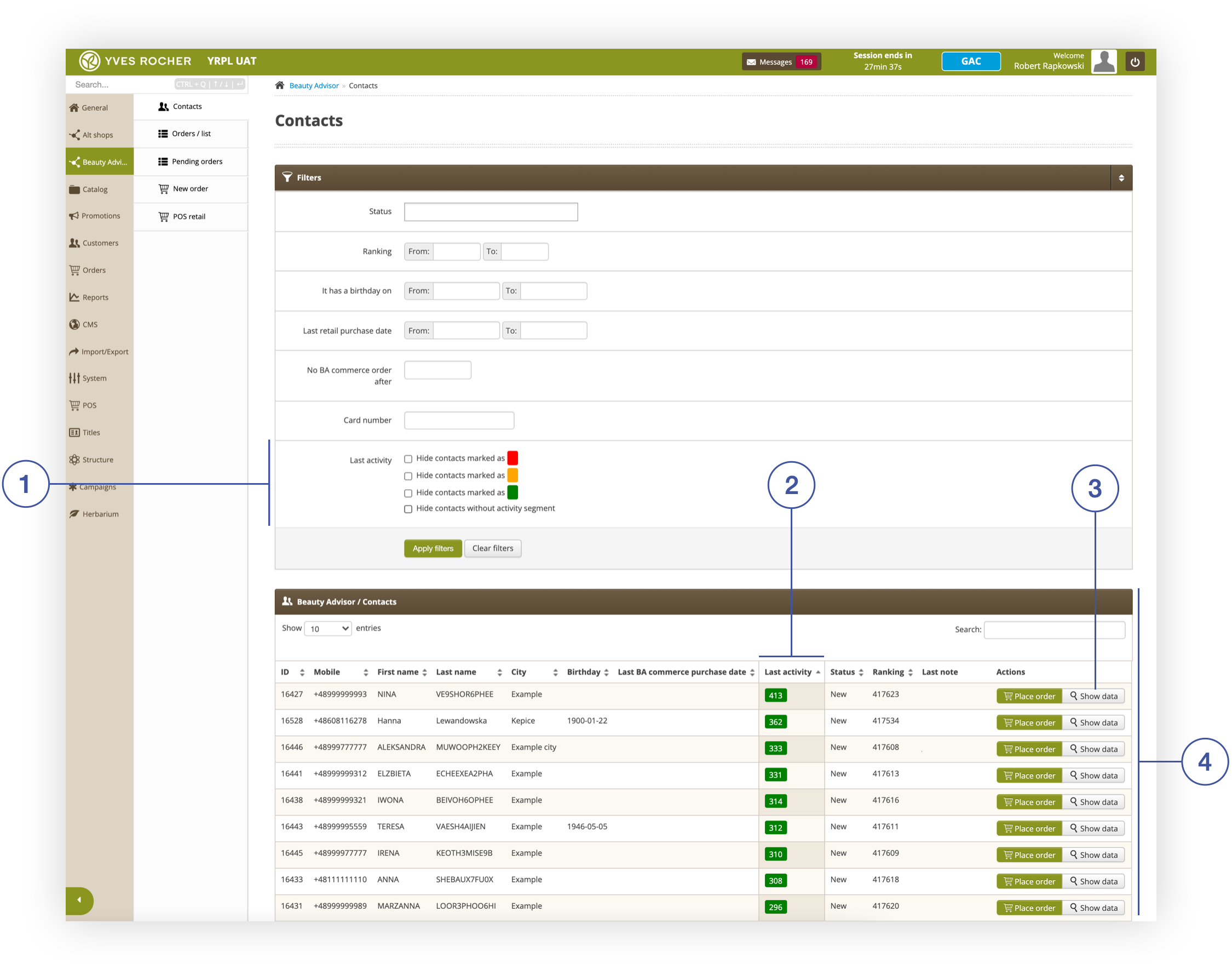
# Beauty Advisor - description of last activity filter

# ![Screenshot_2020-04-29_at_19.12.41.png](https://knowledge.tauceti-digital.com/uploads/images/gallery/2024-11/10467664684188.png) Getting started

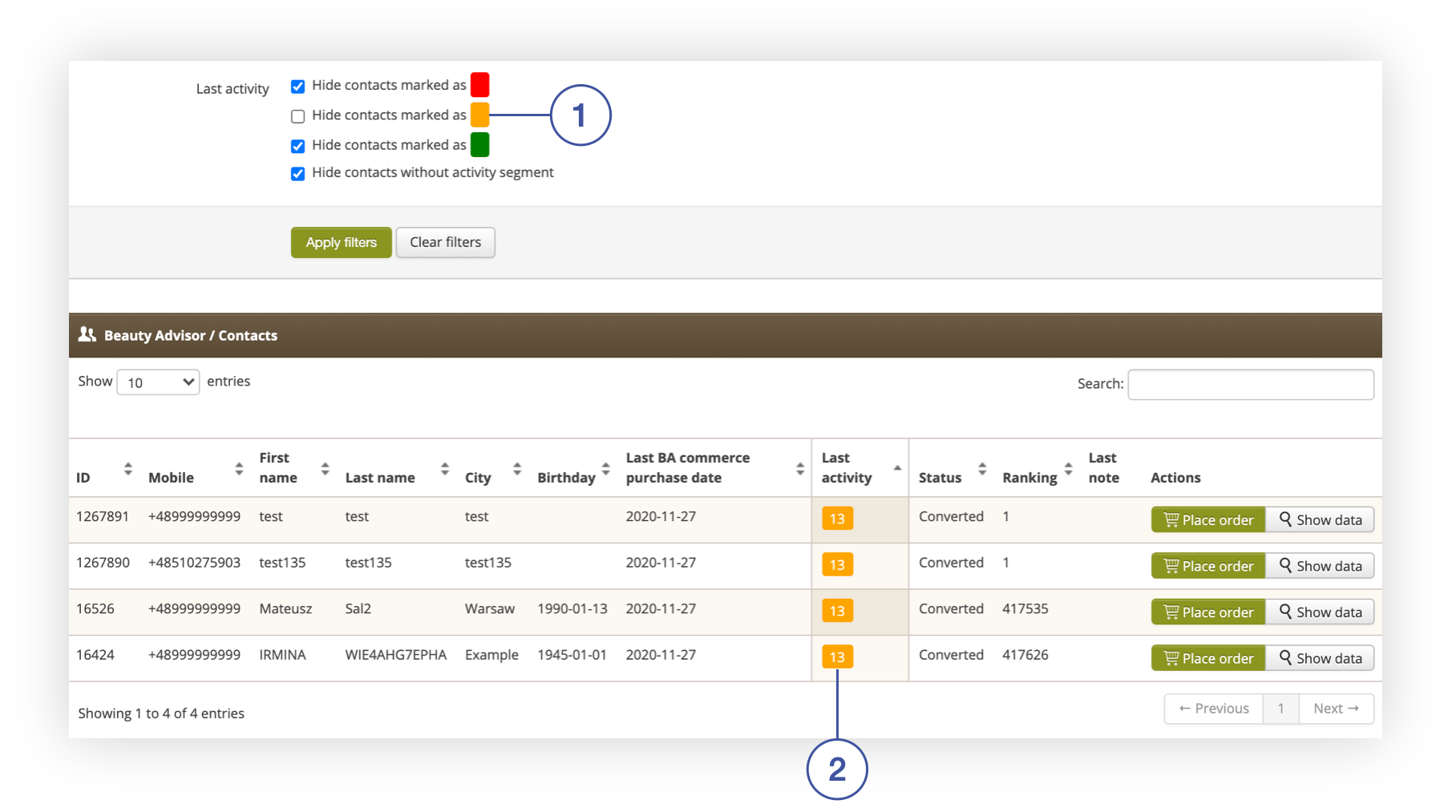
<span lang="PL">The **last activity filter <span style="color: #4054a0;">(1) </span>**allows to select BA customers based on the selected date range of the last purchase. Customers are marked with different colors - depending on the time that has passed since their last purchase. These colors and the date range assigned to them are configurable in the system settings. For more information, see chapter [ Configuration of colors and date range of the “Recent Activity” filter](#bkmrk-configuration-of-col). Clients meeting the criteria specified in the ***Filters*** tab will be displayed in the ***Beauty Advisor / Contacts*** tab **<span style="color: #4054a0;">(4)</span>*****<span style="color: #4054a0;">. </span>***The number of days since the last purchase is shown in the ***Last activity*** column **<span style="color: #4054a0;">(2)</span>**. The **Show data** button **<span style="color: #4054a0;">(3) </span>**<span>shows additional information on the last purchases made by the BA customer. Details are available in the chapter [ Filter - Last activity and customer  
data preview](#bkmrk-filter---last-activi-1)</span>.</span>

<span class="wysiwyg-color-black" style="color: #44549b;">![info2.svg](https://knowledge.tauceti-digital.com/uploads/images/gallery/2024-11/10467672214940.png) **Remember**</span><span class="wysiwyg-color-black" style="display: block; margin-top: 10px;">For more information on BA clients and the Beauty Advisor module, see [Beauty Advisor - getting started](https://knowledge.tauceti-digital.com/books/e-commerce/page/beauty-advisor-getting-started).</span>

<span class="wysiwyg-color-black" style="color: #44549b;">![info2.svg](https://knowledge.tauceti-digital.com/uploads/images/gallery/2024-11/10467672214940.png) **Remember**</span><span class="wysiwyg-color-black" style="display: block; margin-top: 10px;">Access to the configuration is granted to users of the administration panel, with a higher level of rights (min. “Administrator”). For more information on permissions, see [User groups in the administrative panel.](https://knowledge.tauceti-digital.com/books/e-commerce/page/user-groups-in-the-administrative-panel)</span><span class="wysiwyg-color-black" style="display: block; margin-top: 10px;"></span>

<table id="bkmrk-%C2%A0%C2%A0-contacts-section-" style="margin-right: auto; margin-left: auto;"><tbody><tr><td class="wysiwyg-text-align-center" style="text-align: center; vertical-align: middle;">![Contacts_section_in_the_Beauty_Advisor_module.png](https://knowledge.tauceti-digital.com/uploads/images/gallery/2024-11/360019768899.png)</td></tr><tr><td class="wysiwyg-text-align-center" style="text-align: center; vertical-align: middle;"><span class="wysiwyg-font-size-medium">  </span><span class="wysiwyg-font-size-medium"> *Contacts section in the Beauty Advisor module* </span></td></tr></tbody></table>

Table of Contents:

- [ Filter - Last activity and customer data preview](#bkmrk-filter---last-activi-1)
- [ Configuration of colors and date range of the “Recent Activity” filter](#bkmrk-configuration-of-col)
- [ Example of use](#bkmrk-example-of-use)

---

# ![Screenshot_2020-04-29_at_19.12.41.png](https://knowledge.tauceti-digital.com/uploads/images/gallery/2024-11/10467664684188.png) Filter - Last activity and customer data preview

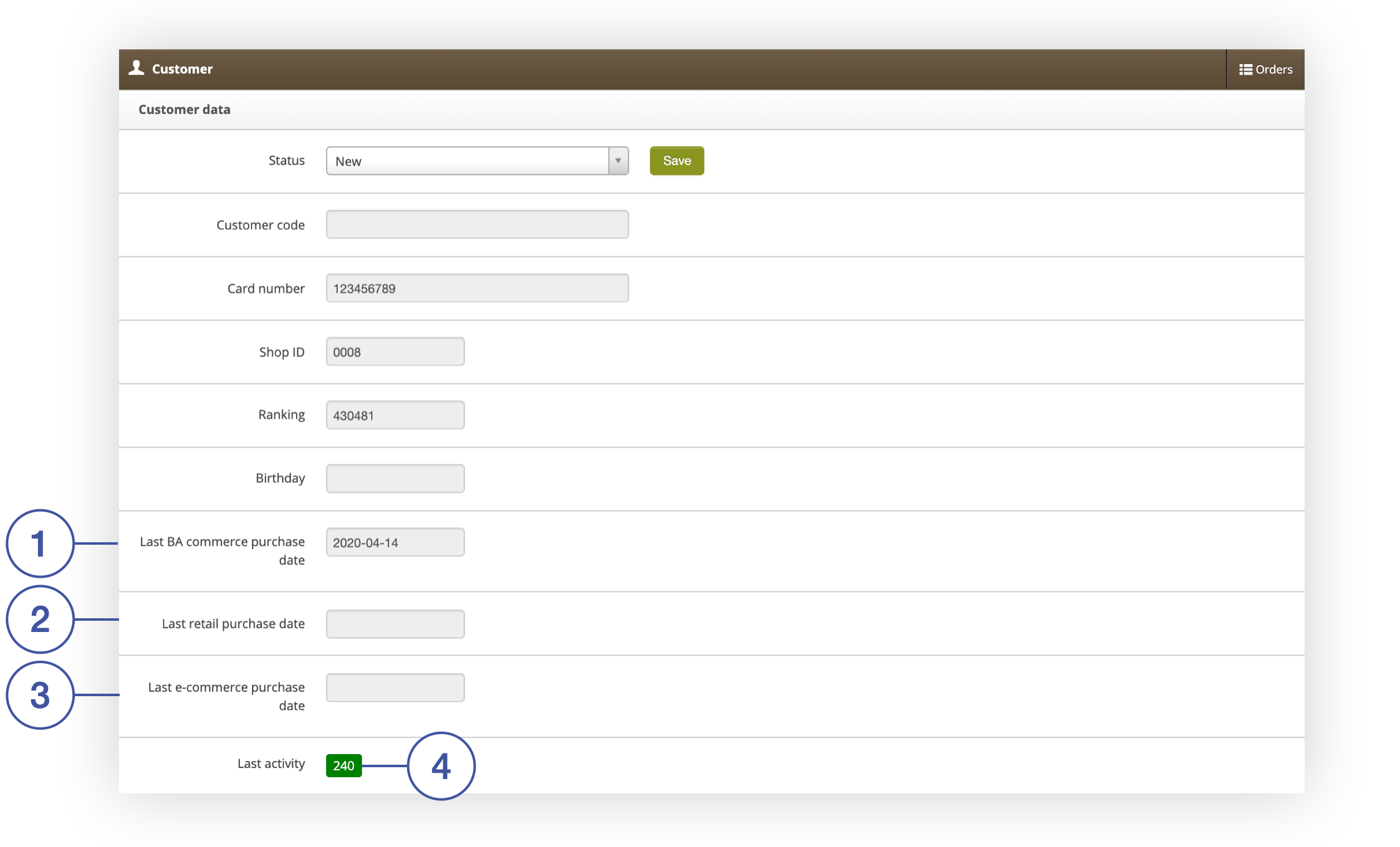
<span lang="PL">The ***Customer data*** screen shows the dates of the last purchases made by a BA customer in each of the three sales channels: BA commerce **<span style="color: #4054a0;">(1)</span>**</span><span lang="PL">, in stationery shops **<span style="color: #4054a0;">(2)</span>**</span><span style="font-family: -apple-system, BlinkMacSystemFont, 'Segoe UI', Helvetica, Arial, sans-serif;">, and e-commerce **<span style="color: #4054a0;">(3). </span>**Position **Last activity** item **<span style="color: #4054a0;">(4)</span>**, indicates the number of days that have elapsed since the last order of a BA customer in any of the sales channels listed above.</span>

<table id="bkmrk-window-with-ba-clien" style="margin-right: auto; margin-left: auto;"><tbody><tr><td class="wysiwyg-text-align-center" style="text-align: center; vertical-align: middle;">![Window_with_BA_client_data_and_information_about_his_Last_activity.png](https://knowledge.tauceti-digital.com/uploads/images/gallery/2024-11/360019765180.png)</td></tr><tr><td class="wysiwyg-text-align-center" style="text-align: center; vertical-align: middle;"><span class="wysiwyg-font-size-medium">*Window with BA client data and information about his Last activity*</span></td></tr></tbody></table>

- <span lang="PL">**Last BA commerce purchase date** **<span style="color: #4054a0;">(1) </span>**</span><span lang="PL">- date of the last purchase made by BA commerce. Data on the purchase are generated automatically by the application.</span>
- <span lang="PL">**Last retail purchase date** **<span style="color: #4054a0;">(2)</span>** - date of the last purchase made at a Yves Rocher store using the customer’s loyalty card. Purchase data is collected from a CSV file daily imported, from the JANTAR database<span>. The value can also be updated during mass import of clients (both in regular and lite versions).</span></span>
- <span lang="PL">**Last e-commerce purchase date** **<span style="color: #4054a0;">(3)</span>** - date of last purchase from Yves Rocher online store. The purchase data is generated automatically by the application.</span>

---

# ![Screenshot_2020-04-29_at_19.12.41.png](https://knowledge.tauceti-digital.com/uploads/images/gallery/2024-11/10467664684188.png) Configuration of colors and date range of the “Recent Activity” filter

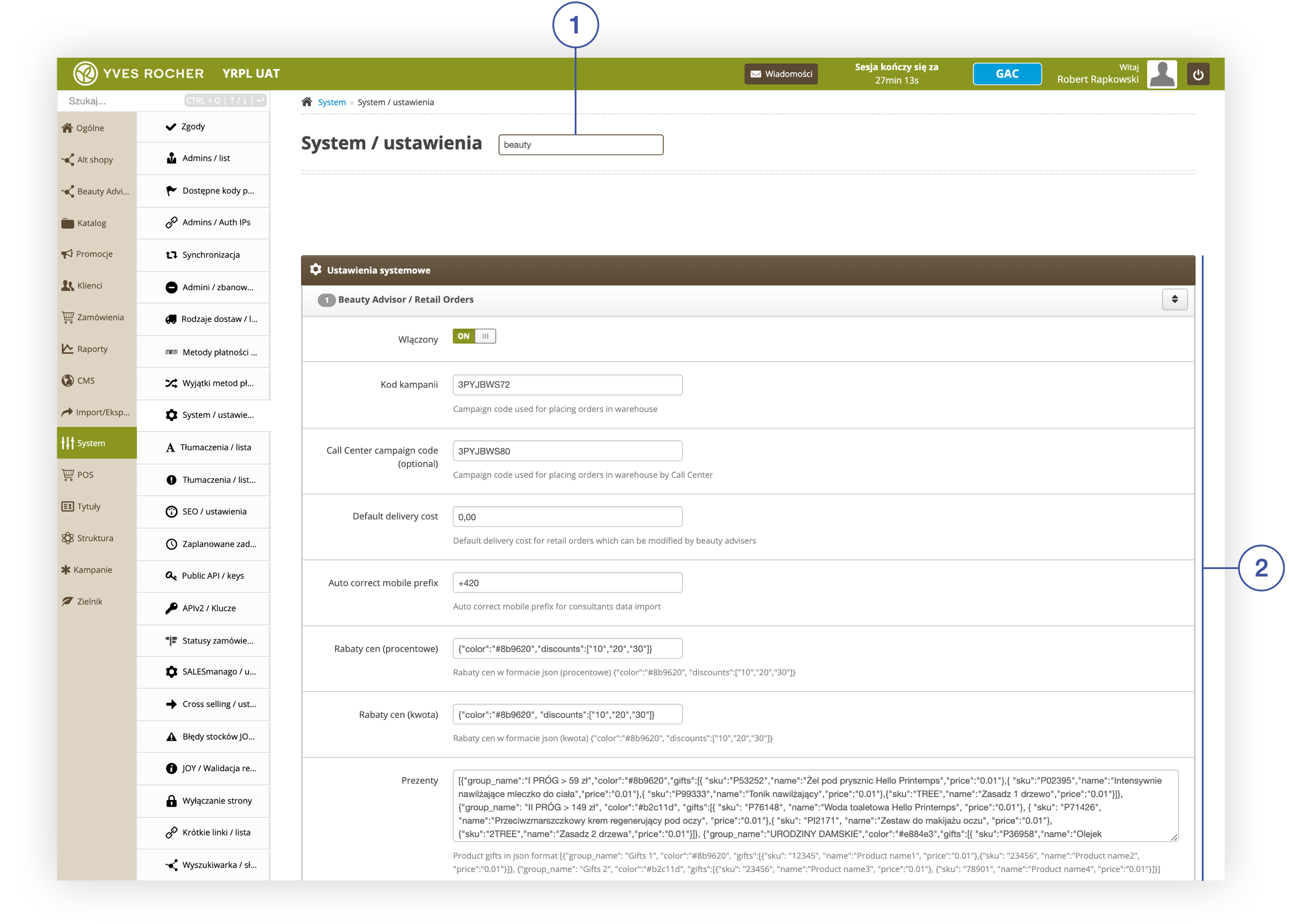
To edit the colors and date ranges assigned to them, go to the ***System / settings*** section in the ***System*** module, and use the search engine <span lang="PL">**<span style="color: #4054a0;">(1)</span>**</span> to enter the phrase “beauty”. After searching for the relevant phrase, the ***Beauty Advisor / Retail Orders*** tab <span lang="PL">**<span style="color: #4054a0;">(2)</span>**</span> will be displayed.

<table id="bkmrk-%C2%A0%C2%A0-beauty-advisor-%2F-" style="margin-right: auto; margin-left: auto;"><tbody><tr><td class="wysiwyg-text-align-center" style="text-align: center; vertical-align: middle;">![Widok_zak_adki_Beauty_Advisor___Retail_Orders_Activity_w_sekcji_System___ustawienia_w_module_Beauty_Advisor.png](https://knowledge.tauceti-digital.com/uploads/images/gallery/2024-11/360018032699.png)</td></tr><tr><td class="wysiwyg-text-align-center" style="text-align: center; vertical-align: middle;"><span class="wysiwyg-font-size-medium">  </span><span class="wysiwyg-font-size-medium"> *Beauty Advisor / Retail Orders Activity tab in the System / Settings section of the Beauty Advisor module*</span></td></tr></tbody></table>

  
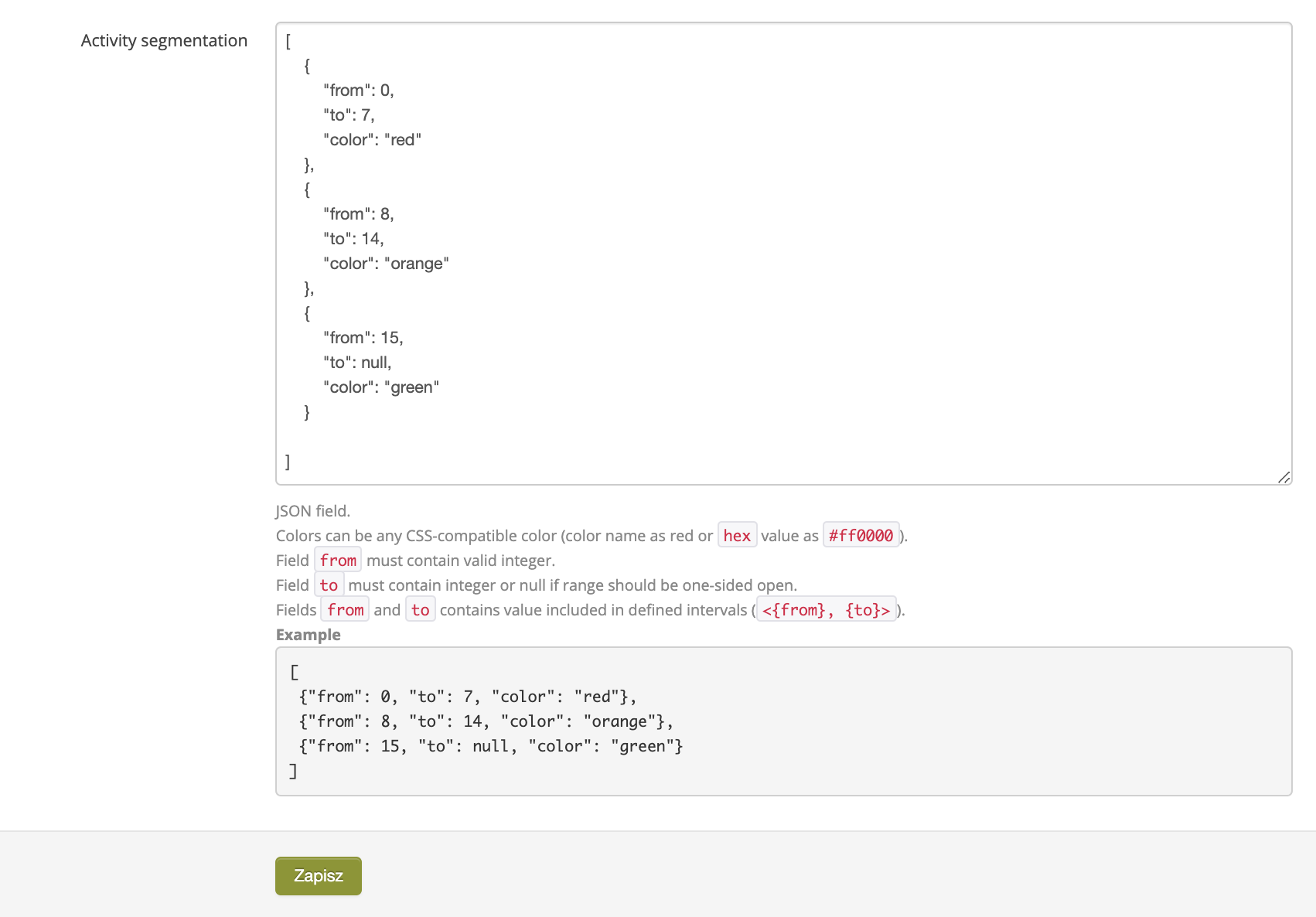
The **Activity segmentation** parameter contains a JSON record that defines the colors and date ranges that appear in the **Last activity** filter. Below you will find an explanation of the record.

<table id="bkmrk-activity-segmentatio" style="margin-right: auto; margin-left: auto; height: 551px;"><tbody><tr style="height: 485px;"><td class="wysiwyg-text-align-center" style="text-align: center; vertical-align: middle; height: 485px; width: 688px;">![Screenshot_2020-10-14_at_12.20.19.png](https://knowledge.tauceti-digital.com/uploads/images/gallery/2024-11/360017548820.png)</td></tr><tr style="height: 66px;"><td class="wysiwyg-text-align-center" style="text-align: center; vertical-align: middle; height: 66px; width: 688px;"><span class="wysiwyg-font-size-medium"> *Activity segmentation parameter settings in the Beauty Advisor / Retail Orders tab in the System / Settings section* </span></td></tr></tbody></table>

- **"from"** - pa parameter that allows to define the number assigned to the filter **Last activity** from which the defined color will be visible. The field must contain a valid integer.
- **"to"** - a parameter that allows to define the number assigned to the filter **Lasy activity** to which the defined color will be visible. The field must contain an integer or null (0) if the range is to be open on one side.
- **"color"** - parameter that allows to define the label color assigned to a given range of numbers. The value can be a color name (example: “red”) or hexadecimal notation ( for example: #ff000).

---

# ![Screenshot_2020-04-29_at_19.12.41.png](https://knowledge.tauceti-digital.com/uploads/images/gallery/2024-11/10467664684188.png) Example of use

To better understand the record, see the example below:

```
{<br></br>"from": 8,<br></br>"to": 14,<br></br>"color": "orange"<br></br>}
```

The above entry will show an orange label <span><span lang="PL">**<span style="color: #4054a0;">(1)</span>**</span></span>:

- in the filter **Last activity**
- next to customers whose Recent Activity is between 8 and 14 days (example below <span><span lang="PL">**<span style="color: #4054a0;">(2)</span>**</span></span>):

<table id="bkmrk-beauty-advisor-%2F-con" style="margin-right: auto; margin-left: auto;"><tbody><tr><td class="wysiwyg-text-align-center" style="text-align: center; vertical-align: middle;">![Beauty_Advisor___Contacts_tab_in_Beauty_Advisor__Contacts.png](https://knowledge.tauceti-digital.com/uploads/images/gallery/2024-11/360019798379.png)</td></tr><tr><td class="wysiwyg-text-align-center" style="text-align: center; vertical-align: middle;"><span class="wysiwyg-font-size-medium">*Beauty Advisor / Contacts tab in Beauty Advisor&gt; Contacts*</span></td></tr></tbody></table>

<span style="font-family: -apple-system, BlinkMacSystemFont, 'Segoe UI', Helvetica, Arial, sans-serif;">  
Below you will find the final JSON code that would work as follows:</span>

- the red label will be assigned to consumers with activity in the range of 0-7 days
- the orange label will be assigned to consumers with an activity in the range of 8-14 days
- the label with the color # 00ff00 will be assigned to consumers with an activity ranging from 15 days to infinity

```
[<br></br> {<br></br>  "from": 0,<br></br>  "to": 7,<br></br>  "color": "red"<br></br> },<br></br> {<br></br>  "from": 8,<br></br>  "to": 14,<br></br>  "color": "orange"<br></br> },<br></br> {<br></br>  "from": 15,<br></br>  "to": null,<br></br>  "color": "#00ff00"<br></br> }<br></br>]
```