# Beauty Advisor - exports

# ![Screenshot_2020-04-29_at_19.12.41.png](https://knowledge.tauceti-digital.com/uploads/images/gallery/2024-11/10486721953436.png) Getting started

<span>The administrative panel allows the following actions:</span>

- <span>export of BA consultants </span>
- <span style="font-family: -apple-system, BlinkMacSystemFont, 'Segoe UI', Helvetica, Arial, sans-serif;">export of BA customers </span>
- <span style="font-family: -apple-system, BlinkMacSystemFont, 'Segoe UI', Helvetica, Arial, sans-serif;"></span><span style="font-family: -apple-system, BlinkMacSystemFont, 'Segoe UI', Helvetica, Arial, sans-serif;">export of BA orders</span>

Descriptions of each of the above have been included in the following chapters of the article.

<span class="wysiwyg-color-black" style="color: #44549b;">![info2.svg](https://knowledge.tauceti-digital.com/uploads/images/gallery/2024-11/10486706549660.png) **Remember**</span><span class="wysiwyg-color-black" style="display: block; margin-top: 10px;">Export - an operation that allows to generate data stored in the administration panel, to a file, usually with the extensions .xlsx or .csv, which can be downloaded to a local disk.</span>

<span class="wysiwyg-color-black" style="color: #44549b;">![info2.svg](https://knowledge.tauceti-digital.com/uploads/images/gallery/2024-11/10486706549660.png) **Remember**</span><span class="wysiwyg-color-black" style="display: block; margin-top: 10px;">For basic information on BA commerce, see the article [Beauty Advisor - getting started](https://knowledge.tauceti-digital.com/books/e-commerce/page/beauty-advisor-getting-started).</span>

<span>Table of contents:</span>

- [ Export of BA consultants](#bkmrk-export-of-ba-consult-2)
- [ Export of BA customers](#bkmrk-export-of-ba-custome)  
    
    - [Full export version](#bkmrk-full-export-version)
    - [Lite version](#bkmrk-lite-version)
- [ Export of BA orders](#bkmrk-export-of-ba-orders)  
    
    - [Full export version](#bkmrk-full-export-version-1)
    - [Lite version](#bkmrk-lite-version-1)

---

# ![Screenshot_2020-04-29_at_19.12.41.png](https://knowledge.tauceti-digital.com/uploads/images/gallery/2024-11/10486721953436.png) Export of BA consultants

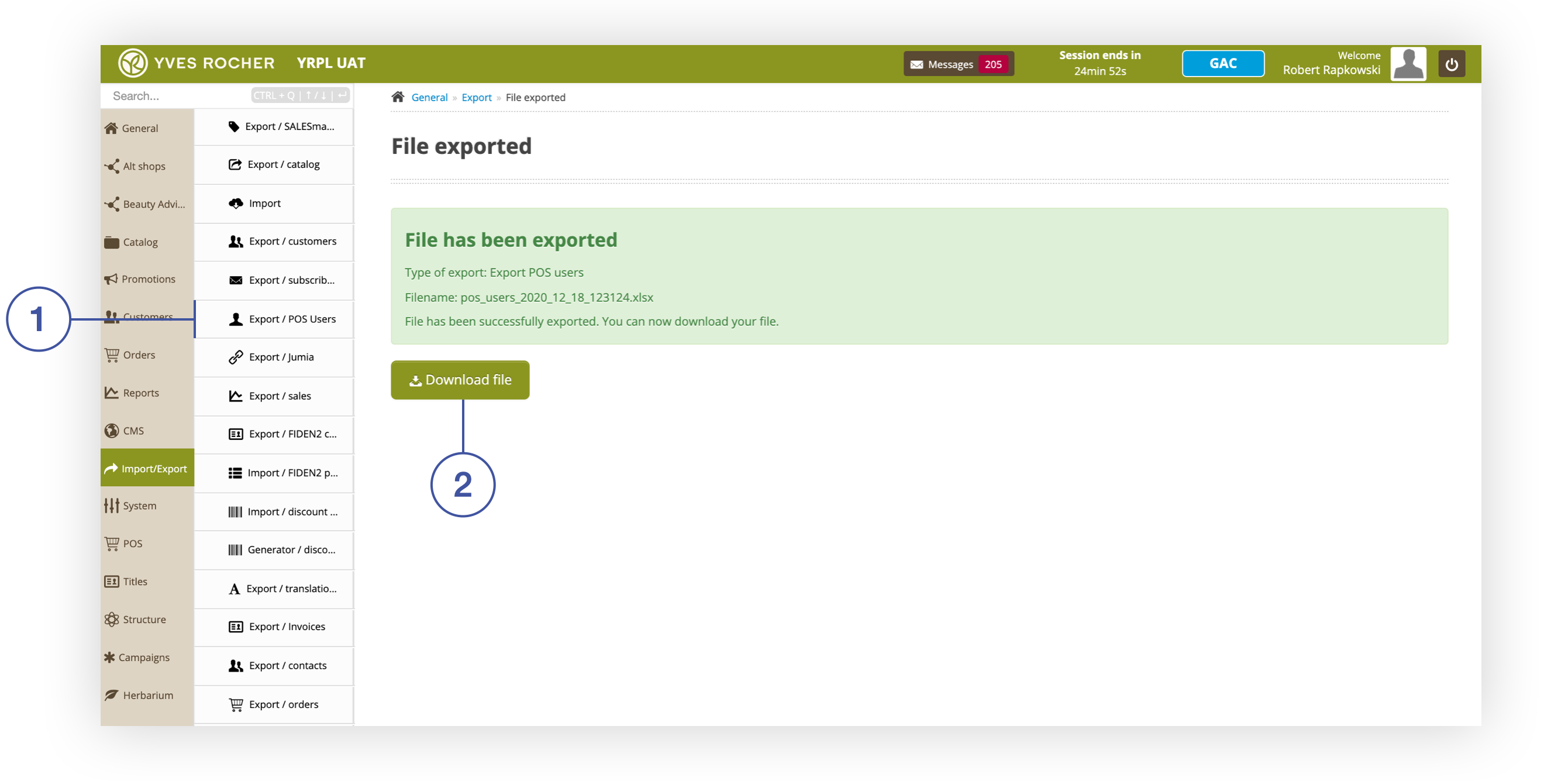
BA consultants can be exported by navigating to the section ***Import / Export&gt; Export / POS Users*** **<span style="color: #4054a0;">(1)</span>***.* Navigating to the tab will automatically initiate the export operation and you will receive a screen with a summary of the performed operation and the option to download the finished file **<span style="color: #4054a0;">(2)</span>** to a local disk.

<table id="bkmrk-screen-with-a-summar" style="margin-right: auto; margin-left: auto;"><tbody><tr><td class="wysiwyg-text-align-center">![Screen_with_a_summary_of_the_export_operation.png](https://knowledge.tauceti-digital.com/uploads/images/gallery/2024-11/360020059340.png)</td></tr><tr><td class="wysiwyg-text-align-center"><span id="bkmrk-screen-with-a-summar-1"><span class="wysiwyg-font-size-medium">*Screen with a summary of the export operation*</span></span></td></tr></tbody></table>

The generated file contains the following data. A description of each parameter can be found in the article [Beauty Advisor - mass imports](https://knowledge.tauceti-digital.com/books/e-commerce/page/beauty-advisor-mass-imports) (chapter: *"Mass Update of BA Consultants"*).

- **id**
- **first\_name**
- **last\_name**
- **email**
- **mobile**
- **active**
- **last\_login\_date**
- **group\_name**
- **pos\_reports\_number**
- **ba\_pos\_number**
- **default\_altshop\_id**

---

# ![Screenshot_2020-04-29_at_19.12.41.png](https://knowledge.tauceti-digital.com/uploads/images/gallery/2024-11/10486721953436.png) Export of BA customers

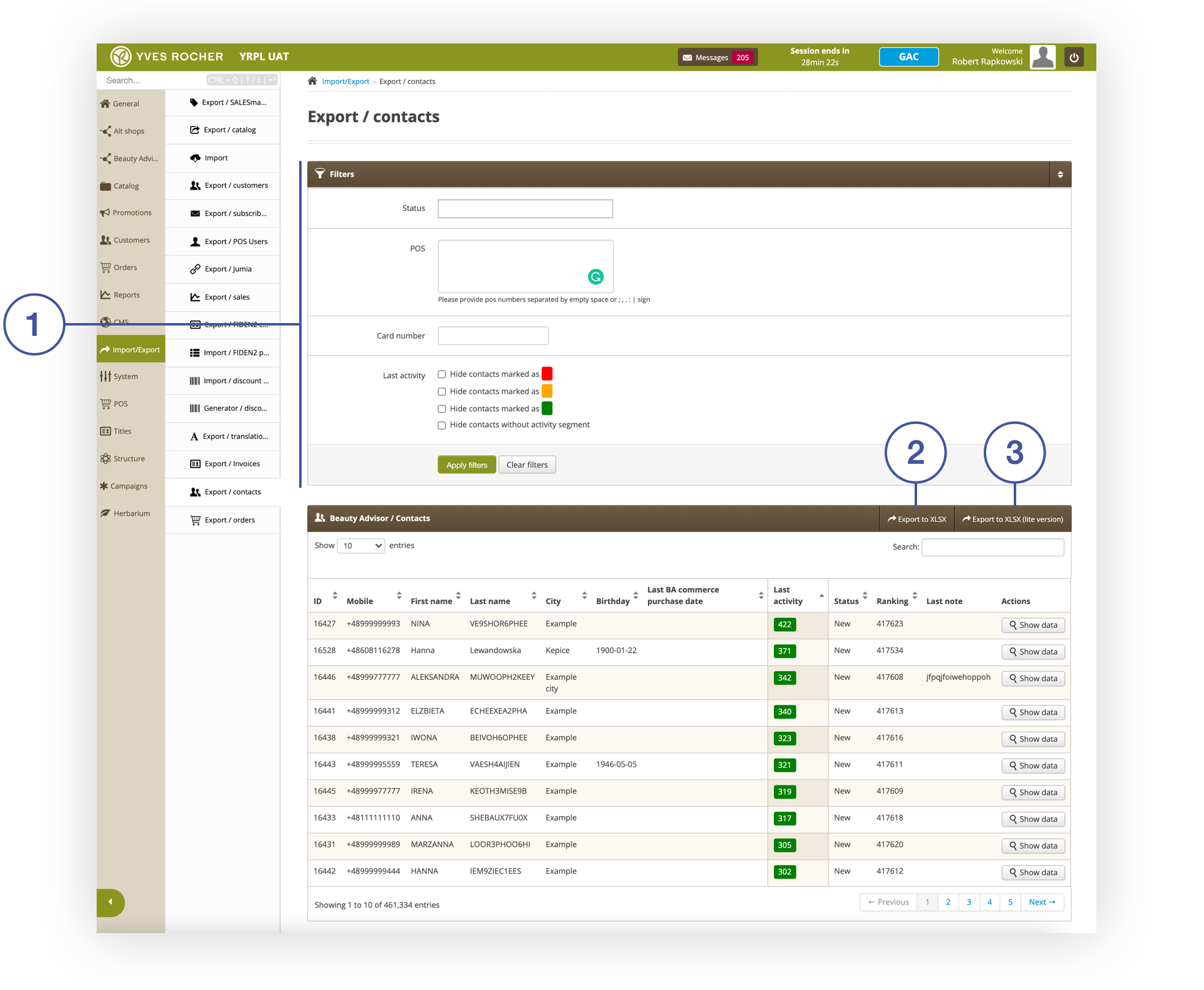
<span>The export of BA customers is possible in the section ***Import / Export&gt; Export / contacts**.* Due to the current limitations when exporting Excel files, there are two possible types of exports (export in full version **<span style="color: #4054a0;">(2)</span>** and in lite version **<span style="color: #4054a0;">(3)</span>**). Each export type is described in the following chapter. Current exports are limited to approximately 100,000 rows. This limit will be extended with subsequent updates.</span>

<span>In the ***Filters*** tab **<span style="color: #4054a0;">(1)</span>**, the scope of the generated data can be narrowed down as needed. </span><span>For a description of the parameters in the tab, see the article [Beauty Advisor &gt; Contacts - viewing and managing BA clients](https://knowledge.tauceti-digital.com/books/e-commerce/page/beauty-advisor-contacts-viewing-and-managing-ba-clients). </span><span>The table and possible actions in the tab ***Beauty Advisor / Contacts*** are described in the article [Beauty Advisor &gt; Contacts - viewing and managing BA clients](https://knowledge.tauceti-digital.com/books/e-commerce/page/beauty-advisor-contacts-viewing-and-managing-ba-clients).</span>

<table id="bkmrk-section-import%2Fexpor" style="margin-right: auto; margin-left: auto; width: 699px;"><tbody><tr><td class="wysiwyg-text-align-center" style="width: 699px;">![Section_Import_Export___Export___contacts.png](https://knowledge.tauceti-digital.com/uploads/images/gallery/2024-11/360020062900.png)</td></tr><tr style="height: 22px;"><td class="wysiwyg-text-align-center" style="height: 22px; width: 699px;"><span id="bkmrk-section-import%2Fexpor-1"><span class="wysiwyg-font-size-medium">*Section Import/Export &gt; Export / contacts*</span></span></td></tr></tbody></table>

## Full export version

The full version generates all BA customer data available in the panel. Below you will find a list of parameters included in the generated export file. Each parameter is described in the article [Beauty Advisor - mass imports](https://knowledge.tauceti-digital.com/books/e-commerce/page/beauty-advisor-mass-imports) <span>(chapter: *"Mass update of BA customers"*).</span>

- <span>**LAST\_CUSTOMER\_CODE** </span>
- <span>**FIRST\_NAME**</span>
- **NAME**
- **PHONE**
- **ACTUAL\_SHOP**
- <span>**RANKING**</span>
- **CITY**<span></span>
- **POSTAL\_CODE**
- **STREET1**
- **HOUSE\_NUMBER**
- **BOX\_NUMBER**
- **EMAIL**
- **DATE\_BIRTH**
- **LPD\_BA**
- **LPD\_ECOMMERCE**
- **LPD\_RETAIL**
- **LA**
- **ID**
- **TOP1\_TO\_PRODUCT**
- **TOP1\_TO\_PRODUCT\_LABEL**
- **TOP1\_TO\_LPD\_TXT**
- **TOP1\_TO\_PRODUCT\_PRICE**
- **TOP1\_TO\_TO**
- **TOP1\_TO\_QT**

## Lite version

<span style="font-family: -apple-system, BlinkMacSystemFont, 'Segoe UI', Helvetica, Arial, sans-serif;">The generated file in the lite version contains four columns with data of BA customers. Below you will find a list of parameters included in the generated export file. Each parameter is described in the article [Beauty Advisor - mass imports](https://knowledge.tauceti-digital.com/books/e-commerce/page/beauty-advisor-mass-imports) (chapter: *"Mass update of BA customers"*).</span><span style="font-family: -apple-system, BlinkMacSystemFont, 'Segoe UI', Helvetica, Arial, sans-serif;"></span>

- **ACTUAL\_SHOP**
- **RANKING**
- **LPD\_RETAIL**
- **ID**

---

# ![Screenshot_2020-04-29_at_19.12.41.png](https://knowledge.tauceti-digital.com/uploads/images/gallery/2024-11/10486721953436.png) Export of BA orders

<span>There are two types of NA order exports (export in full version and in lite version). Each type is described in the chapter below.</span>

## Full export version

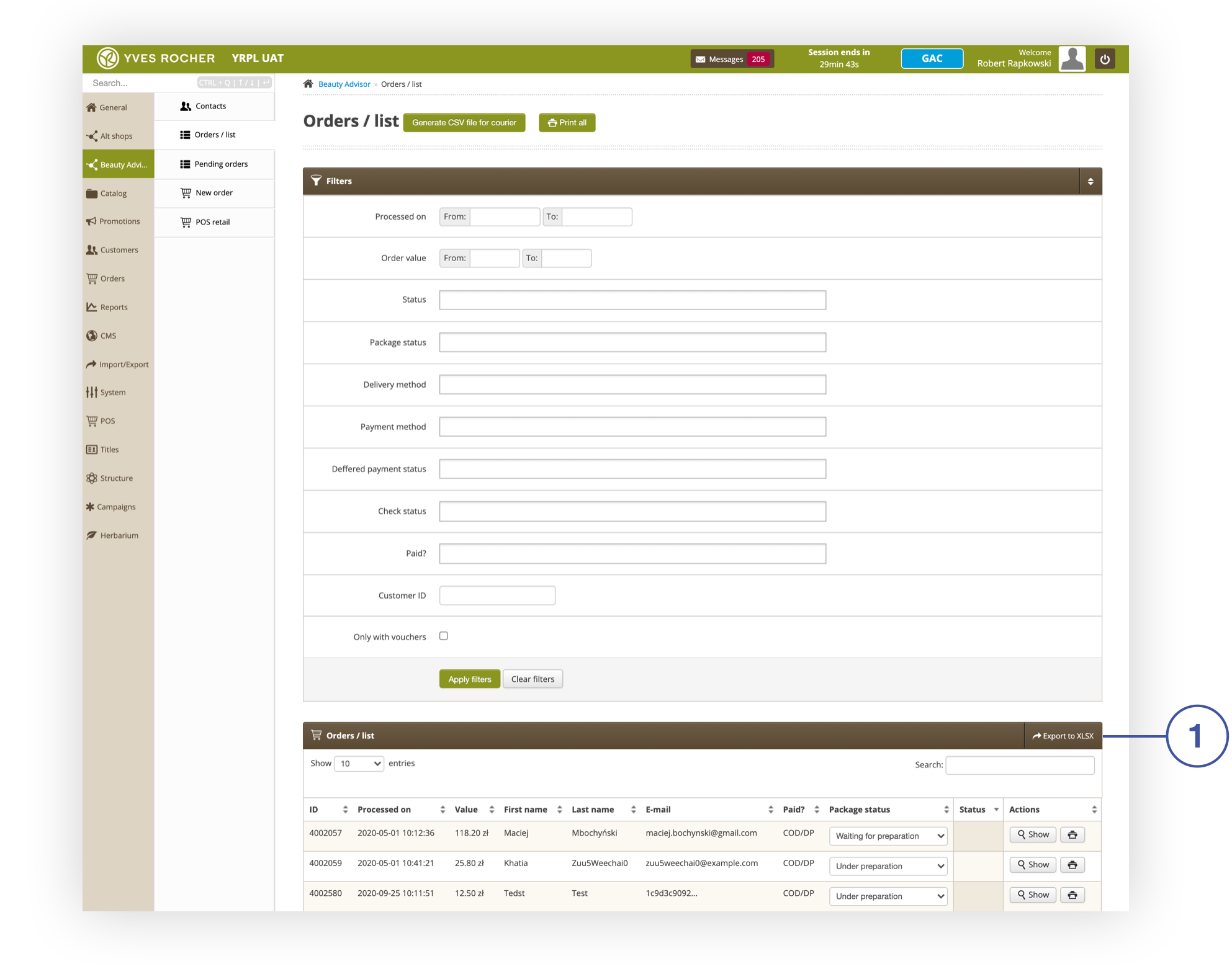
<span>A full version of the export of BA orders is possible in the section ***Beauty Advisor &gt; Orders / list***, by selecting the **Export to XLSX** button **<span style="color: #4054a0;">(1)</span>**</span><span>. The scope of the generated data can be narrowed down using the criteria available in the ***Filters*** tab. All parameters appearing in the tab are described in the article [Beauty Advisor &gt; Orders / list - viewing and handling orders](https://knowledge.tauceti-digital.com/books/e-commerce/page/beauty-advisor-orders-list-viewing-and-handling-orders).</span>

<table id="bkmrk-section-beauty-advis" style="margin-right: auto; margin-left: auto; width: 699px; height: 43px;"><tbody><tr style="height: 21px;"><td class="wysiwyg-text-align-center" style="width: 687px; height: 21px;">![Section_Beauty_Advisor___Orders___list.png](https://knowledge.tauceti-digital.com/uploads/images/gallery/2024-11/360020078219.png)</td></tr><tr style="height: 22px;"><td class="wysiwyg-text-align-center" style="height: 22px; width: 687px;"><span id="bkmrk-section-beauty-advis-1"><span class="wysiwyg-font-size-medium">*Section Beauty Advisor &gt; Orders / list*</span></span></td></tr></tbody></table>

   
Below you will find a list of parameters included in the generated export file. Each parameter is described in the article [Beauty Advisor &gt; Orders / list - viewing and handling orders](https://knowledge.tauceti-digital.com/books/e-commerce/page/beauty-advisor-orders-list-viewing-and-handling-orders).

- **ID**
- **Processed on**
- **Value**
- **First name**
- **Last name**
- **E-mail**
- **Paid?**
- **Package status**
- **Status**

- 

## Lite version

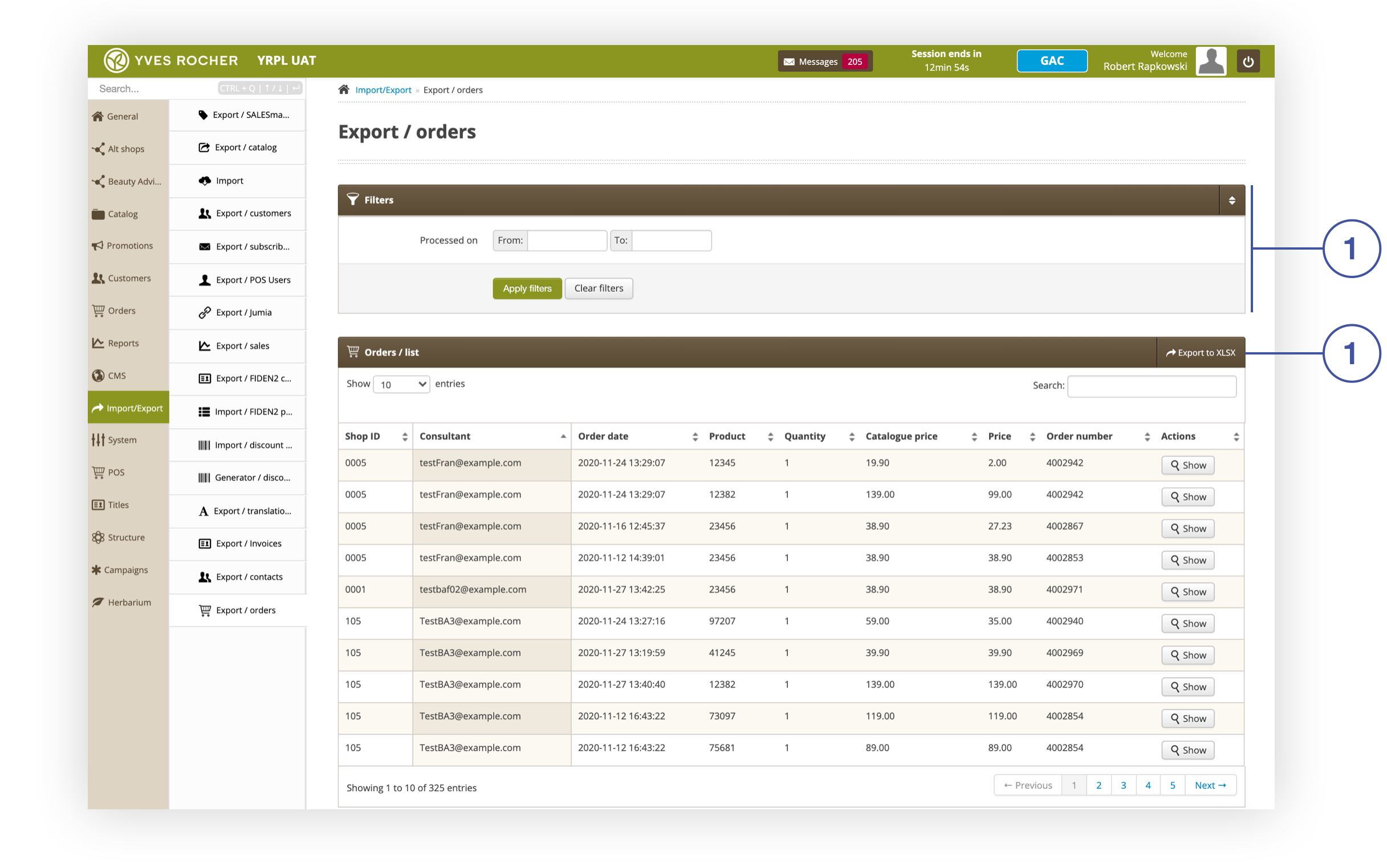
<span>BA orders in lite version can be exported in the section ***Import/Export&gt; Export / orders***, by selecting the **Export to XLSX** button **<span style="color: #4054a0;">(2)</span>**</span><span>. The scope of the generated data can be narrowed down using the criterion **Processed on**, available in the tab ***Filters* <span style="color: #4054a0;">(1)</span>**.</span>

<table id="bkmrk-section-import-%2F-exp" style="margin-right: auto; margin-left: auto; height: 43px;"><tbody><tr style="height: 21px;"><td class="wysiwyg-text-align-center" style="width: 687px; height: 21px;">![Section_Import___Export__Export___orders_.png](https://knowledge.tauceti-digital.com/uploads/images/gallery/2024-11/360020065940.png)</td></tr><tr style="height: 22px;"><td class="wysiwyg-text-align-center" style="height: 22px; width: 687px;"><span id="bkmrk-section-import-%2F-exp-1"><span class="wysiwyg-font-size-medium">*Section Import / Export&gt; Export / orders* </span></span></td></tr></tbody></table>

<span>Below you will find a list of parameters included in the generated export file.</span>

- **Shop ID** - POS store number. More details about POS stores <span style="font-family: -apple-system, BlinkMacSystemFont, 'Segoe UI', Helvetica, Arial, sans-serif;">are available in the article [Beauty Advisor &gt; POS retail – store management](https://knowledge.tauceti-digital.com/books/e-commerce/page/beauty-advisor-pos-retail-store-management).</span>
- **Consultant** - BA consultant e-mail address.
- **Order date** - BA order placement date.
- **Product** - Product SKU.
- **Quantity** - the number of pieces of the product in the order.
- **Catalogue price** - product catalog price. More information on the list price can be found in the article [Beauty Advisor &gt; New order - description of the ordering process](https://knowledge.tauceti-digital.com/books/e-commerce/page/beauty-advisor-new-order-description-of-the-ordering-process).
- **Price** - order price, including discounts. You can find more information about discounts and rebates in the article [Beauty Advisor &gt; New order - description of the ordering process](https://knowledge.tauceti-digital.com/books/e-commerce/page/beauty-advisor-new-order-description-of-the-ordering-process).
- **Order number** - BA order number in the administrative panel.