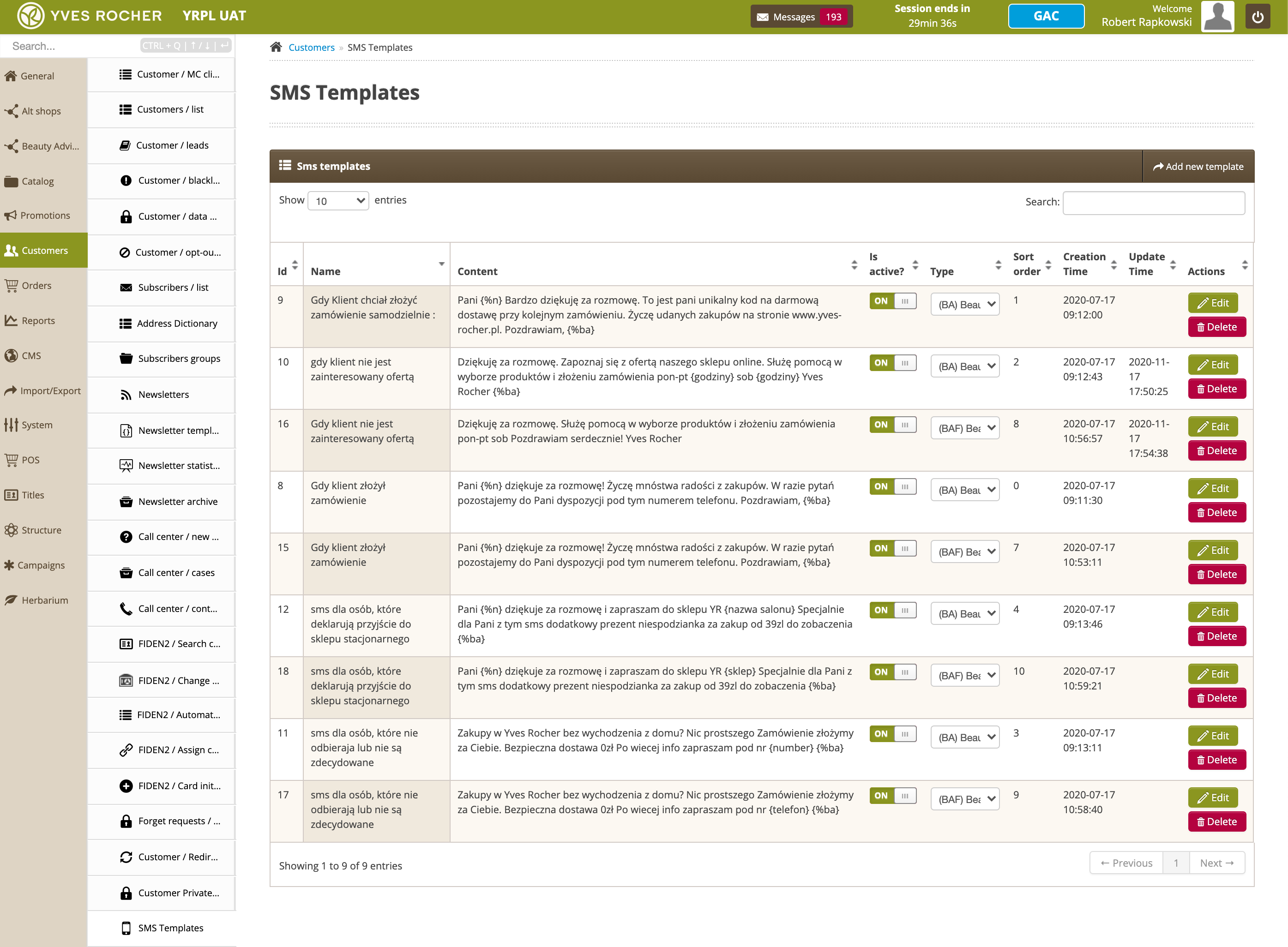
# Beauty Advisor - message templates

# ![Screenshot_2020-04-29_at_19.12.41.png](https://knowledge.tauceti-digital.com/uploads/images/gallery/2024-11/NkLscreenshot-2020-04-29-at-19-12-41-png.png) Getting started

<span>The SMS templates section in the Customers module contains a table with a list of SMS templates that are used on the BA customer data preview screen (for details, see [Beauty Advisor &gt; Contacts - viewing and managing BA clients](https://knowledge.tauceti-digital.com/books/e-commerce/page/beauty-advisor-contacts-viewing-and-managing-ba-clients)). </span>The table allows to activate the template, define the type of template, edit, delete and add a new item. The templates are sortable and each item can be managed using the drag and drop method.  
<span></span>

<table id="bkmrk-sms-templates-sectio" style="margin-right: auto; margin-left: auto;"><tbody><tr><td class="wysiwyg-text-align-center" style="text-align: center; vertical-align: middle;">![SMS_Templates_section_in_the_Beauty_Advisor_module.png](https://knowledge.tauceti-digital.com/uploads/images/gallery/2024-11/sms-templates-section-in-the-beauty-advisor-module-png.png)</td></tr><tr><td class="wysiwyg-text-align-center" style="text-align: center; vertical-align: middle;"><span class="wysiwyg-font-size-medium"> *SMS Templates section in the Beauty Advisor module* </span></td></tr></tbody></table>

  
Table of contents:

- [ Viewing and managing templates SMS](#bkmrk-viewing-and-managing-1)
- [ Adding a new SMS template](#bkmrk-adding-a-new-sms-tem)

---

# ![Screenshot_2020-04-29_at_19.12.41.png](https://knowledge.tauceti-digital.com/uploads/images/gallery/2024-11/NkLscreenshot-2020-04-29-at-19-12-41-png.png) Viewing and managing templates SMS

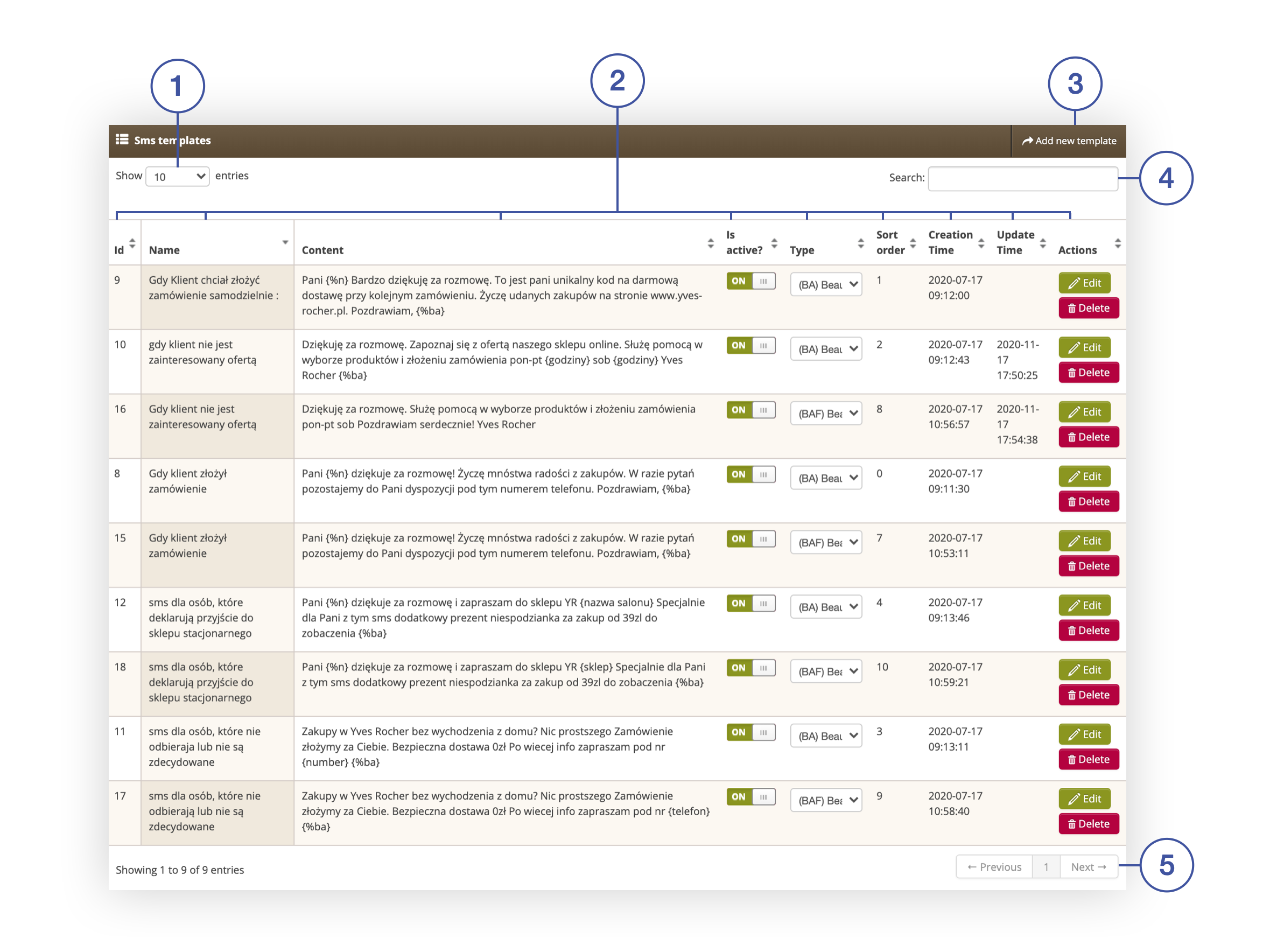
Below you will find a description of the table and the actions that can be performed in the ***SMS templates*** tab.

<table id="bkmrk-sms-templates-tab-in" style="margin-right: auto; margin-left: auto;"><tbody><tr><td class="wysiwyg-text-align-center" style="text-align: center; vertical-align: middle;">![SMS_templates_tab_in_the_Customers___SMS_templates_section.png](https://knowledge.tauceti-digital.com/uploads/images/gallery/2024-11/sms-templates-tab-in-the-customers-sms-templates-section-png.png)</td></tr><tr><td class="wysiwyg-text-align-center" style="text-align: center; vertical-align: middle;"><span class="wysiwyg-font-size-medium">*SMS templates tab in the Customers &gt; SMS templates section*</span></td></tr></tbody></table>

- **<span style="color: #4054a0;">(1) </span>Show X entries** - option to change the number of displayed SMS templates on one page (available range from 10 to 100).
- **<span style="color: #4054a0;">(2) </span>**- columns containing information on SMS templates. Each column is sortable: 
    - **ID** - unique number of the SMS template in the administration panel. Parameter value generated by the application.
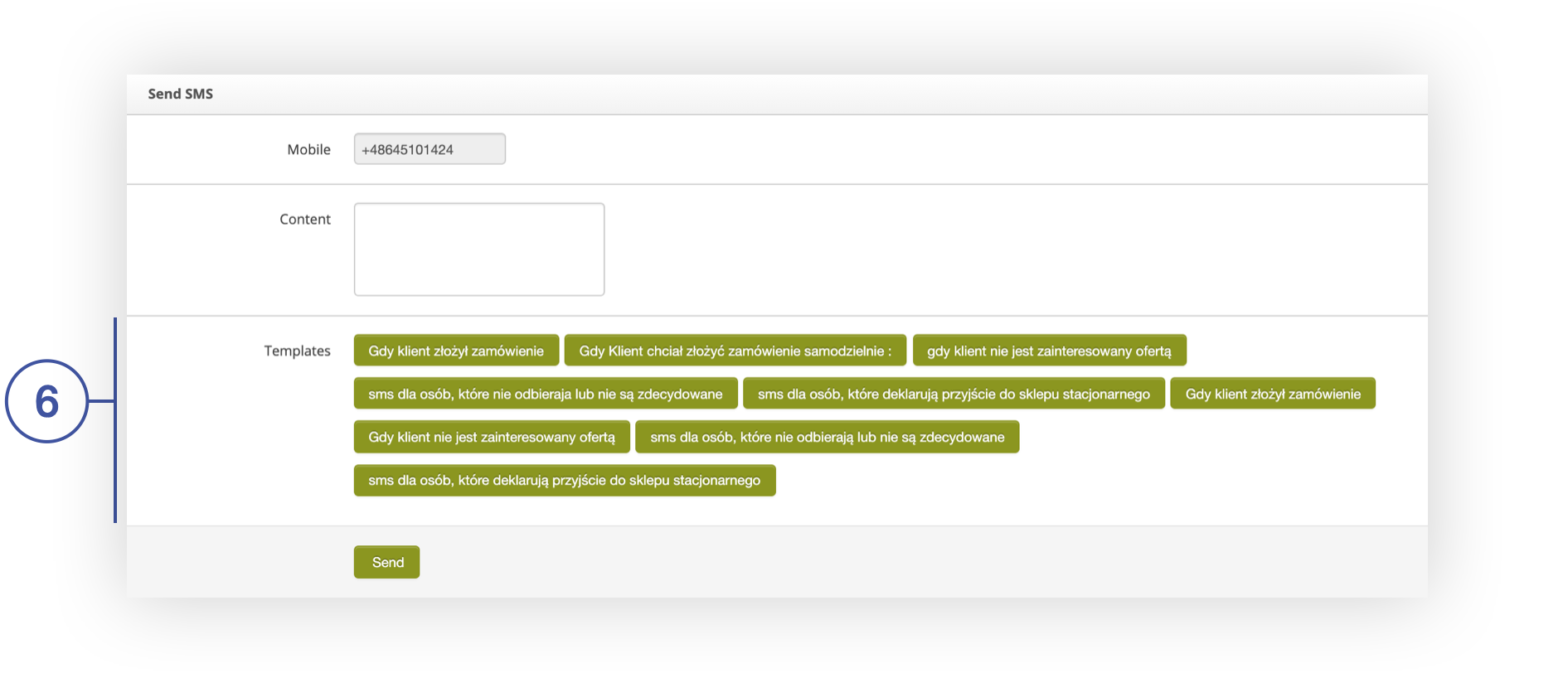
    - **Name** - name of the SMS template, displayed on the button on the BA client preview screen **<span style="color: #4054a0;">(6)</span>**. More details is available in the article [Beauty Advisor &gt; Contacts - viewing and managing BA clients](https://knowledge.tauceti-digital.com/books/e-commerce/page/beauty-advisor-contacts-viewing-and-managing-ba-clients).

<table id="bkmrk-send-sms-column-on-t" style="margin-right: auto; margin-left: auto;"><tbody><tr><td class="wysiwyg-text-align-center" style="text-align: center; vertical-align: middle;">![Send_SMS_column_on_the_BA_customer_preview_screen.png](https://knowledge.tauceti-digital.com/uploads/images/gallery/2024-11/send-sms-column-on-the-ba-customer-preview-screen-png.png)</td></tr><tr><td class="wysiwyg-text-align-center" style="text-align: center; vertical-align: middle;"><span class="wysiwyg-font-size-medium">*Send SMS column on the BA customer preview screen* </span></td></tr></tbody></table>

- - **Content** - text of the SMS that will be sent to the BA client.
    - **Is active?** - the ability to activate and deactivate the SMS template.
    - **Type** - defining the group for which the template will be visible in the column ***Send SMS***<span style="font-family: -apple-system, BlinkMacSystemFont, 'Segoe UI', Helvetica, Arial, sans-serif;"> on the BA client preview screen. For more on BA Consultant Groups, see [Beauty Advisor - getting started](https://knowledge.tauceti-digital.com/books/e-commerce/page/beauty-advisor-getting-started).</span>
    - **Sort order** - parameter defining the sequence of buttons on the client’s preview screen **<span style="color: #4054a0;">(6)</span>**. The template with the assigned value 0 will be in the first position.
    - **Creation Time** - CMS template creation date.
    - **Update Time** - data ostatniej edycji szablonu CMS.
    - **Actions** 
        - **Edit** - select the button to go to the SMS template editing window.
        - **Delete** - select the button to delete the SMS template.
- **<span style="color: #4054a0;">(3) </span>**- choose the button to go to the window for adding a new CMS template.
- **<span style="color: #4054a0;">(4) </span>**- SMS template search engine (search possible by criteria: **Name, Content, Creation time, Update time).**
- **<span style="color: #4054a0;">(5) </span>**- navigation through the list of BA customers in the administration panel.

---

# ![Screenshot_2020-04-29_at_19.12.41.png](https://knowledge.tauceti-digital.com/uploads/images/gallery/2024-11/NkLscreenshot-2020-04-29-at-19-12-41-png.png) Adding a new SMS template

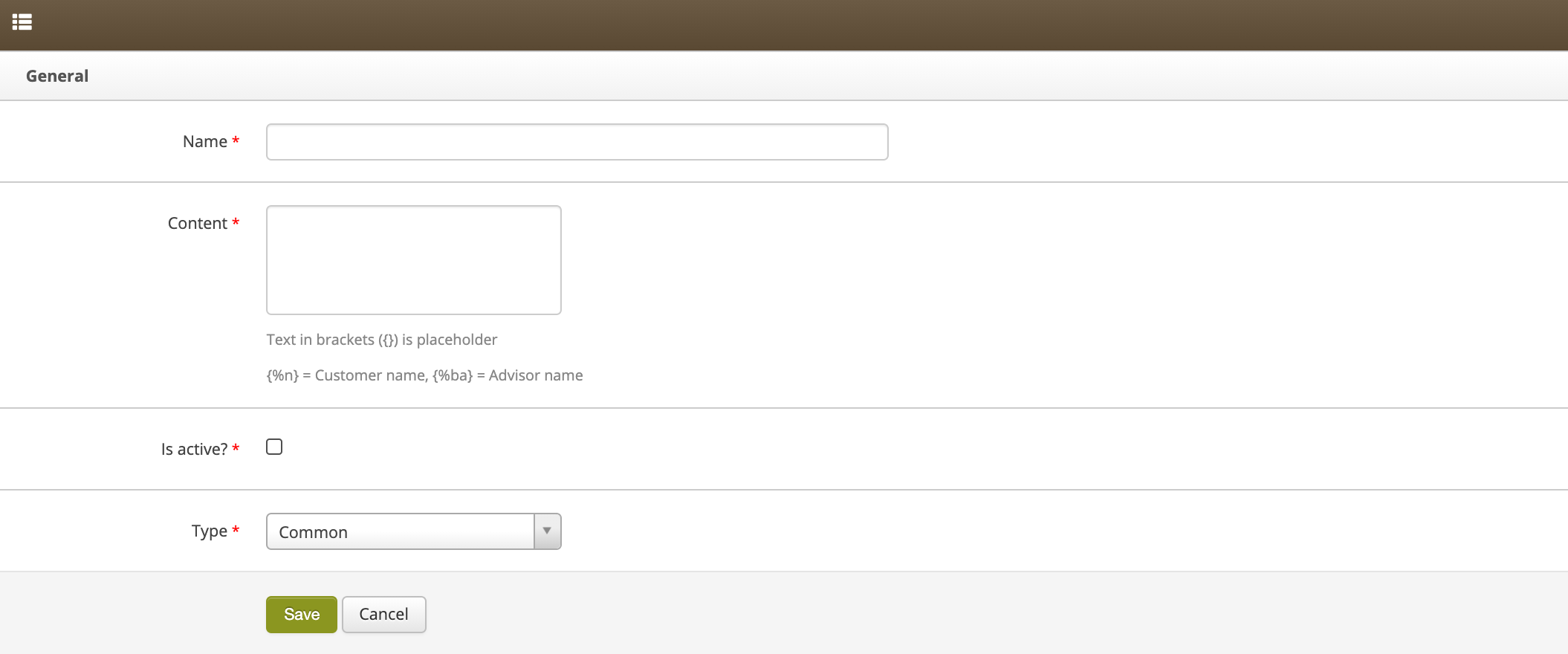
To create a new SMS template, you must complete the fields: **Name, Content, Is active and Type.**

<table id="bkmrk-screen-for-adding-a-" style="margin-right: auto; margin-left: auto;"><tbody><tr><td class="wysiwyg-text-align-center" style="text-align: center; vertical-align: middle;">![Screen_for_adding_a_new_CMS_template.png](https://knowledge.tauceti-digital.com/uploads/images/gallery/2024-11/screen-for-adding-a-new-cms-template-png.png)</td></tr><tr><td class="wysiwyg-text-align-center" style="text-align: center; vertical-align: middle;"><span class="wysiwyg-font-size-medium"> *Screen for adding a new CMS template* </span></td></tr></tbody></table>

In the **Content** field you can use variables and any placeholders.

<span class="wysiwyg-color-black" style="color: #44549b;">![info2.svg](https://knowledge.tauceti-digital.com/uploads/images/gallery/2024-11/Eo7info2-svg.png) **Remember**</span><span class="wysiwyg-color-black" style="display: block; margin-top: 10px;">Placeholder - Attribute, used as a temporary filler or auxiliary text in a text field.  
The content in the placeholder can be anything.</span>

**Types of variables:**

- {%n} - BA clinet name.
- {%ba} - BA consultant name.

**Placeholder construction:**

- {Placeholder\_name}

**Example:**

```
Mrs. {% n} Thank you for our conversation.<br></br>This is your unique code for free delivery with your next order.<br></br>I wish you pleasant shopping at <a href="http://www.yves-rocher.pl">www.yves-rocher.pl.</a><br></br>Best regards, {%ba}
```

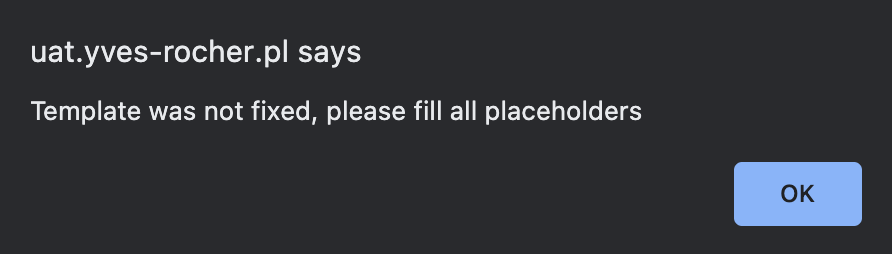
<span class="wysiwyg-color-black" style="color: #44549b;">![info2.svg](https://knowledge.tauceti-digital.com/uploads/images/gallery/2024-11/Eo7info2-svg.png) **Remember**</span><span class="wysiwyg-color-black" style="display: block; margin-top: 10px;">The placeholder can be used in the body of the message, but be sure to remove it before sending it to the client. Otherwise, the application will prevent sending the message with the following warning:</span>

<table id="bkmrk-warning-about-incomp" style="margin-right: auto; margin-left: auto;"><tbody><tr><td class="wysiwyg-text-align-center" style="text-align: center; vertical-align: middle;">![Warning_about_incomplete_template.png](https://knowledge.tauceti-digital.com/uploads/images/gallery/2024-11/warning-about-incomplete-template-png.png)</td></tr><tr><td class="wysiwyg-text-align-center" style="text-align: center; vertical-align: middle;"><span class="wysiwyg-font-size-medium"> *Warning about incomplete template* </span></td></tr></tbody></table>