# Beauty Advisor - system settings

# ![Screenshot_2020-04-29_at_19.12.41.png](https://knowledge.tauceti-digital.com/uploads/images/gallery/2024-11/10486257038748.png) Getting started

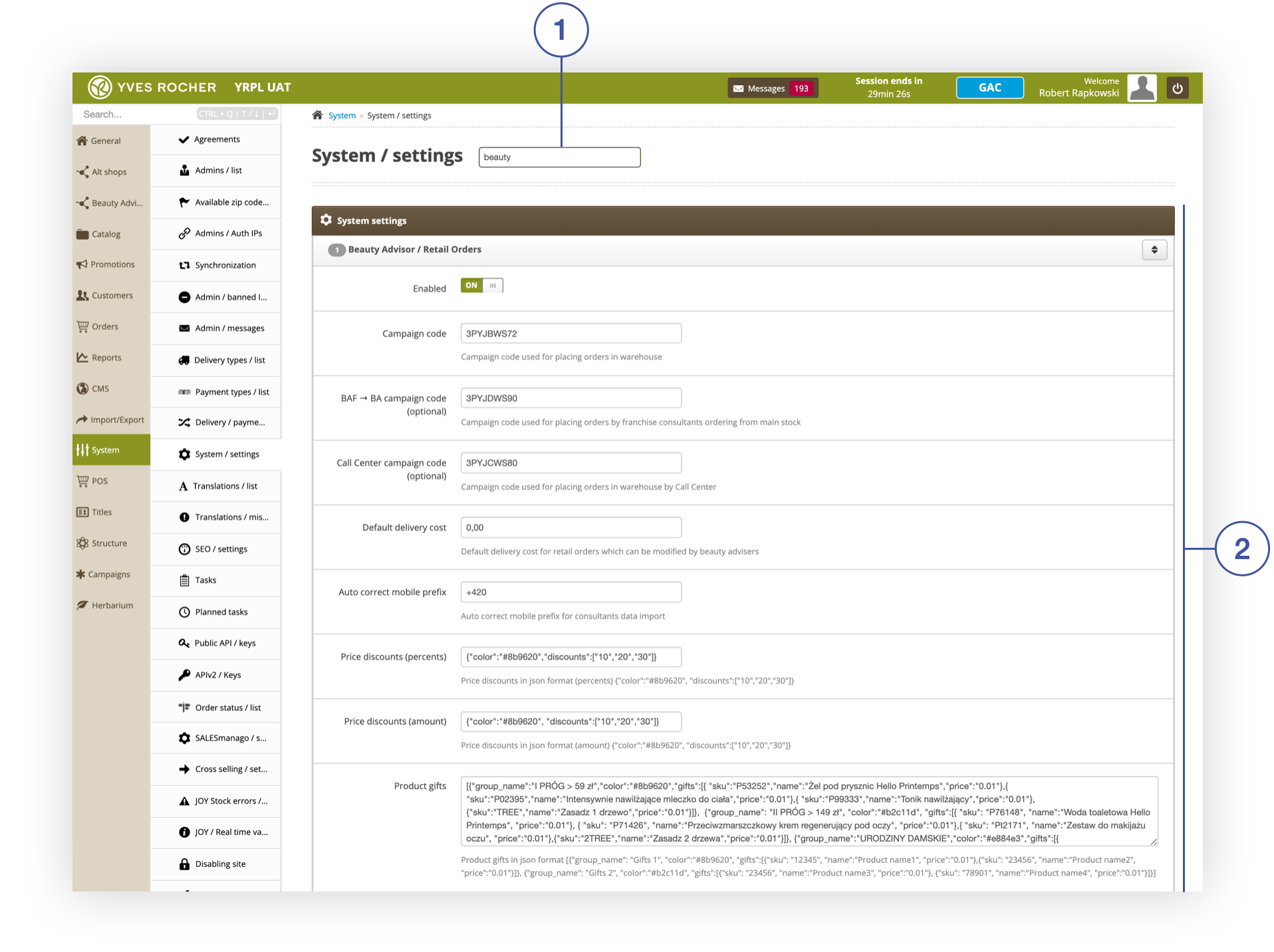
The general settings of the **Beauty Advisor** module is available in the **Beauty Advisor / Retail Orders** <span lang="PL">**<span style="color: #4054a0;">(2) </span>**</span>tab, located in the ***System&gt; System / settings*** section. To go directly to the tab, use the search engine <span lang="PL">**<span style="color: #4054a0;">(1)</span>**</span> and type “beauty”. The next chapter will describe the configurable parameters.<span lang="PL"></span>

<span class="wysiwyg-color-black" style="color: #44549b;">![info2.svg](https://knowledge.tauceti-digital.com/uploads/images/gallery/2024-11/10486257041948.png) **Remember**</span><span class="wysiwyg-color-black" style="display: block; margin-top: 10px;">For basic information on the Beauty Advisor module, see the [Beauty Advisor - getting started](https://knowledge.tauceti-digital.com/books/e-commerce/page/beauty-advisor-getting-started).</span><span></span>

<table id="bkmrk-system%3E-system-setti" style="margin-right: auto; margin-left: auto;"><tbody><tr><td class="wysiwyg-text-align-center" style="text-align: center; vertical-align: middle;">![System__System_Settings_section.png](https://knowledge.tauceti-digital.com/uploads/images/gallery/2024-11/360019920939.png)</td></tr><tr><td class="wysiwyg-text-align-center" style="text-align: center; vertical-align: middle;"><span class="wysiwyg-font-size-medium">*System&gt; System Settings section*</span></td></tr></tbody></table>

   
Table of Contents:

- [ Description of parameters in the Beauty Advisor / Retail orders tab](#bkmrk-description-of-param-1)

---

# ![Screenshot_2020-04-29_at_19.12.41.png](https://knowledge.tauceti-digital.com/uploads/images/gallery/2024-11/10486257038748.png) Description of parameters in the Beauty Advisor / Retail orders tab

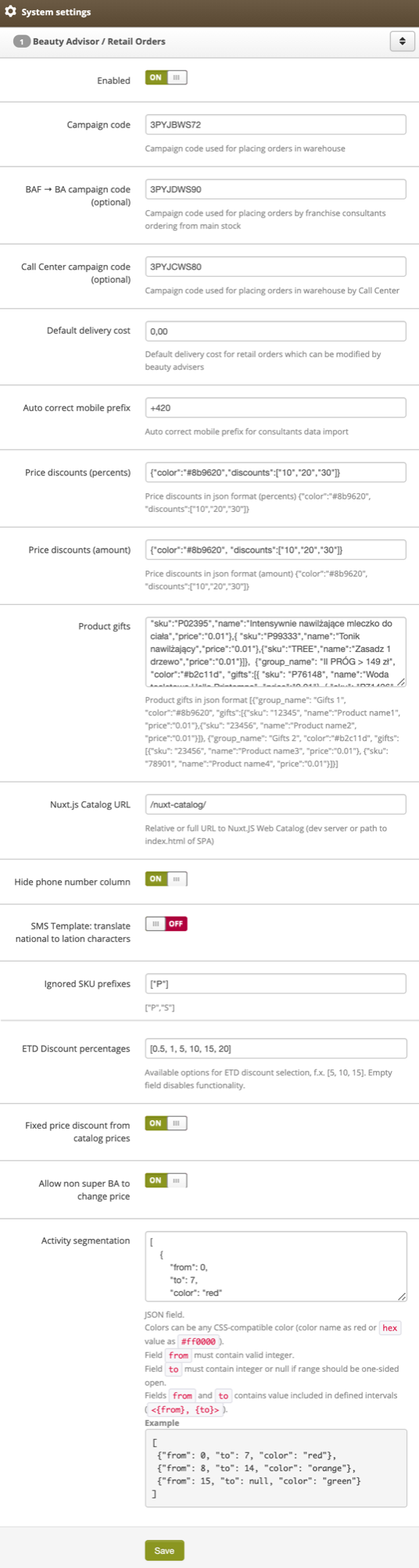
<table id="bkmrk-%C2%A0%C2%A0-beauty-advisor-%2F-" style="margin-right: auto; margin-left: auto;"><tbody><tr><td class="wysiwyg-text-align-center" style="text-align: center; vertical-align: middle;">![Beauty_Advisor___Retail_Orders_tab_in_System__System_settings.png](https://knowledge.tauceti-digital.com/uploads/images/gallery/2024-11/360019906820.png)</td></tr><tr><td class="wysiwyg-text-align-center" style="text-align: center; vertical-align: middle;"><span class="wysiwyg-font-size-medium">  </span><span class="wysiwyg-font-size-medium"> *Beauty Advisor / Retail Orders tab in System&gt; System settings*</span></td></tr></tbody></table>

- **Enabled** - a switch that enables / disables the **Beauty Advisor** functionality.
- **Campaign code** - campaign code assigned to the order placed using BA commerce<span style="font-family: -apple-system, BlinkMacSystemFont, 'Segoe UI', Helvetica, Arial, sans-serif;"><span style="font-family: -apple-system, BlinkMacSystemFont, 'Segoe UI', Helvetica, Arial, sans-serif;">. </span></span>The value overrides the default campaign code.
- **Call center campaign code (optional)** <span style="font-family: -apple-system, BlinkMacSystemFont, 'Segoe UI', Helvetica, Arial, sans-serif;"><span style="font-family: -apple-system, BlinkMacSystemFont, 'Segoe UI', Helvetica, Arial, sans-serif;">- </span></span>campaign code assigned to the placed order, using BA commerce, by an administrator with Call Center rights. If the field is empty, administrators with the Call Center group will use the campaign code defined in the **Campaign code** field.
- **Default delivery cost** - the default delivery cost for orders carried out through the BA commerce channel. The value can be changed by the BA consultant when placing the order. For more details, see the article<span> [Beauty Advisor &gt; New order - description of the   
    ordering process](https://knowledge.tauceti-digital.com/books/e-commerce/page/beauty-advisor-new-order-description-of-the-ordering-process).</span>
- **<label class="control-label" for="settings_auto_correct_mobile_prefix">Auto correct mobile prefix</label>** - phone number auto-correction when importing BA clients and BA consultants.
- **Price discounts (percentage)** - a field with JSON notation where you can modify price discounts granted when placing a BA order. JSON configuration is described in the article [Beauty Advisor &gt; New order - description of the ordering process](https://knowledge.tauceti-digital.com/books/e-commerce/page/beauty-advisor-new-order-description-of-the-ordering-process).
- **Price discounts (amount)** - a field with JSON notation where you can modify the amount of discounts granted when placing the BA order. JSON configuration is described in the article [Beauty Advisor &gt; New order - description of the ordering process](https://knowledge.tauceti-digital.com/books/e-commerce/page/beauty-advisor-new-order-description-of-the-ordering-process).
- **<label class="control-label" for="settings_beauty_advisor_product_gifts">Gifts</label>** - a field with JSON notation where you can modify the gifts given when placing the BA order. JSON configuration has been described in the article [Beauty Advisor &gt; New order - description of the ordering process](https://knowledge.tauceti-digital.com/books/e-commerce/page/beauty-advisor-new-order-description-of-the-ordering-process).
- **<label class="control-label" for="settings_nuxt_catalog_url">Nuxt.js Catalog URL</label>** - path to the product catalog window for BA commerce.
- **Hide phone number column** - a switcher to hide the phone number column in ***Beauty Advisor&gt; Contacts***<span style="font-family: -apple-system, BlinkMacSystemFont, 'Segoe UI', Helvetica, Arial, sans-serif;">. </span>Changes are visible only to BA consultants with the following permissions: BA, BAC, BAF. The permissions are described in the article [User groups in the   
    administrative panel.](https://knowledge.tauceti-digital.com/books/e-commerce/page/user-groups-in-the-administrative-panel)
- **SMS Template: translate national to lation characters** - a switch that enables / disables the use of Latin characters in the text of the SMS template (section ***Customers &gt; SMS templates***).
- **<label class="control-label" for="settings_ba_ignored_sku_prefixes">Ignored SKU prefixes</label>** - Option to omit prefixes for orders placed by BA consultants with BAF privileges. The permissions are described in the article [User groups in the administrative panel.](https://knowledge.tauceti-digital.com/books/e-commerce/page/user-groups-in-the-administrative-panel)
- **ETD Discount percentages** - a field where you can modify the ETD discount given when placing a BA order. Recording configuration is described in [Beauty Advisor &gt; New order - description of the ordering process](https://knowledge.tauceti-digital.com/books/e-commerce/page/beauty-advisor-new-order-description-of-the-ordering-process).
- **Fixed price discount from catalog prices** - a switch enabling / disabling the option of granting a quota discount on catalog prices when placing an order.
- **Allow non super BA to change price** - a switch enabling / disabling the option of changing price during placing an order for admin panel users with permissions lower than **Super BA**. For more information, see [User groups in the administrative panel](https://knowledge.tauceti-digital.com/books/e-commerce/page/user-groups-in-the-administrative-panel).
- **Activity segmentation** - a field with JSON record, where you can modify the parameters and values of the recent activity filter. For more information, see [Beauty Advisor - description of last activity filter](https://knowledge.tauceti-digital.com/books/e-commerce/page/beauty-advisor-description-of-last-activity-filter).