# Conditions

# ![Screenshot_2020-04-29_at_19.12.41.png](https://knowledge.tauceti-digital.com/uploads/images/gallery/2024-11/Yqlscreenshot-2020-04-29-at-19-12-41-png.png) Getting started

This article will teach you about conditions, their types, and how to configure them. Conditions are used to determine whether a customer is eligible to get a promotion.

Conditions can be found in the

***Promotions &gt; Conditions / list***

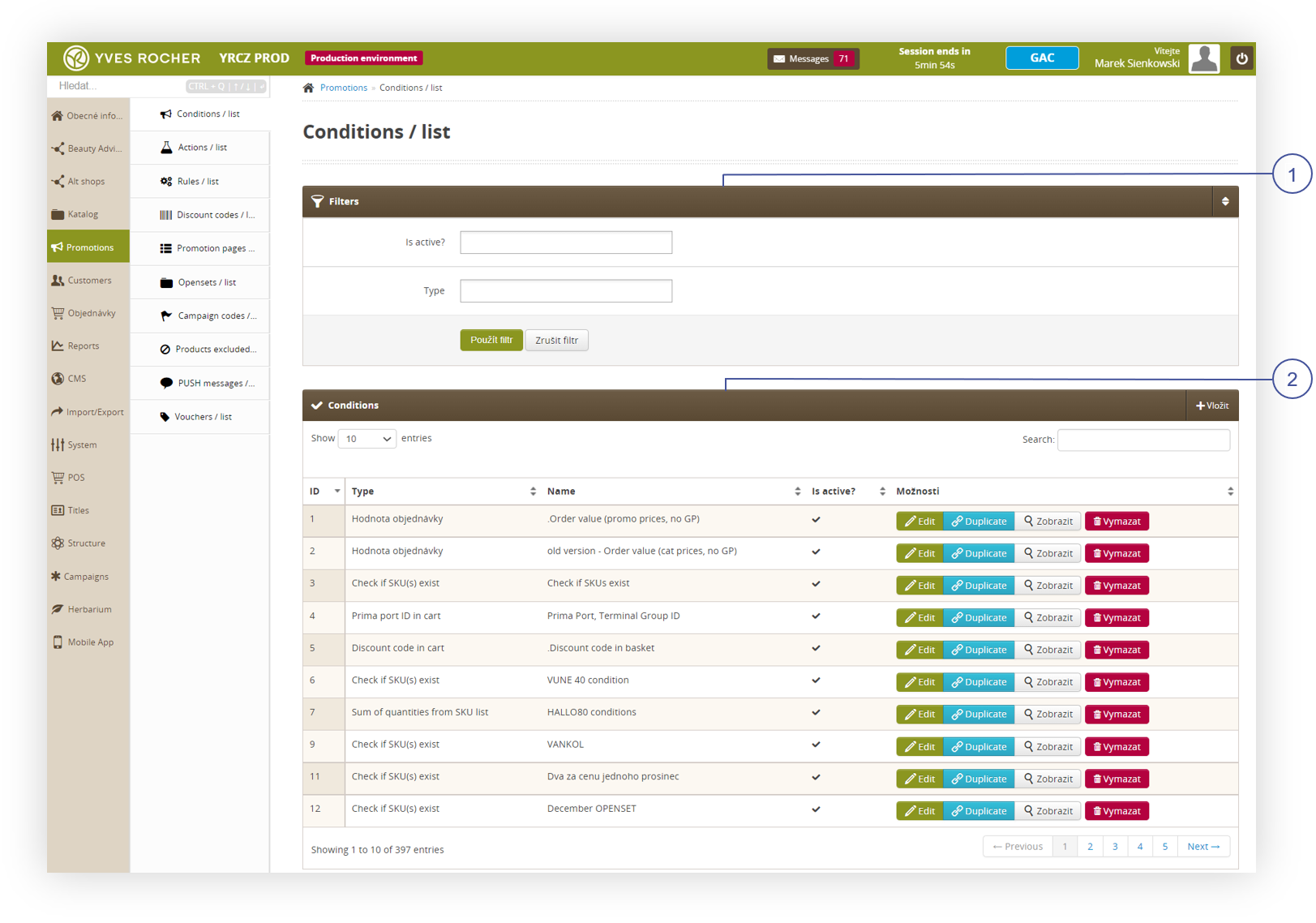
At the **Conditions / list** window **Filters <span style="color: #4054a0;">(1)</span>** can be found which will help search for a specific type of conditions, and the list of **Conditions <span style="color: #4054a0;">(2)</span>** itself, which allows for searching conditions by name, editing, deleting, and adding new ones.

<table id="bkmrk-visualization-of-the" style="margin-right: auto; margin-left: auto;"><tbody><tr><td class="wysiwyg-text-align-center">![Screenshot_2022-09-14_154342.png](https://knowledge.tauceti-digital.com/uploads/images/gallery/2024-11/screenshot-2022-09-14-154342-png.png)</td></tr><tr><td class="wysiwyg-text-align-center"><span id="bkmrk-visualization-of-the-1"><span class="wysiwyg-font-size-medium">*Visualization of the Promotions, Conditions / list* </span></span></td></tr></tbody></table>

<span class="wysiwyg-color-black" style="color: #44549b;">![info2.svg](https://knowledge.tauceti-digital.com/uploads/images/gallery/2024-11/Blminfo2-svg.png) **Remember**</span><span class="wysiwyg-color-black" style="display: block; margin-top: 10px;">**Conditions** and **Actions** are integral to **Promotion Rules**. All three can't be used individually. You can learn more about actions and rules in the [Actions](https://knowledge.tauceti-digital.com/books/e-commerce/page/actions) and [Rules](https://knowledge.tauceti-digital.com/books/e-commerce/page/rules) articles</span><span class="wysiwyg-color-black" style="display: block; margin-top: 10px;"></span><span class="wysiwyg-color-black" style="display: block; margin-top: 10px;"></span><span class="wysiwyg-color-black" style="display: block; margin-top: 10px;"></span><span class="wysiwyg-color-black" style="display: block; margin-top: 10px;"></span><span class="wysiwyg-color-black" style="display: block; margin-top: 10px;"></span><span class="wysiwyg-color-black" style="display: block; margin-top: 10px;"></span><span class="wysiwyg-color-black" style="display: block; margin-top: 10px;"></span>

Table of contents:

1. <span>[Conditions / list](#bkmrk-conditions-%2F-list)</span>
    1. <span>[Filters](#bkmrk-filters)</span>
    2. <span>[Conditions](#bkmrk-conditions)</span>
2. <span>[Creating new condition](#bkmrk-creating-new-conditi)</span>
3. <span>[Condition types](#bkmrk-condition-types)</span>
    1. <span>[Discount code in cart](#bkmrk-discount-code-in-car)</span>
    2. <span>[Discount code is empty in cart](#bkmrk-discount-code-is-emp)</span>
    3. <span>[Order value](#bkmrk-order-value)</span>
    4. <span>[Check if SKU(s) exist](#CON4)</span>
    5. <span>[Active alt shop](#bkmrk-check-if-sku%28s%29-exis)</span>
    6. <span>[Sum of quantities from SKU list](#bkmrk-active-alt-shop)</span>
    7. <span>[Prima port ID in cart](#bkmrk-sum-of-quantities-fr)</span>
    8. <span>[Count of orders](#bkmrk-prima-port-id-in-car)</span>
    9. <span>[Days from last order](#bkmrk-count-of-orders)</span>
    10. <span>[Voucher in cart](#bkmrk-days-from-last-order)</span>
    11. <span>[Empty gift of choice in the cart](#bkmrk-voucher-in-the-cart)</span>
    12. <span>[Delivery method](#bkmrk-empty-gift-of-choice)</span>
    13. <span>[Payment method](#bkmrk-delivery-method)</span>
    14. <span>[Customer title](#bkmrk-payment-method)</span>
    15. <span>[Regular account](#bkmrk-customer-title)</span>
    16. <span>[Order items count](#bkmrk-regular-account)</span>
    17. <span>[Promotion rules active in cart](#bkmrk-promotion-rules-acti)</span>

---

# ![Screenshot_2020-04-29_at_19.12.41.png](https://knowledge.tauceti-digital.com/uploads/images/gallery/2024-11/Yqlscreenshot-2020-04-29-at-19-12-41-png.png) Conditions / list

## Filters

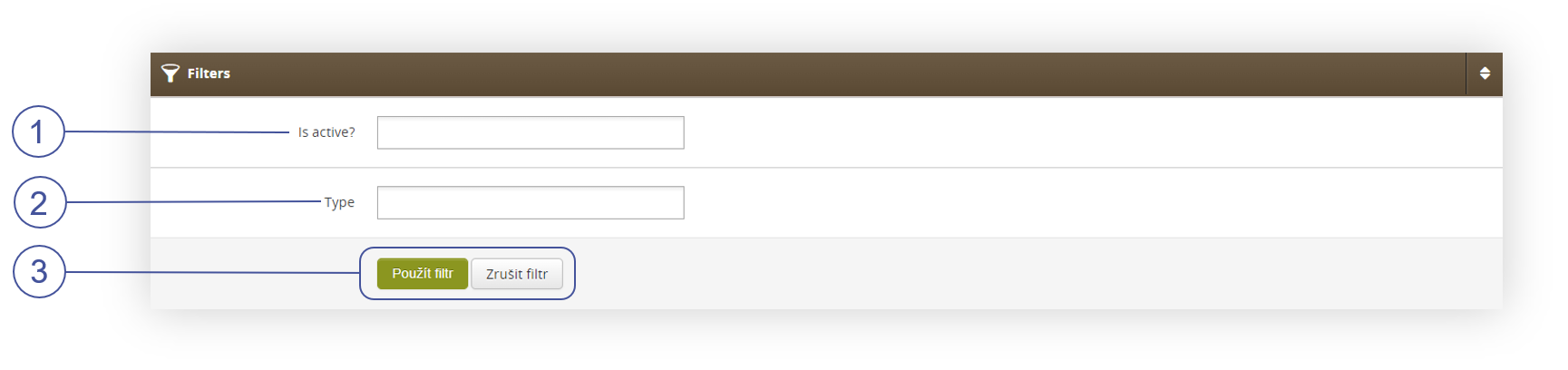
Filters are the first tab in **Conditions / list**. It is used to narrow the results in the **Conditions** list.

**<span style="color: #4054a0;">(1)</span>** **Is active?** - Shows only active or inactive conditions.

**<span style="color: #4054a0;">(2) </span>Type** - Shows only active or inactive conditions.

**<span style="color: #4054a0;">(3) </span>Two buttons:**

- **Apply filters** - Applies chosen filters to **Conditions**
- **Clear filters** - Clears chosen filters and refreshes **Conditions**

<table id="bkmrk-visualization-of-fil" style="margin-right: auto; margin-left: auto;"><tbody><tr><td class="wysiwyg-text-align-center">![Screenshot_2022-09-14_161027.png](https://knowledge.tauceti-digital.com/uploads/images/gallery/2024-11/screenshot-2022-09-14-161027-png.png)</td></tr><tr><td class="wysiwyg-text-align-center"><span id="bkmrk-visualization-of-fil-1"><span class="wysiwyg-font-size-medium">*Visualization of Filters, Conditions / list* </span></span></td></tr></tbody></table>

##  

## Conditions

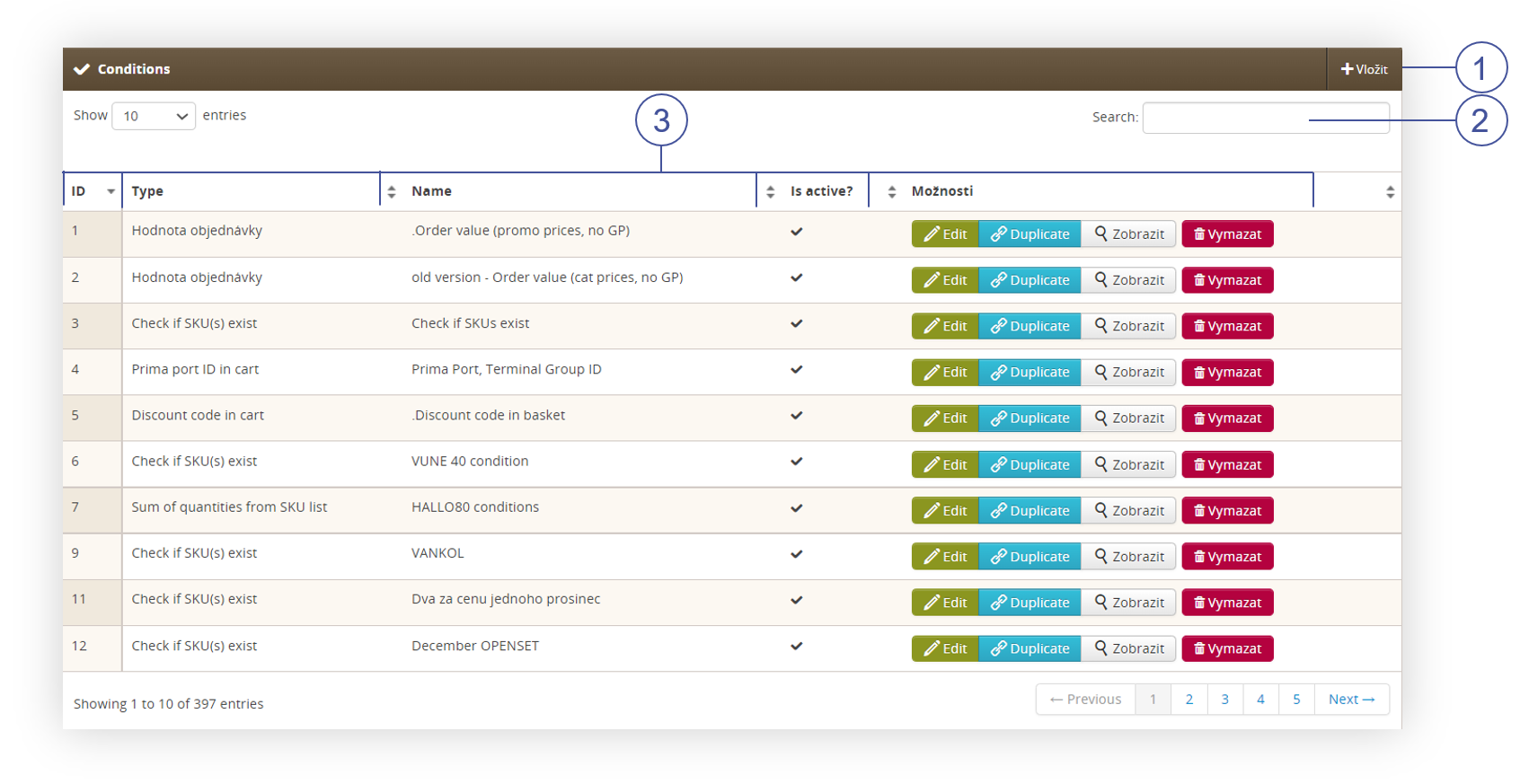
The conditions list is the main tab in this module. Here new conditions can be added **<span style="color: #4054a0;">(1)</span>**, bellow there is a search field **<span style="color: #4054a0;">(2)</span>** that will filter out conditions names to typed letters. The table list itself **<span style="color: #4054a0;">(3)</span>** contains several columns, these are:

- **ID** - The number given after the creation of the condition, it cannot be changed. Used only for database listing.
- **Type** - Type of condition that determines its behavior (more about types in this section**\[LINK\]**)
- **Name** - Name of the condition, used as the main identification. Its name is used for rules and in the search bar.
- **Is active?** - Mark that shows whether a condition is active or inactive
- **Actions** - Four buttons: 
    - **Edit** - Edit condition, its name, description, whether it's active, and parameters.
    - **Duplicate** - Duplicates condition with exact same parameters, the name will be edited by gaining (copy) as a suffix and changing its activation status to inactive.
    - **Show** - Shows details of the condition without permission to edit.
    - **Delete** - Erase condition, it won't be recoverable.

<table id="bkmrk-visualization-of-fil-2" style="margin-right: auto; margin-left: auto; width: 699px;"><tbody><tr><td class="wysiwyg-text-align-center" style="width: 687.026px;">![Screenshot_2022-09-14_163202.png](https://knowledge.tauceti-digital.com/uploads/images/gallery/2024-11/screenshot-2022-09-14-163202-png.png)</td></tr><tr><td class="wysiwyg-text-align-center" style="width: 687.026px;"><span id="bkmrk-visualization-of-fil-3"><span class="wysiwyg-font-size-medium">*Visualization of Filters, Conditions / list* </span></span></td></tr></tbody></table>

---

# ![Screenshot_2020-04-29_at_19.12.41.png](https://knowledge.tauceti-digital.com/uploads/images/gallery/2024-11/Yqlscreenshot-2020-04-29-at-19-12-41-png.png) Creating new condition

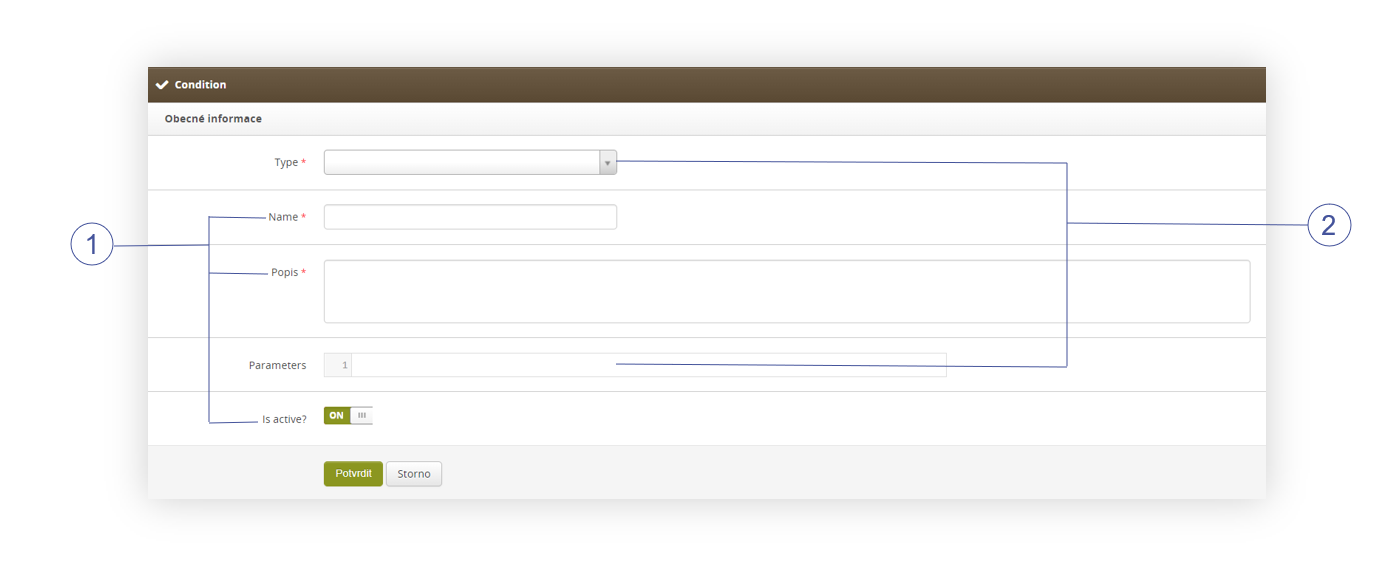
The condition has three fixed options that will stay the same **<span style="color: #4054a0;">(1)</span>**, these are:

- **Name** - Name of the condition, used as the main identification. Its name is used for rules and in the search bar.
- **Description** - Description serves as an additional source of information about the condition and its mechanics
- **Is active?** - ON/OFF - switch to turn the condition active or inactive.

There are also two **<span style="color: #4054a0;">(2)</span>** configurable options that determine its behavior, these are:

- **Type** - Determines the main target of verification. Types are:  
    
    - **Discount code in cart (link do każdego, scrollujący do danego typu)**
    - **Discount code is empty in cart**
    - **Order value**
    - **Check if SKU(s) exist**
    - **Active alt shop**
    - **Sum of quantities from SKU list**
    - **Prima port ID in cart**
    - **Count of orders**
    - **Days from last order**
    - **Voucher in the cart**
    - **Empty gift of choice in the cart**
    - **Delivery method**
    - **Payment method**
    - **Customer title**
    - **Regular account**
    - **Order items count**
    - **Promotion rules active in cart**
- **Parameters** - JSON code used for parametrization of the condition.

<table id="bkmrk-visualization-of-fil-4" style="margin-right: auto; margin-left: auto; width: 699px;"><tbody><tr><td class="wysiwyg-text-align-center" style="width: 687.026px;">![Screenshot_2022-09-15_152600.png](https://knowledge.tauceti-digital.com/uploads/images/gallery/2024-11/screenshot-2022-09-15-152600-png.png)</td></tr><tr><td class="wysiwyg-text-align-center" style="width: 687.026px;"><span id="bkmrk-visualization-of-fil-5"><span class="wysiwyg-font-size-medium">*Visualization of Filters, Conditions / list* </span></span></td></tr></tbody></table>

<span class="wysiwyg-color-black" style="color: #44549b;">![info2.svg](https://knowledge.tauceti-digital.com/uploads/images/gallery/2024-11/Blminfo2-svg.png) **Remember**</span><span class="wysiwyg-color-black" style="display: block; margin-top: 10px;">**JSON** is a light-weighted format to exchange data. More about this format you can learn from here.</span><span class="wysiwyg-color-black" style="display: block; margin-top: 10px;"></span><span class="wysiwyg-color-black" style="display: block; margin-top: 10px;"></span><span class="wysiwyg-color-black" style="display: block; margin-top: 10px;"></span><span class="wysiwyg-color-black" style="display: block; margin-top: 10px;"></span><span class="wysiwyg-color-black" style="display: block; margin-top: 10px;"></span><span class="wysiwyg-color-black" style="display: block; margin-top: 10px;"></span><span class="wysiwyg-color-black" style="display: block; margin-top: 10px;"></span>

# ![Screenshot_2020-04-29_at_19.12.41.png](https://knowledge.tauceti-digital.com/uploads/images/gallery/2024-11/Yqlscreenshot-2020-04-29-at-19-12-41-png.png) Condition types

The type of condition defines what it's supposed to look for when calculating cart items and values. Here are described all types of conditions and their parameters

###  

### Discount code in cart

This condition checks if there is a discount code in the cart (more about discount codes can be found in the [Discount codes](https://knowledge.tauceti-digital.com/books/e-commerce/page/discount-codes) article).

Parameters: - **None**

Logic operators: - **=**
- **!=**

Logic values: - **Discount code name**

<span class="wysiwyg-color-black" style="color: #44549b;">![info2.svg](https://knowledge.tauceti-digital.com/uploads/images/gallery/2024-11/Blminfo2-svg.png) **Remember** </span><span class="wysiwyg-color-black">Since this condition type is so general and lacks any parameters. There is usually one of this type in the environment.</span><span class="wysiwyg-color-black" style="display: block; margin-top: 10px;"></span><span class="wysiwyg-color-black" style="display: block; margin-top: 10px;"></span><span class="wysiwyg-color-black" style="display: block; margin-top: 10px;"></span><span class="wysiwyg-color-black" style="display: block; margin-top: 10px;"></span><span class="wysiwyg-color-black" style="display: block; margin-top: 10px;"></span><span class="wysiwyg-color-black" style="display: block; margin-top: 10px;"></span><span class="wysiwyg-color-black" style="display: block; margin-top: 10px;"></span>

###  

### Discount code is empty in cart

This condition checks if there isn't a discount code in the cart.

Parameters: - **Discount code name** - it is not used in the condition itself since adding this type of condition to the rule will require naming it.

Logic operators: - **=**
- **!=**

Logic values: - **TRUE**
- **FALSE**

<span class="wysiwyg-color-black" style="color: #44549b;">![info2.svg](https://knowledge.tauceti-digital.com/uploads/images/gallery/2024-11/Blminfo2-svg.png) **Remember**</span><span class="wysiwyg-color-black" style="display: block; margin-top: 10px;">Since this condition type is so general and lacks any parameters. There is usually one of this type in the environment.</span><span class="wysiwyg-color-black" style="display: block; margin-top: 10px;"></span><span class="wysiwyg-color-black" style="display: block; margin-top: 10px;"></span><span class="wysiwyg-color-black" style="display: block; margin-top: 10px;"></span><span class="wysiwyg-color-black" style="display: block; margin-top: 10px;"></span><span class="wysiwyg-color-black" style="display: block; margin-top: 10px;"></span><span class="wysiwyg-color-black" style="display: block; margin-top: 10px;"></span><span class="wysiwyg-color-black" style="display: block; margin-top: 10px;"></span>

###  

### Order value

This condition checks the current cart value.

Parameters: - <span>**prices**:</span>
    - <span>**promotion** - used by default, counts the value of products by promotion prices</span>
    - **catalog** - counts values of products by their standard prices
- <span>**consider\_discounts**:</span>  
    
    - <span>**FALSE** - used by default, counts the value before all discounts</span>
    - **TRUE** - <span>calculate order value after all discounts</span><span></span>
- <span>**use\_default\_excluded\_list**:</span>  
    
    - **TRUE** - used by default, uses global excluded SKU list
    - **FALSE** - excluded SKUs will also be counted toward the cart value
- <span>**include\_payed\_gifts**:</span>  
    
    - **TRUE** - <span>consider the value of payed gifts</span>
    - **FALSE** - used by default, do not count payed gifts
- <span>**include\_opensets**:</span>  
    
    - **TRUE** - <span>opensets count into the cart value</span>
    - **FALSE** - used by default, do not count value of opensets
- <span>**exclude\_products**:</span>  
    
    - **Array** - <span>SKU numbers, these will be excluded from the order value. This parameter is above and will exclude products regardless of **use\_default\_excluded\_list** parameter.</span>
- <span>**exclude\_fid\_discounted\_products**:</span>  
    
    - **TRUE** - Products discounted by the fidelity program will not be counted.
    - **FALSE** - used by default, do not count value of products discounted by fidelity points

Logic operators: - **=**
- **!=**
- **&gt;**
- **&lt;**
- **&gt;=**
- **&lt;=**

Logic values: - **Number** - cart value

Example: - {"prices":"catalog","consider\_discounts":"TRUE","exclude\_products":\["12345","54321"\]}

###  

### Check if SKU(s) exist

This condition checks if the product SKUs from the selected array are present in the cart.

Parameters: - <span>**SKU**:</span>
    - **Array** - SKU numbers, without this parameter the condition won't work.
- <span>**required\_quantity**:</span>  
    
    - **all** - All SKUs from the **SKU** parameter have to be present in the cart
    - **number** - Number of SKUs from the SKU parameter that has to be present.<span></span>
- <span>**consider\_quantity**:</span>  
    
    - **TRUE** - The number of pieces counts towards the **SKU** parameter (for example if the **SKU** parameter has 3 SKU's in the list then one of these SKU's added 3 times to the cart will return **TRUE** value in the promotion rule)
    - **FALSE** - Used by default, doesn't count the number of pieces

Logic operators: - **=**
- **!=**

Logic values: - **TRUE**
- **FALSE**

Example: - {"SKU":\["12345","54321"\],"required\_quantity":"5"}

###  

### Active alt shop

This condition checks the altshop. This type is deprecated and unused. Promotion rules already are able to filter altshops.

###  

### Sum of quantities from SKU list

This type sums up all pieces from the SKU list set in the parameters.

Parameters: - <span>**SKU**:</span>
    - **Array** - SKU numbers, without this parameter the condition won't work.

Logic operators: - **=**
- **!=**
- **&gt;**
- **&lt;**
- **&gt;=**
- **&lt;=**

Logic values: - **Number** - Quantity of products

Example: - {"SKU":\["54321","12345"\]}

###  

### Prima port ID in cart

This type of condition is no longer supported since Prima port is no longer used.

###  

### Count of orders

This type count the number of orders in the customer account.

Parameters: - <span>**orders**:</span>
    - **all** - All orders from the customer account will be counted (still regulated by the rest of the parameters)
    - **all\_mc** - All orders are counted but since the date of gaining a title. You can learn more about customer titles in the [Campaigns and titles](https://knowledge.tauceti-digital.com/books/e-commerce/page/campaigns-and-titles) article.
    - **<span>current\_title </span>**<span>- Orders are counted since the date of gaining the current customer title.</span>
    - **active\_rule** - Orders are counted only if they used certain promotion rules (list from parameter **rule id**)
- <span>**campaigns**:</span>
    - **Array** - List of campaigns short names (more about campaigns in this article **\[UNDER CONSTRUCTION\]**
- <span>**date\_from**:</span>
    - **date** - The format for the date is YYYY-MM-DD (for example 2018-12-31). Orders will be counted from this date onwards.
- <span>**date\_to**:</span>
    - **date** - The format for the date is YYYY-MM-DD (for example 2018-12-31). Counted will be orders placed only before this date.
- <span>**titles**:</span>
    - **Array** - List of title short names. Orders will be counted only if they were placed while the customer had these titles. Only used when parameter **"orders":"current\_title"**
- **rule\_id**:  
    
    - **Array** - List of **Rules** id's. This parameter only works with **"orders":"active\_rule"**
- **only\_paid**:  
    
    - **TRUE** - Only <span>COD or fully paid orders are counted.</span>
    - **FALSE** - Orders with pending payment are also counted
- **altshop\_id**<span>:</span>
    - id of altshop only from which orders are considered. <span>The parameter value can only be one altshop/one ID. You can't use an array of altshop ID's.   
        **Syntax example:**</span>
    - <span>{"altshop\_id":"122"}  
        </span>

Logic operators: - **=**
- **!=**
- **&gt;**
- **&lt;**
- **&gt;=**
- **&lt;=**

Logic values: - **Number** - Orders

Example: - {"orders":"all\_mc","campaigns":\["Campaign1","Campaign2"\],"date\_from":"2023-01-12","date\_to":"2023-02-22"}

### Days from last order

This condition count passed days from the last order.

Parameters: - <span>**orders**:</span>
    - **all** - All orders from the customer account will be counted (still regulated by the rest of the parameters)
    - **all\_mc** - All orders are counted but since the date of gaining a title. You can learn more about customer titles in the [Campaigns and titles](https://knowledge.tauceti-digital.com/books/e-commerce/page/campaigns-and-titles) article.
    - **<span>current\_title </span>**<span>- Orders are counted since the date of gaining the current customer title.</span>
    - **active\_rule** - Orders are counted only if they used certain promotion rules (list from parameter **rule id**)
- <span>**campaigns**:</span>
    - **Array** - List of campaigns short names (more about campaigns in this article **\[UNDER CONSTRUCTION\]**
- <span>**date\_from**:</span>
    - **date** - The format for the date is YYYY-MM-DD (for example 2018-12-31). Orders will be counted from this date onwards.
- <span>**date\_to**:</span>
    - **date** - The format for the date is YYYY-MM-DD (for example 2018-12-31). Counted will be orders placed only before this date.

Logic operators: - **=**
- **!=**
- **&gt;**
- **&lt;**
- **&gt;=**
- **&lt;=**

Logic values: - **Number** - Orders

Example: - {"orders":"all\_mc","campaigns":\["Campaign1","Campaign2"\],"date\_from":"2023-01-12","date\_to":"2023-02-22"}

<span class="wysiwyg-color-black" style="color: #d23a4e;">![caution.svg](https://knowledge.tauceti-digital.com/uploads/images/gallery/2024-11/vDBcaution-svg.png) **Warning**</span> <span class="wysiwyg-color-black" style="display: block; margin-top: 10px;"> <font color="#000000"> <span>If there are no order-matching rules defined by parameters, the condition will return 999 days. We strongly recommend pairing this condition with "Count of closed orders &gt; 0"</span> </font> </span> <span class="wysiwyg-color-black"></span><span class="wysiwyg-color-black"></span><span class="wysiwyg-color-black"></span><span class="wysiwyg-color-black"></span>

###  

### Voucher in the cart

This condition verifies whether there is applied promotion code in the cart.

Parameters: - <span>**type**:</span>
    - **1** - Fiden2 code, this type is set as default.
    - **2** - Promotion code from ***Promotions &gt; Discount codes / list***. You can learn more about discount codes in the [Discount codes](https://knowledge.tauceti-digital.com/books/e-commerce/page/discount-codes) article.

Logic operators: - **=**
- **!=**

Logic values: - **TRUE**
- **FALSE**

Example: - {"type":"2"}

###  

### Empty gift of choice in cart

This condition will check if the customer chooses a certain, empty gift from the **Gift of choice** action type. You can learn more about actions in the [Actions](https://knowledge.tauceti-digital.com/books/e-commerce/page/actions) article.

Parameters: - <span>**rule\_id**:</span>
    - **1** - Fiden2 code, this type is set as default.
    - **2** - Promotion code from ***Promotions &gt; Discount codes / list*** (More about codes in this article**\[UNDER CONSTRUCTION\]**)

Logic operators: - **=**
- **!=**

Logic values: - **TRUE**
- **FALSE**

Example: - {"rule\_id":"2"}

###  

### Delivery method

This type checks chosen delivery method.

Parameters: - <span>**name**:</span>
    - **Array** - List of delivery method names.

Logic operators: - **=**
- **!=**

Logic values: - **TRUE**
- **FALSE**

Example: - {"name":\["Delivery1","Delivery2"\]}

###  

### Payment method

This type checks chosen payment method.

Parameters: - <span>**name**:</span>
    - **Array** - List of delivery method names.

Logic operators: - **=**
- **!=**

Logic values: - **TRUE**
- **FALSE**

Example: - {"name":\["Payment1","Payment2"\]}

###  

### Customer title

This type checks current customer title.

Parameters: - <span>**include\_title**:</span>
    - **Array** - List of **shortcut title names** that will count into the **TRUE** value during calculation.
- <span>**exclude\_title**:</span>
    - **Array** - List of **shortcut title names** that will count into the **FALSE** value during calculation.

Logic operators: - **=**
- **!=**
- 

Logic values: - **TRUE**
- **FALSE**

Example: - {"include\_title":\["T0","TS"\]}

###  

### Regular account

This type checks if a customer is logged in to a registered account (not one-time).

Parameters: - **None**

Logic operators: - **=**
- **!=**

Logic values: - **TRUE**
- **FALSE**

###  

### Orders item count

This type checks the number of items in the cart.

Parameters: - **consider\_quantity:**
    - **TRUE** - Set by default, every piece in each row will be counted.
    - **FALSE** - Only unique SKUs will be counted.
- **consider\_gifts**: 
    - **TRUE** - Gifts will be counted to this condition.
    - **FALSE** - Set by default, gifts won't be counted to this condition.
- **consider\_sets**: 
    - **TRUE** - All sets will be counted.
    - **FALSE** - Set by default, sets won't be counted.
- **consider\_outlet**: 
    - **TRUE** - Discounted products with the flag outlet will count toward this condition.
    - **FALSE** - Set by default, products with the flag outlet won't be counted.
- **consider\_greenpoint**: 
    - **TRUE** - Products with the flag greenpoint will count toward this condition.
    - **FALSE** - Set by default, products with the flag greenpoint won't be counted.

Logic operators: - **=**
- **!=**
- **&gt;**
- **&lt;**
- **&gt;=**
- **&lt;=**

Logic values: - **Number** - Products in a cart

Example: - {"consider\_quantity":"FALSE","consider\_greenpoint":"TRUE"}

### Promotion rules active in cart

This type checks if a set of rules is active in a cart. A rule is considered an active one when its conditions are met. A rule with no conditions is always considered as active. It is important to remember to set a sort order in a rule with this condition to a high value, so it is read last by the promotion module.

Parameters: - **rule\_ids:**
    - **Array**- list of rules' IDs that are checked for activity. Set by default, every piece in each row will be counted.
- **mode (Default "all")**: 
    - **"all"** means *all of the rules must be active*,
    - **"any"** means *any of the rules must be active.*

Logic operators: - **=**
- **!=**

Logic values: - **TRUE**
- **FALSE**

Examples: - **Rule 123 is active:**
    - {"rule\_ids": \[123\]}
- **All the rules 123 and 321 are active**: 
    - {"rule\_ids": \[123, 321\]}
- **Any of the rules 123 and 321 is active:**  
    
    - {"rule\_ids": \[123, 321\], "mode": "any"\]}