# Glovo feed

# ![Screenshot_2020-04-29_at_19.12.41.png](https://knowledge.tauceti-digital.com/uploads/images/gallery/2024-11/17qscreenshot-2020-04-29-at-19-12-41-png.png) Getting started

In this article, you will find how to enable and download Glovo feed. Glovo is an on-demand courier service that purchases, picks up, and delivers products ordered through its mobile app.

By default, the feed is disabled on all countries except Romania.

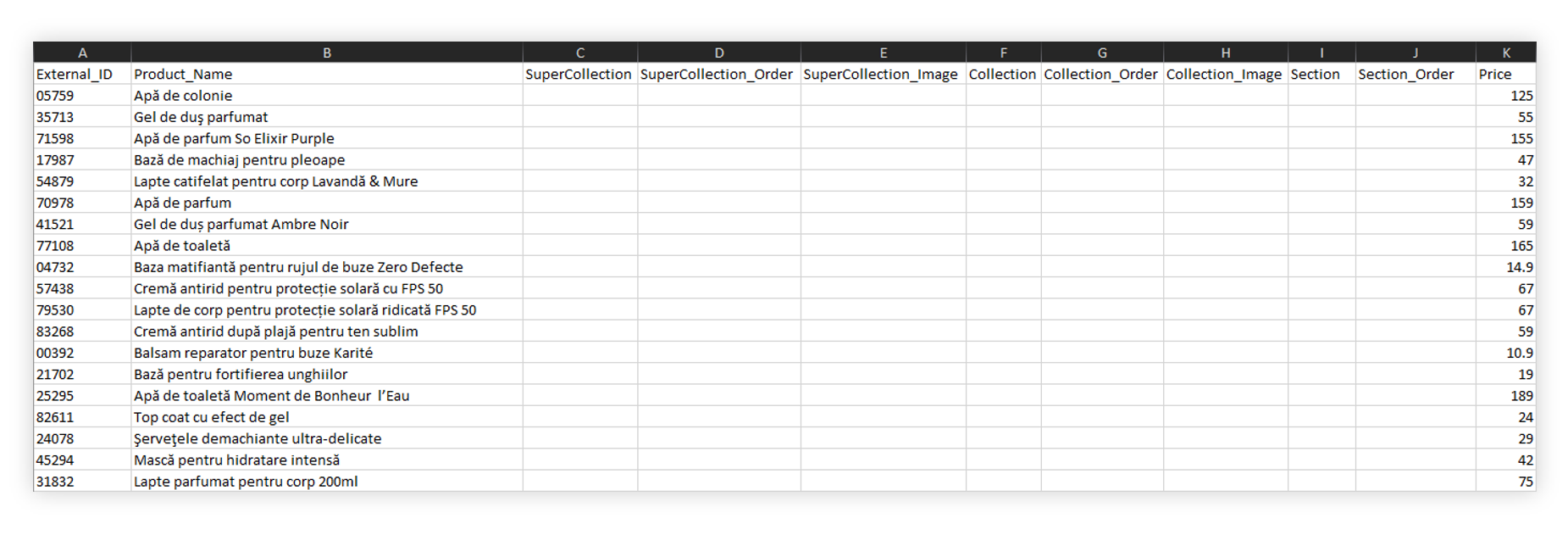
<table id="bkmrk-visualization-of-the" style="margin-right: auto; margin-left: auto; height: 44px; width: auto;"><tbody><tr style="height: 22px;"><td class="wysiwyg-text-align-center" style="text-align: center; vertical-align: middle; height: 22px; width: auto;">![POWERPNT_nTf8j7pXfJ.png](https://knowledge.tauceti-digital.com/uploads/images/gallery/2024-11/6904822449820.png)</td></tr><tr style="height: 22px;"><td class="wysiwyg-text-align-center" style="text-align: center; vertical-align: middle; height: 22px; width: auto;"><span class="wysiwyg-font-size-medium">*Visualization of the Glovo feed* </span></td></tr></tbody></table>

Table of contents:

1. [ Enabling the feed](#bkmrk-enabling-the-feed)
2. [ Downloading the feed](#bkmrk-downloading-the-feed)

---

# ![Screenshot_2020-04-29_at_19.12.41.png](https://knowledge.tauceti-digital.com/uploads/images/gallery/2024-11/17qscreenshot-2020-04-29-at-19-12-41-png.png) Enabling the feed

The feed switch can be found the

***System / settings &gt; Integrations &gt; Glovo***

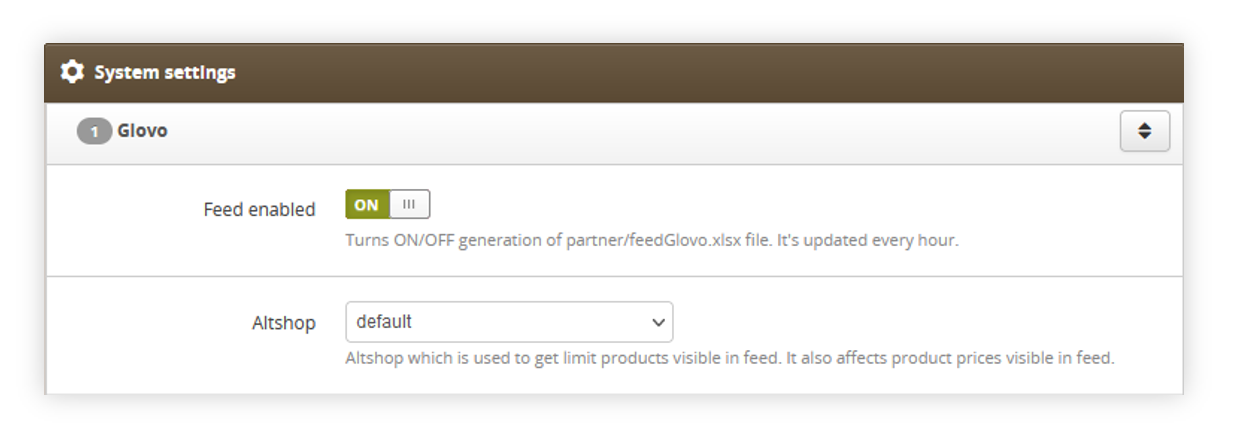
<table id="bkmrk-visualization-of-the-1" style="margin-right: auto; margin-left: auto; height: 44px; width: auto;"><tbody><tr style="height: 22px;"><td class="wysiwyg-text-align-center" style="text-align: center; vertical-align: middle; height: 22px; width: auto;">![POWERPNT_FpFLpSv9LQ.png](https://knowledge.tauceti-digital.com/uploads/images/gallery/2024-11/6985575625116.png)</td></tr><tr style="height: 22px;"><td class="wysiwyg-text-align-center" style="text-align: center; vertical-align: middle; height: 22px; width: auto;"><span class="wysiwyg-font-size-medium">*Visualization of the Glovo system settings* </span></td></tr></tbody></table>

Here you can change the **Feed enabled** switch state which will enable or disable the Glovo feed. The feed is updated every hour at XX:09.

**Altshop** option allows selecting from which altshop product list will be taken with their altshop prices.

---

# ![Screenshot_2020-04-29_at_19.12.41.png](https://knowledge.tauceti-digital.com/uploads/images/gallery/2024-11/17qscreenshot-2020-04-29-at-19-12-41-png.png) Downloading the feed

When the switch is enabled in the system settings the feed can be accessed through **/partner/feedGlovo.xlsx** URL for example [https://www.yves-rocher.ro/partner/feedGlovo.xlsx](https://www.yves-rocher.ro/partner/feedGlovo.xlsx).

<table id="bkmrk-visualization-of-the-2" style="margin-right: auto; margin-left: auto; height: 44px; width: auto;"><tbody><tr style="height: 22px;"><td class="wysiwyg-text-align-center" style="text-align: center; vertical-align: middle; height: 22px; width: auto;">![POWERPNT_nTf8j7pXfJ.png](https://knowledge.tauceti-digital.com/uploads/images/gallery/2024-11/6904822449820.png)</td></tr><tr style="height: 22px;"><td class="wysiwyg-text-align-center" style="text-align: center; vertical-align: middle; height: 22px; width: auto;"><span class="wysiwyg-font-size-medium">*Visualization of the Glovo feed* </span></td></tr></tbody></table>

In the feed you can find the following columns:

- **External\_ID** - Contains product SKU.
- **Product\_Name** - Contains product name.
- **SuperCollection** - This field is always empty.
- **SuperCollection\_Order** - This field is always empty.
- **SuperCollection\_Image** - This field is always empty.
- **Collection** - This field is always empty.
- **Collection\_Order** - This field is always empty.
- **Collection\_image** - This field is always empty.
- **Section** - This field is always empty.
- **Section\_Order** - This field is always empty.
- **Price** - Contains the price of the product
- **Image** - Contains URL of an image of the product in 500x500 format.
- **Extra\_Images** - Contains additional images if the product has them assigned to it.
- **Description** - Contains description of the product
- **Is\_Alcoholic** - Is always set to NO
- **Is\_Tobacco**- Is always set to NO
- **Attribute\_Groups** - This field is always empty.