# Simplified mobile top menu

# ![Screenshot_2020-04-29_at_19.12.41.png](https://knowledge.tauceti-digital.com/uploads/images/gallery/2024-11/k49screenshot-2020-04-29-at-19-12-41-png.png) Getting started

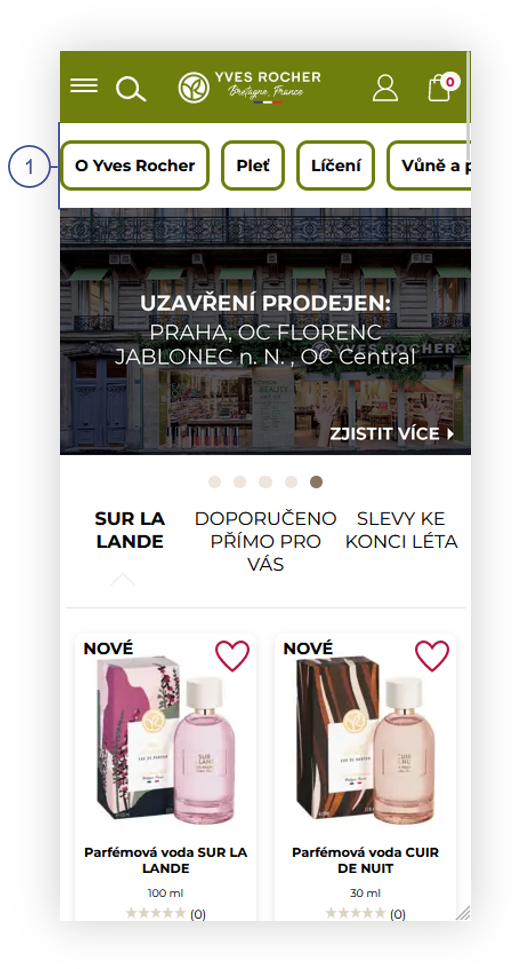
This article describes simplified mobile top menu functionality, that shows top menu categories in the mobile view <span lang="PL">**<span style="color: #4054a0;">(1)</span>**</span>. This functionality allows partners to decide, if they prefer to use top menu for mobile version of the website.

<span class="wysiwyg-color-black" style="color: #44549b;">![info2.svg](https://knowledge.tauceti-digital.com/uploads/images/gallery/2024-11/uXainfo2-svg.png) **Remember**</span><span class="wysiwyg-color-black" style="display: block; margin-top: 10px;">The content visible in the top menu is configured in CMS &gt; Top menu / list. More information regarding top menu can be found in **\[UNDER CONTRUCTION\]** article.</span>

<table id="bkmrk-visualization-of-the" style="margin-right: auto; margin-left: auto;"><tbody><tr><td class="wysiwyg-text-align-center">![POWERPNT_6uecHPhVbY.png](https://knowledge.tauceti-digital.com/uploads/images/gallery/2024-11/powerpnt-6uechphvby-png.png)</td></tr><tr><td class="wysiwyg-text-align-center"><span id="bkmrk-visualization-of-the-1"><span class="wysiwyg-font-size-medium">*Visualization of the mobile view of the home page.* </span></span></td></tr></tbody></table>

Table of contents:

1. [Turning on the functionality](#bkmrk-turning-on-the-funct-1)
2. [Customer perspective](#bkmrk-customer-perspective)

---

# ![Screenshot_2020-04-29_at_19.12.41.png](https://knowledge.tauceti-digital.com/uploads/images/gallery/2024-11/k49screenshot-2020-04-29-at-19-12-41-png.png) Turning on the functionality

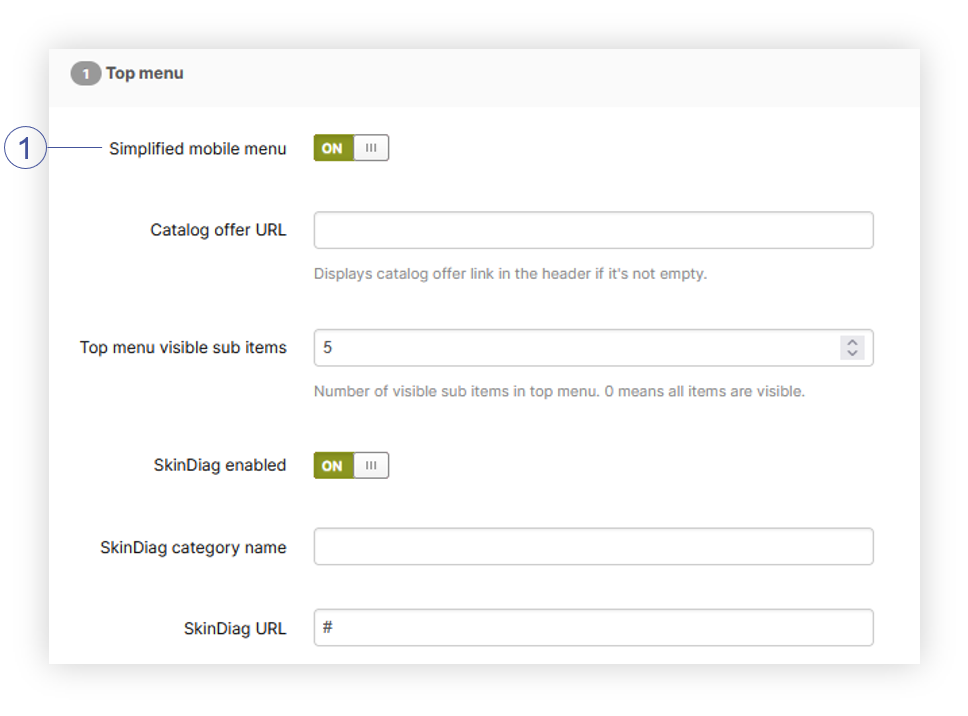
When turned on, simplified mobile top menu will be visible at all times on the mobile version of the website. It can be turned on in the **Admin panel &gt; System &gt; System / Settings &gt; Built-in functions &gt; Top menu.**

<table id="bkmrk-visualization-of-the-2" style="margin-right: auto; margin-left: auto; width: 634px;"><tbody><tr><td class="wysiwyg-text-align-center" style="width: 622.4px;">[![POWERPNT_0nHMmUuUHi.png](https://ecomm-docs.tauceti-digital.com/uploads/images/gallery/2025-02/scaled-1680-/powerpnt-0nhmmuuuhi.png)](https://ecomm-docs.tauceti-digital.com/uploads/images/gallery/2025-02/powerpnt-0nhmmuuuhi.png)</td></tr><tr><td class="wysiwyg-text-align-center" style="width: 622.4px;"><span id="bkmrk-visualization-of-the-3"><span class="wysiwyg-font-size-medium">*Visualization of the top menu tab*</span></span></td></tr></tbody></table>

In **Top menu** tab we can find **Simplified mobile menu** <span lang="PL">**<span style="color: #4054a0;">(1)</span>**</span> switch, which will turn on the functionality when it’s turned on.

---

# ![Screenshot_2020-04-29_at_19.12.41.png](https://knowledge.tauceti-digital.com/uploads/images/gallery/2024-11/k49screenshot-2020-04-29-at-19-12-41-png.png) Customer perspective

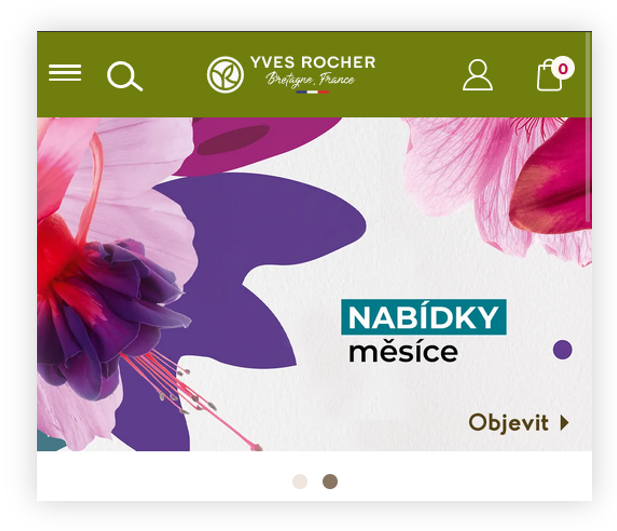
With the functionality turned off, customer will see the old top menu, where he needs to click on the menu in the top right corner in order to see available categories on the website

<table id="bkmrk-visualization-of-the-4" style="margin-right: auto; margin-left: auto;"><tbody><tr><td class="wysiwyg-text-align-center">![POWERPNT_aSa29kbdyK.png](https://knowledge.tauceti-digital.com/uploads/images/gallery/2024-11/powerpnt-asa29kbdyk-png.png)</td></tr><tr><td class="wysiwyg-text-align-center"><span id="bkmrk-visualization-of-the-5"><span class="wysiwyg-font-size-medium">*Visualization of the mobile top menu when functionality is turned off* </span></span></td></tr></tbody></table>

With functionality turned on, the customer will see available categories in the top menu <span lang="PL">**<span style="color: #4054a0;">(1)</span>**</span> and will be able to scroll through them and select the desired one, which will redirect him to that web page.

<table id="bkmrk-visualization-of-the-6" style="margin-right: auto; margin-left: auto;"><tbody><tr><td class="wysiwyg-text-align-center">![POWERPNT_6uecHPhVbY.png](https://knowledge.tauceti-digital.com/uploads/images/gallery/2024-11/powerpnt-6uechphvby-png.png)</td></tr><tr><td class="wysiwyg-text-align-center"><span id="bkmrk-visualization-of-the-7"><span class="wysiwyg-font-size-medium">*Visualization of the mobile top menu when functionality is turned on* </span></span></td></tr></tbody></table>